 HackingPassion.com
Bitwarden CLI Backdoored on npm for 93 Minutes
Ethical Hacking Complete Course Zero to Expert
Hack like black hat hackers. Penetration testing, Kali Linux, WiFi and web hacking, and the hacker mindset behind it.
→ Take the full courseBitwarden’s CLI was backdoored and pushed to npm on April 22, 2026. It was live for 93 minutes. Every developer who installed it during that window has to treat their entire machine as compromised. GitHub tokens, SSH keys, AWS credentials, cloud secrets. All of it.
If you followed the Shai-Hulud story back in November 2025, this will sound familiar. That attack spread through npm and hit packages from Zapier, Postman, PostHog, and hundreds of others. 132 million monthly downloads affected. Stolen credentials dumped into public GitHub repositories for anyone to find. This new attack names itself Shai-Hulud: The Third Coming, after the giant sandworms from Frank Herbert’s Dune. The irony is that this third wave specifically targets AI tools.
The group behind this is tracked as TeamPCP. What makes this more serious than a standard credential theft operation is that TeamPCP works together with a ransomware group called Vect. TeamPCP handles the break-in and the credential theft. Vect handles the extortion. The stolen keys do not just sit in a database somewhere. They get used.
On February 27, 2026, TeamPCP stole the initial credentials from Aqua Security’s Trivy using a misconfigured CI workflow. The active attack chain that followed started in March. First Trivy, the open-source vulnerability scanner from Aqua Security. Then Checkmarx KICS, a tool used to scan infrastructure-as-code files for security issues. Then LiteLLM. And then, using access they gained through Checkmarx’s own GitHub Action, they got into Bitwarden.
Checkmarx makes security scanning tools. Bitwarden’s repository used their GitHub Action, checkmarx/ast-github-action, to scan code for vulnerabilities. That Action had already been compromised. When it ran inside Bitwarden’s pipeline, the attackers walked away with Bitwarden’s GitHub identity and Azure credentials, pushed a modified publish workflow, and let npm’s own trusted publishing system do the rest.
Trusted publishing was built to replace long-lived tokens. The attackers did not steal a token. They got upstream of the publishing process entirely, and this is the first known compromise of a package distributed through npm’s trusted publishing mechanism.
The malicious version, @bitwarden/cli@2026.4.0, added two new files. The first is bw_setup.js, 132 lines of readable JavaScript that checks if the Bun runtime is installed, downloads it from GitHub if not, and runs bw1.js. Bun is a legitimate, widely used JavaScript runtime, which is exactly why it was chosen. The loader looks completely clean.
bw1.js is 10 megabytes, written as a single line of code.
Most security scanning tools work line by line. A 10 MB single-line payload is designed to break those tools before they start looking. There is also a version mismatch buried inside the package: the package.json claims version 2026.4.0, but the internal build/bw.js metadata still says 2026.3.0. A legitimate release never has that gap. If a package version does not match what is inside it, that is reason enough to stop and investigate before installing anything.
The moment the package installs, three things happen at the same time. The first sweeps the filesystem for SSH keys, .git-credentials, .npmrc files, .env files, shell history, AWS credentials, GCP keys, and Azure Key Vault data. The second runs gh auth token to grab GitHub CLI credentials and scans every environment variable for anything that looks like a token. The third goes after GitHub Actions runner contexts, pulling secrets straight out of automated build pipelines.
The malware also specifically targets AI coding assistant configuration files: ~/.claude.json, ~/.claude/mcp.json, and ~/.kiro/settings/mcp.json. API keys stored there are worth exactly as much to an attacker as anything in AWS.
But it goes further than stealing config files. The payload probes six AI coding tools simultaneously: Claude Code, Gemini CLI, Codex CLI, Kiro CLI, Aider, and OpenCode. It sends each one the message “Hey! Just making sure you’re here. If you are can you respond with ‘Hello’ and nothing else?” Whichever tool responds first is active and authenticated on that machine. The malware then injects approximately 3,500 bytes of anti-AI manifesto text into ~/.bashrc and ~/.zshrc. The next time that AI tool reads the shell config to understand the developer’s environment, it reads the manifesto directly into its context window. No shell execution. No detectable behavior. The payload exists purely at the AI context level.
When the malware finds GitHub tokens, it validates them and uses them to trigger Actions, pull CI secrets, and find other npm packages the token can publish to. Those packages get the same payload injected and get republished. If PyPI credentials show up, the worm jumps to Python packages and spreads the same way.
Everything stolen gets encrypted with AES-256-GCM and RSA before it leaves the machine. Primary destination: audit.checkmarx[.]cx, a domain built to look like legitimate Checkmarx infrastructure. If that is blocked, the malware creates repositories under the victim’s own GitHub account and commits encrypted data there. Traffic to api.github.com does not raise flags on most networks.
The backup command channel runs through public GitHub commit messages. The malware searches for commits starting with beautifulcastle, verified with a built-in RSA public key. Encoded inside those commits are credentials and new instructions from the attacker, hidden in plain sight. The recovery string is LongLiveTheResistanceAgainstMachines. That string sits in public GitHub commits right now, searchable by anyone who knows to look for it.
Three days before the attack, on April 20, a GitHub account appeared called helloworm00. Two commits in a public repository show the attacker testing this exact channel. First beautiful_castle with an underscore, which fails the regex. Then beautifulcastle without one, which works. A rehearsal, in public, three days before the real thing.
One more detail: the malware exits immediately if the system locale starts with ru. Russian-language machines are excluded from targeting entirely.
Socket Research, JFrog, and multiple security firms link this to TeamPCP. The naming, the code, and the shared infrastructure all point that way. But IP addresses can be spoofed and tools get shared between groups. What is certain is how this malware works. Who built it remains an assessment, not a confirmed fact.
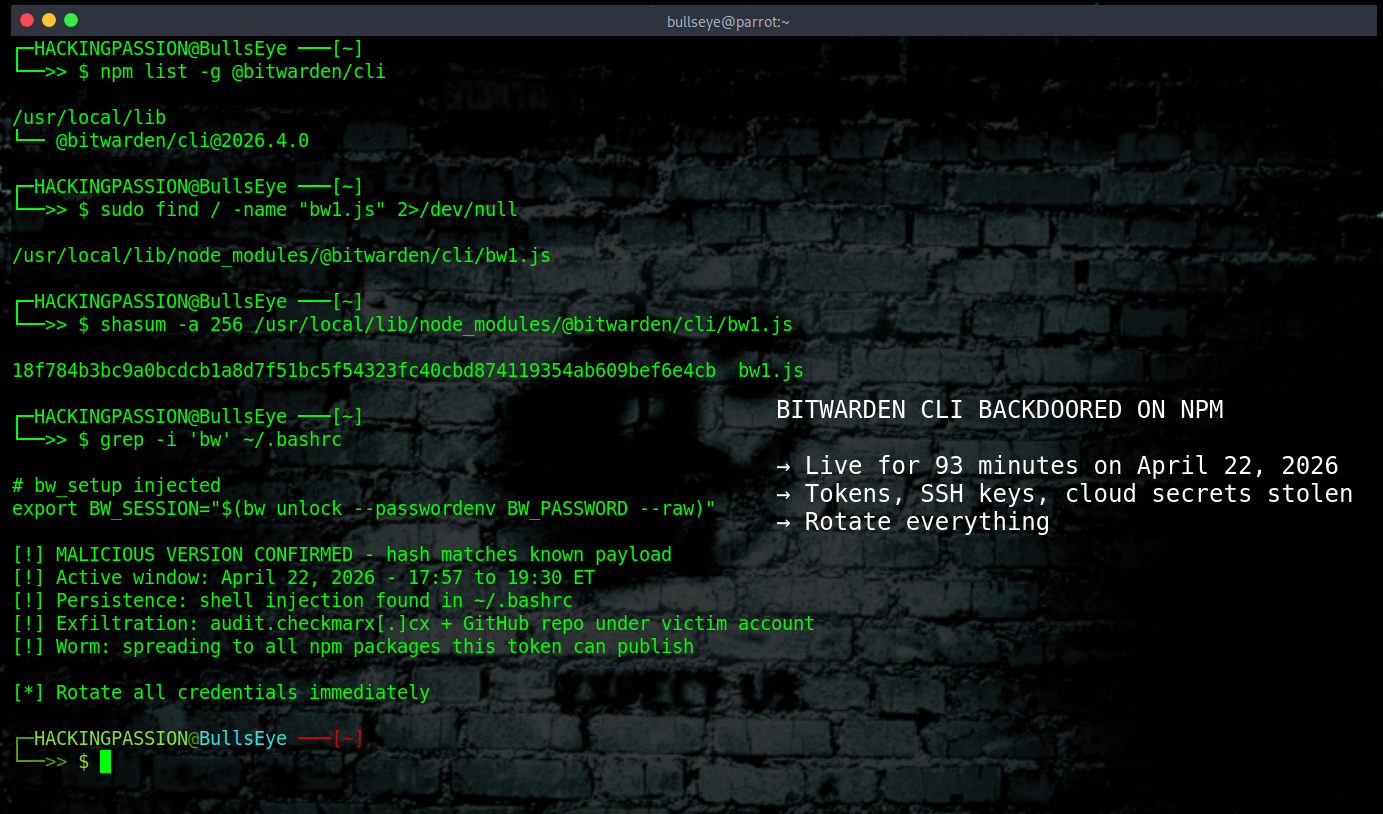
Here is what to do if you have @bitwarden/cli anywhere near April 22.
- → Check your installed version:
| |
If it shows 2026.4.0, treat the machine as fully compromised.
- → Remove it and clear the cache:
| |
- → Look for payload files left behind:
| |
- → Check for persistence in shell config files. The malware injects itself into
~/.bashrcand~/.zshrcand survives package removal:
| |
- → Verify the SHA256 hash of
bw1.jsif you still have it:
| |
Hash of the malicious version: 18f784b3bc9a0bcdcb1a8d7f51bc5f54323fc40cbd874119354ab609bef6e4cb
- → Block both C2 domains at network level:
| |
→ Check your GitHub account for repositories created after April 22 that you did not make. The malware names them using Dune vocabulary: words like
fremen,harkonnen,melange,atreides,fedaykin,sandwormcombined with random numbers. Search your repos for those patterns.→ Check CI/CD logs for connections to
audit.checkmarx.cxor the IP94.154.172.43.→ Rotate everything: GitHub PATs, npm tokens, AWS access keys, GCP service account keys, Azure credentials, SSH keys, and any API keys in AI coding tool config files.
→ Reinstall clean. Bitwarden released
@bitwarden/cli@2026.4.1on April 23 as the verified clean version.
If you use Bitwarden as a password manager, your vault is safe. The Chrome extension, the desktop app, the MCP server were not touched. Only the CLI on npm, only during those 93 minutes. If you did not install it from npm during that window, you are not impacted.
That is what makes this type of attack so effective. Nobody thinks to check the password manager.
Supply chain security does not stop at the code you write yourself. The tools that build, scan, and deploy that code are part of the attack surface too. This campaign has been running since March and keeps finding new doors to open.
If you want to understand how attackers actually pull this off, my ethical hacking course covers exactly that. How initial access works, how credential theft chains are built, how post-exploitation runs once you are inside a system, how privilege escalation works on Windows and Linux, and how attackers move through a network once they have a foothold. Hands-on, from zero, using real tools like Metasploit, Nmap, Burp Suite, and Mimikatz in your own lab environment.
Hacking is not a hobby but a way of life.
Sources: → Bitwarden Statement on Checkmarx Supply Chain Incident → Socket Research: Bitwarden CLI Compromised → Endor Labs: Shai-Hulud The Third Coming
Stay updated
Get the latest posts in your inbox every week. Ethical hacking, security news, tutorials, and everything that catches my attention. If that sounds useful, drop your email below.