 HackingPassion.com
Watch a Buffer Overflow Take Over a Machine on Your Own Lab
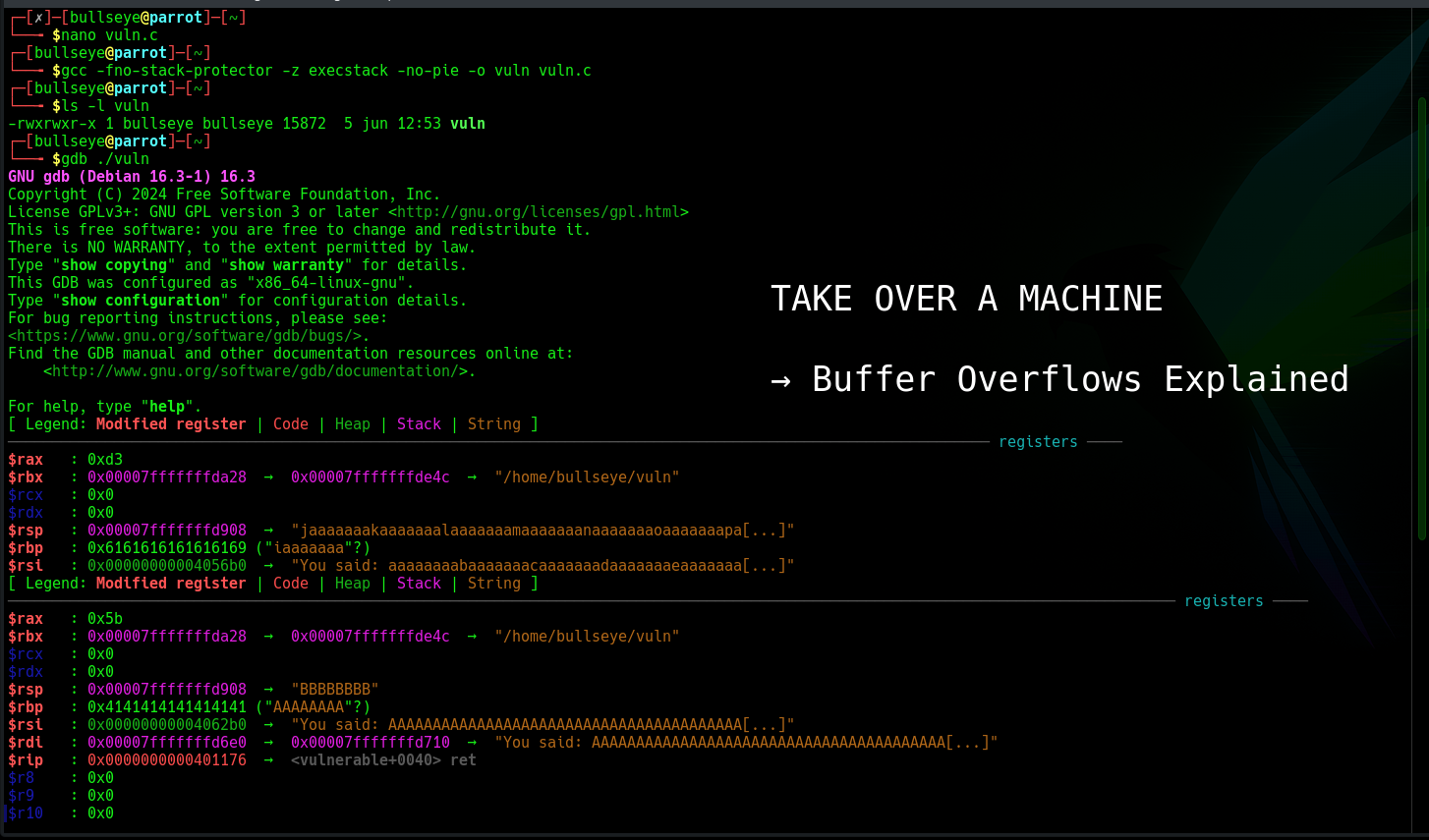
Ethical Hacking Complete Course Zero to Expert
Hack like black hat hackers. Penetration testing, Kali Linux, WiFi and web hacking, and the hacker mindset behind it.
→ Take the full courseBuffer Overflows: The Oldest Way to Take Over a Machine, and How to See It Work on Your Own Lab
Give a running program more data than it was built to hold, and on a lot of systems that extra data does not just get thrown away. It spills into the memory right next to it. And with a little care, that spilled data ends up running as code, with full control over the machine.
This is a buffer overflow, and it is the oldest serious attack in offensive security. In November 1988 a graduate student named Robert Morris let loose a program that used one to spread across the early internet. It reached around 6,000 of the 60,000 machines that were online back then. The flaw it leaned on lived in a service called fingerd. That service read incoming data into a fixed block of memory of 512 bytes, using a function called gets() that never checked how much was actually coming in. Send it more than 512 bytes and the rest just kept writing into memory it was never meant to touch.
Eight years later, in 1996, someone writing under the name Aleph One published a paper in Phrack magazine called “Smashing the Stack for Fun and Profit.” It was the first clear, step by step explanation of how this actually worked, and it is still the paper almost everyone learning offensive security gets pointed to.
WHAT A BUFFER OVERFLOW ACTUALLY IS
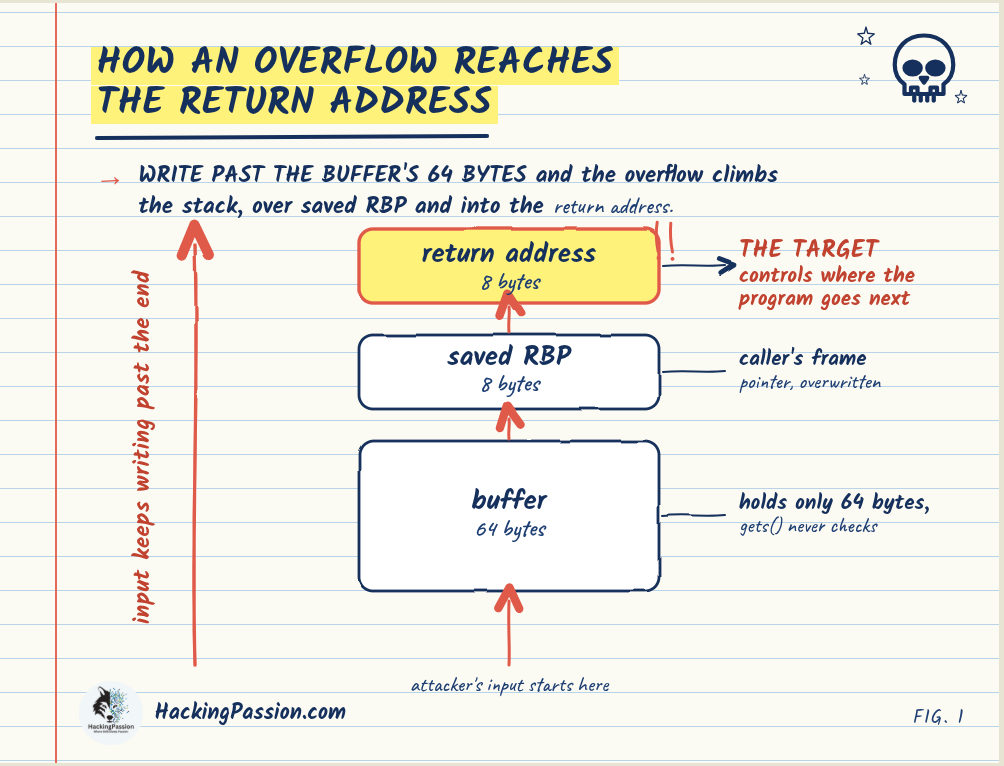
A buffer is just a fixed block of memory a program sets aside to hold something, a username, a filename, a chunk of data coming in over the network. Think of it as a row of 64 boxes. The program decides up front how many boxes it needs, and a buffer built for 64 characters expects 64 and nothing more.
The trouble starts when the code filling those boxes never checks whether the data actually fits. Older C functions like gets(), strcpy(), and sprintf() copy until they reach the end of the input, not until the boxes are full. Give them more than fits and they keep writing straight past the last box, into whatever sits next to it in memory.
What sits next to it is where this turns dangerous. There are two kinds of overflow, named after the part of memory they hit. This walkthrough is about the stack overflow, the classic one. The other kind, a heap overflow, hits the area where a program holds data it asks for while running, and it works on different ground. The stack is where it started and where it is easiest to see.
The boxes, plus the little notes a program keeps for itself while it runs, all live together in a region called the stack. One of those notes matters more than the rest. It remembers the exact spot the program has to jump back to when the current function finishes. That note is the return address. Overflow far enough and you write straight over it.
That little note is what an attacker is really after. Control it, and you control where the program goes next.
HOW THE CLASSIC ATTACK WORKS
The original version is almost mechanical. You fill the boxes with enough data to reach the return address. You overwrite that address with one that points back into the data you just sent. And in that data you drop a small set of machine instructions. Those instructions are usually called shellcode, because the goal is normally to open a shell. The function finishes, reads your planted address, and jumps straight into your instructions.
That is the attack Aleph One described, and on a nineties machine it ran almost exactly like that. On a modern machine it does not. The last three decades have been one long back and forth between people building defenses and people finding ways around them.
EACH DEFENSE AND THE WAY AROUND IT
The first real defense is a simple tamper check. The compiler drops a secret random value onto the stack, right in front of the return address, and checks it just before the function returns. An overflow that reaches the return address has to write over that value on the way through. The moment it changes, the program knows it has been hit and shuts down before the planted address is ever used. That value is the stack canary, sometimes called a stack cookie.
The next defense goes after the shellcode itself. The rule is simple. A piece of memory can hold data, or it can run code, but not both at once. The stack is meant for data, so it gets stamped no-code-allowed, and shellcode sitting there just refuses to start. On Windows this is called Data Execution Prevention, or DEP. On Linux it is the NX bit.
So attackers changed tack. If you cannot bring your own code, reuse the code that is already there and already allowed to run. The early form was return to libc, pointing the return address at a system function the program already has. The fuller version came from Hovav Shacham in 2007, and it is called Return Oriented Programming, or ROP. Instead of one function, you hunt for dozens of tiny scraps of existing code that each end in a ret instruction. These scraps are called gadgets. You line their addresses up on the stack so each gadget does one small step and then hands off to the next. Strung together, they carry out whatever you want, built entirely from code the program already had and already trusted.
To make that harder, systems started shuffling where everything sits in memory on each run. That defense is called Address Space Layout Randomization, or ASLR, usually paired with Position Independent Executables, or PIE. A ROP chain needs the exact address of every gadget, and if those addresses move every time the program starts, the chain falls apart. The way around it is to first leak one address out of the running program, often through a separate bug, and work out the rest from that single known point.
The newest layer sits in the processor itself. It keeps a second copy of every return address in a spot normal instructions cannot touch. When a function returns, the processor checks the address on the normal stack against that protected copy. If they do not match, it stops the program. An overflow can still write over the address on the normal stack, but it cannot reach the protected copy, so the mismatch gets caught. Intel calls this Control flow Enforcement Technology, or CET, and the protected copy is the shadow stack.
IT IS STILL HERE
All those defenses raised the cost and the skill it takes. But the basic mistake keeps turning up in brand new software, so this is a problem of right now, not a story from the past. It still lands in things people use every day, from file archivers to web servers, sometimes with working proof of concept code out in the same week the flaw goes public. That track record is why the FBI and CISA put out a joint Secure by Design alert in 2025 that called buffer overflows “unforgivable” defects. Their reasoning was blunt. The mistake has been understood for decades. The fixes are well documented. Vendors keep making it anyway. What they want is simple. Stop building in memory unsafe languages like C and C++, and move to ones like Rust, Go, and Swift, where the language itself blocks this kind of bug before it can happen.
SEE IT WORK ON YOUR OWN LAB
Reading about it only gets you so far. Watching it happen on a program you compiled yourself is what makes it click. This walkthrough runs the same on Kali and on Parrot, since both are Debian based and ship the same tools. It leans on gdb with the GEF extension, which adds the pattern and crash commands you use here.
Install GEF on top of gdb first. Start with gdb itself if it is not already there:
| |
gdb is a debugger. It lets you freeze a program mid-run and look at exactly what it is doing inside. It is what turns this from a story into something you watch happen.
Then install GEF. The same line works on Kali and Parrot:
| |
GEF is an add-on that sits on top of gdb. Plain gdb is bare and hard to read. GEF makes the output readable and brings the pattern and crash commands you use below. You run this once. From then on gdb loads GEF on its own.
If that line stops with Could not resolve host, your machine cannot turn names into addresses yet. That is a DNS problem, not the tool. Point it at a working resolver and run the GEF line again:
| |
The target is a tiny program with the same flaw fingerd had in 1988, a block of memory that gets filled with no size check. Save it as vuln.c:
| |
That scanf("%s", buffer) line is the flaw. It reads whatever you type into the 64 byte buffer and never checks how much actually arrives. The classic version used a function called gets(), but modern compilers flat out refuse to build that one now. That refusal is its own lesson in how dangerous it was. scanf with %s does the same unchecked read and still compiles fine. Build it with the modern defenses switched off, so the old behavior shows through:
| |
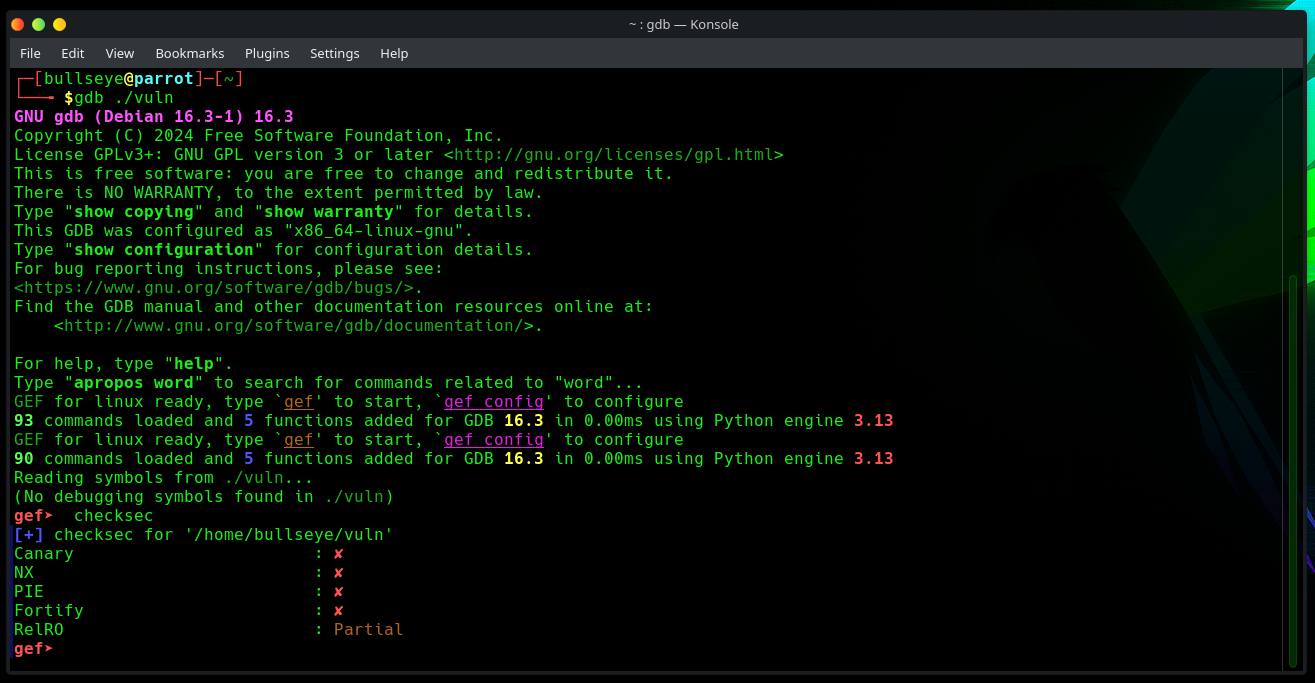
Each flag switches off one of the defenses from earlier. -fno-stack-protector drops the stack canary. -z execstack lets code run on the stack, so planted shellcode is allowed to start. -no-pie keeps the addresses fixed instead of shuffling them like ASLR would. With all three off, the program acts the way it did before any of this protection existed. Now open it in gdb, which loads GEF on its own, and check what is on or off with one built in command:
| |
checksec is a quick scan that asks a program which of those defenses are built in. The output lists each one and its state. Here you want Canary, NX, and PIE all showing as disabled, because that is what lets the old behavior through. On a real target this is the first thing you look at. It tells you straight away which walls are up and which are missing.
Next you need the exact distance from the start of the buffer to the return address. Guessing one byte at a time is slow. So GEF builds a pattern where every short run of bytes is unique. Because no two spots look the same, wherever the program crashes you can read straight off how far into the input that spot was. Make one 200 bytes long, well past what the buffer can hold, then start the program inside gdb with run:
| |
Paste the pattern in when the program asks for input. It crashes almost at once, and that crash is the point. The bytes that landed where the program tried to return come straight out of your pattern. $rsp is the stack pointer, the marker showing the exact spot on the stack the program is sitting on the moment it crashes. Ask GEF for the offset of $rsp and it works out on its own how many bytes of input it took to reach the return address:
| |
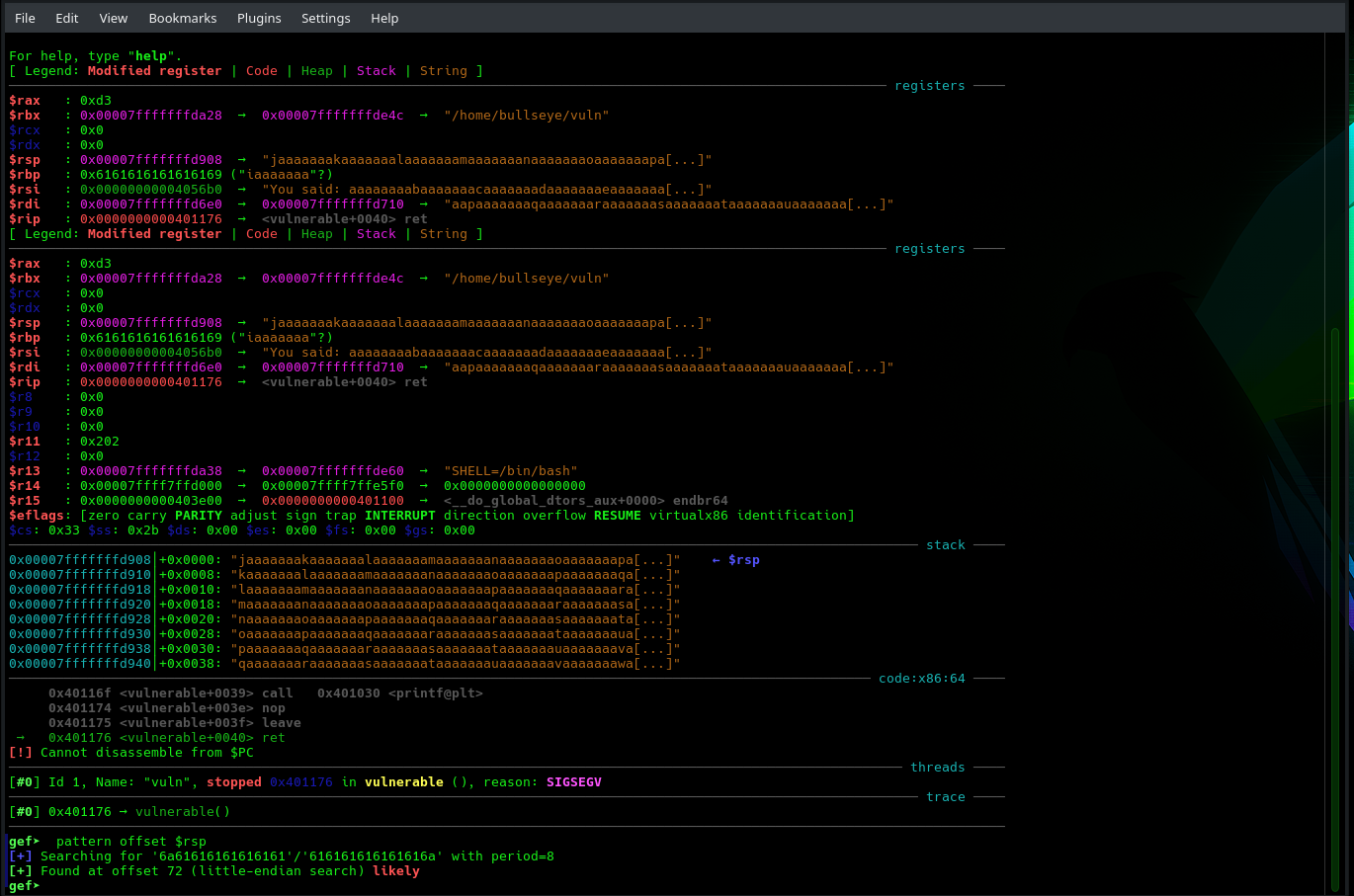
Here that number comes back as 72. That is the 64 bytes of the buffer plus the 8 bytes the function tucked away just below the return address. Everything else hangs on this number, because it marks the exact point where your input starts writing over the return address. Another compiler might lay things out a touch differently, so always use the number GEF gives you, not a fixed one. Now feed the program a block of filler followed by something you will recognize, and that something lands right on the return address. One shell line does it, no script needed, using the offset GEF just reported:
| |
Then run the program again inside gdb and hand it that file:
| |
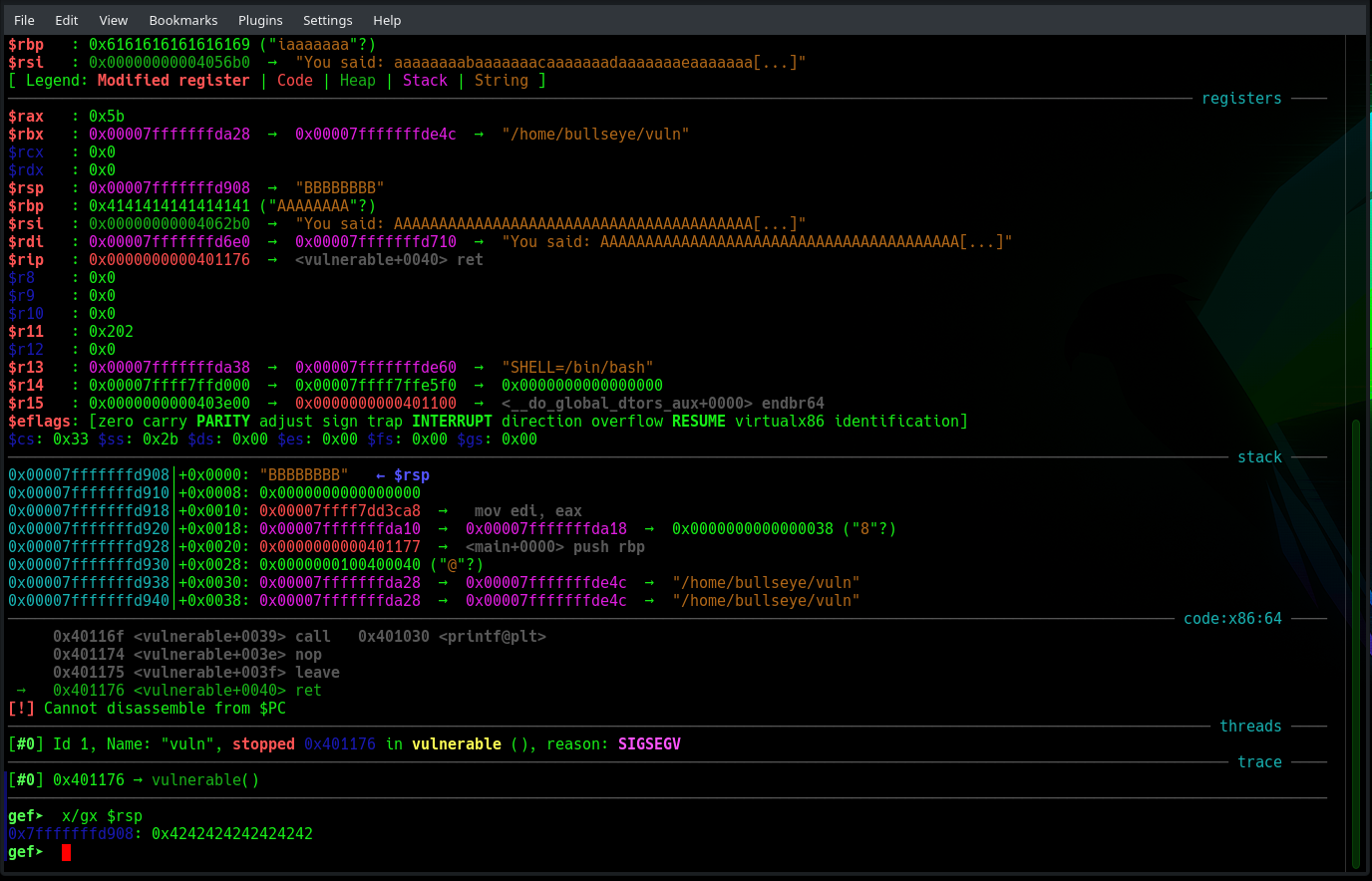
It crashes again, and this is the part to slow down for. x/gx $rsp tells gdb to print the eight bytes sitting at the top of the stack, which right now is the return slot. Run it and you see 0x4242424242424242, the exact eight B bytes you just typed. The program never actually lands there. A 64 bit processor refuses to jump to an address shaped like that, so it faults right on the return instruction. But that is not the point. The point is that the spot the program was about to jump to now holds a value you picked at the keyboard. That is control of execution. Everything heavier sits on top of this: writing real shellcode, building full ROP chains, and getting past the protections you switched off here.
HOW TO STOP IT
The defenses above should stay on. The lab switched them off only to lay the bug bare.
If you write code, the simplest fix is to drop the functions that caused this in the first place. Swap gets() for fgets(), strcpy() for strncpy(), and sprintf() for snprintf(). Each of those takes a size limit and stops there. Leave the compiler protections on too, since the stack canary, DEP, ASLR, and PIE each block a different step of the attack and cost almost nothing to keep. While testing, compile with AddressSanitizer, which catches an overflow the second it happens and points straight at the line. Then run a fuzzer, a tool that throws piles of junk and malformed input at your code until something breaks.
The bigger answer is the one the FBI and CISA pointed at. A language like Rust checks every read and write to make sure you stay inside the buffer, so this kind of bug simply cannot happen. You wipe it out instead of patching it one case at a time. Rewriting old C and C++ is slow and costly, but more and more new code starts out in something safer.
From the attacking side, the same knowledge tells you where to look. Run checksec on a target and it shows which protections are missing. A binary with no stack canary or no ASLR is pointing you straight at where to spend your time. Reading source code for those unsafe functions during a review gets you there from the other direction.
- → Build the tiny vulnerable program on a VirtualBox lab, compile it with the protections off, and use GEF to find the offset and land a value you picked on the return address. Seeing your own bytes in the return slot is the moment it stops being theory.
- → Run
checksecon a binary before you do anything else. A missing canary or missing ASLR shows you the soft spots right away. - → In your own code, swap
gets(),strcpy(), andsprintf()for their size limited versions, keep the compiler protections on, and test with AddressSanitizer and a fuzzer before anything ships.
This walkthrough stops at the moment you take control. The next step in pure binary work is writing the shellcode that actually runs once you are in, and chaining together those ROP gadgets to slip past the protections you switched off in this lab. Most people lean on a tool called pwntools for that, which does by script what you just did by hand.
My course takes a wider route, and covers far more than this one binary. Instead of going deeper into a single program, it walks you through a real break-in from start to finish: finding a target and scanning it for weak spots, getting your first foothold with Metasploit and by hand, climbing from a normal user up to full control, pulling passwords straight out of memory, leaving yourself a way back in that survives a reboot, and hopping from the machine you cracked into the hidden network behind it.
Hacking is not a hobby but a way of life. 🎯
Stay updated
Get the latest posts in your inbox every week. Ethical hacking, security news, tutorials, and everything that catches my attention. If that sounds useful, drop your email below.