 HackingPassion.com
Signed by Microsoft Does Not Mean Safe
Ethical Hacking Complete Course Zero to Expert
Hack like black hat hackers. Penetration testing, Kali Linux, WiFi and web hacking, and the hacker mindset behind it.
→ Take the full courseA digital signature on a Windows driver proves who made it. It was never proof that the driver is safe. Attackers built a technique on that gap, called Bring Your Own Vulnerable Driver, and it hands them control of Windows at its deepest level. Some of the malware they use was signed through Microsoft’s own program.
A driver is the piece of software that lets Windows and a device work together, your keyboard, your printer, your graphics card. It runs in the kernel, the core of the operating system, at a level called ring 0, where code has direct access to memory and hardware. Security software mostly watches from a step below. Some of it runs inside the kernel too, but even that cannot protect itself once an attacker controls that level. Reaching the kernel puts an attacker on top.
Windows will not load a kernel driver unless it carries a valid digital signature. That signature is a stamp from a known company, checked by a system called Driver Signature Enforcement. The idea behind it is trust. When a recognised vendor signs the driver, Windows treats it as allowed to run.
The weakness sits in what that signature promises. It proves who signed the driver. It says nothing about whether the code inside is safe. A signed driver can carry a bug that was never meant to be there, and a signed driver can be malicious from the start and still hold a valid signature. Windows checks the stamp, not the behaviour.
This is where Bring Your Own Vulnerable Driver comes in, shortened to BYOVD. The attacker already has admin rights on the machine. Admin rights are powerful, but they still run in user mode, one step short of the kernel. To cross that line, the attacker needs a driver.
So they bring one. They drop a signed driver onto the disk, register it as a Windows service, and start it. Because the driver is signed, Windows loads it into the kernel without objection.
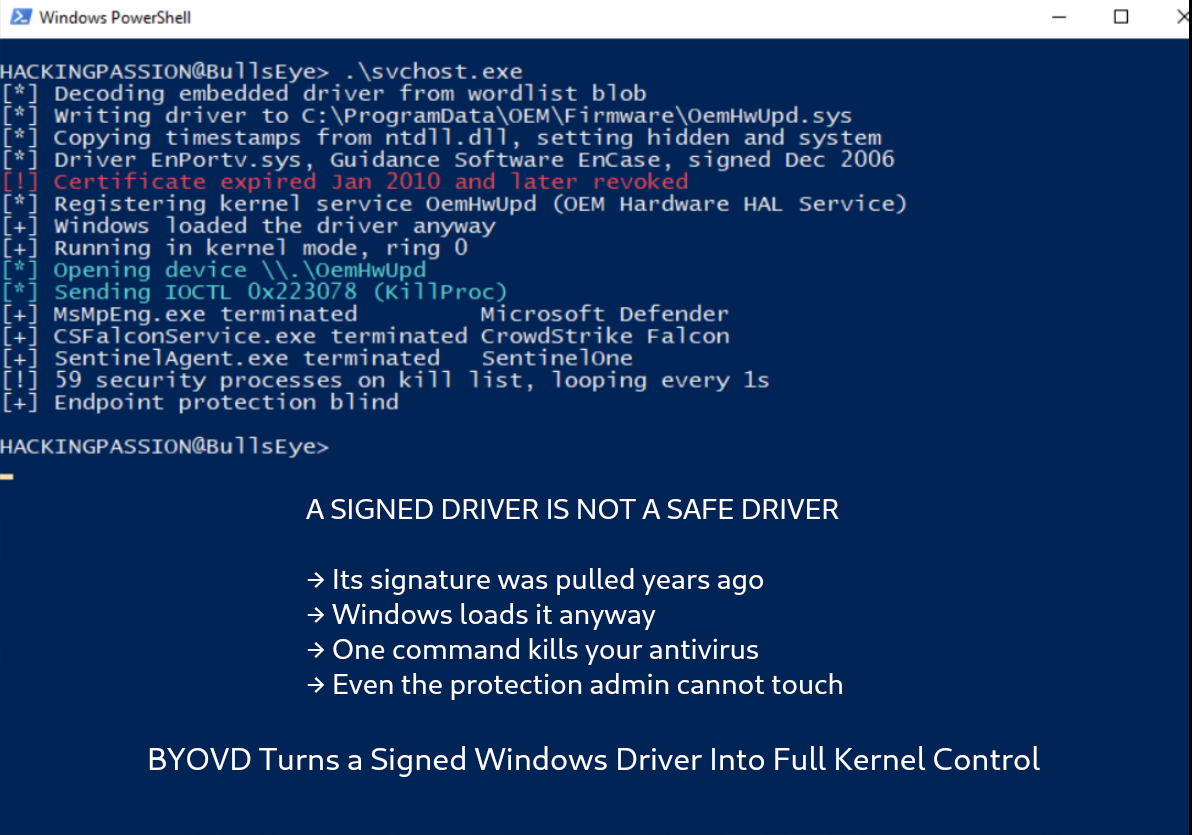
Then they start talking to it. A driver has a slot where a normal program can hand it a job. That slot has a name, IOCTL, short for input output control. A well written driver looks at each job and only does the one thing it was built for. A broken one does whatever it is handed.
What these broken drivers will do is the scary part. Some will read and change protected kernel memory, the memory at the core of Windows, for whoever asks. Others will shut down any program on the system, no questions asked. That first one, reading and writing kernel memory, is the powerful one. With it, an attacker can find a single setting buried deep inside Windows and flip it, wipe the notes the security software keeps for itself, or replace a list of pointers Windows follows so the next step runs the attacker’s own code.
One signed file, and they are loose inside the machine.
There is a reason that second power, shutting a program down, matters so much. Your antivirus is not an ordinary app. Windows gives it a special protection level so that even someone with full admin rights cannot close it or read its memory. That level has a name, Protected Process Light, or PPL. It also protects many EDR products, the newer security software that watches how programs behave instead of only scanning files.
PPL is the reason admin is not enough, and the reason attackers want the kernel so badly. From inside the kernel, the driver reaches into the record Windows keeps for that protected program and switches the PPL flag off. Now the antivirus is an ordinary program again, and a plain command can close it. Or the driver skips that step and ends the program directly, from a level PPL cannot block.
Admin could not touch it. The kernel closes it in one move.
Killing the security tool is the loud way to do it. When your antivirus suddenly stops, Windows can pop up and tell you protection is off. So the smarter move is to leave it running and quietly blind it.
EDR works by asking the kernel to notify it whenever something happens, a program starts, a file loads, the registry changes. Those notifications have a name, callbacks. A driver sitting in the kernel can find the list of callbacks and delete the ones the EDR set up. It can also switch off ETW, Event Tracing for Windows, another channel security tools listen on. The antivirus keeps running, the icon stays green, and it sees nothing, because nothing reaches it anymore.
Tools that do this, wiping the callbacks in one pass, are already out there and already used by ransomware crews.
At that point the attacker sits at ring 0, with the protection blind or gone. They can hide their own code, plant a rootkit so their access survives a reboot, and move through the machine without being seen. Defenders keep a catalogue of attacker moves called MITRE ATT&CK, and this counts as two of them at once, T1068 for climbing to full control and T1562.001 for switching the defences off. The driver did not break in. It handed over the level that decides what runs on the machine and what gets stopped.
There are two ways to get a driver Windows will trust.
The first is to take a genuine driver from a known vendor that happens to contain one of those flaws. Plenty of these exist, because a driver only has to let a normal program trigger a kernel action it was never meant to reach. Drivers pulled from graphics utilities, laptop firmware updaters, and a popular game’s anti cheat have all been turned to this purpose, and a public project called LOLDrivers, at loldrivers.io, catalogues hundreds of the known ones and lets you scan your own machine.
The second is to get a malicious driver signed anyway. In December 2022, Microsoft, Mandiant, Sophos and SentinelOne disclosed that malicious drivers had been pushed through Microsoft’s own Windows Hardware Developer Program, using developer accounts in the Partner Center and a route called attestation signing. The drivers came back carrying a genuine Microsoft signature. That was not a single slip. In 2026, Symantec found a ransomware family loading a driver called PoisonX. It also carried a genuine Microsoft signature, though how the attackers got it is not known. Four years after the 2022 case, and a malicious driver still had Microsoft’s stamp.
Pulling a signature back does less than you would hope. One forensic driver from the EnCase software was signed in 2006. Its certificate expired in 2010 and was revoked after that, yet attackers were still loading it in 2026.
Three things keep a driver like that loading, and together they explain why pulling a certificate back does so little.
The first is an exception. When Microsoft tightened kernel driver signing in 2015, it made an exception for drivers signed before that date, to avoid breaking older hardware. A certificate from 2006 falls under that exception, so Windows still accepts it.
The second is how the date is checked. Windows does not compare the signature to today’s date. It compares it to the moment the driver was signed, recorded in a timestamp. Back then the certificate was valid, so the signature stays valid for good, even years after the certificate expired.
The third is revocation itself. The list of pulled certificates, called a CRL, is never checked for drivers, because a driver loads early in startup, before there is any network to fetch that list. So a revoked certificate looks no different from a live one.
Put those together and a signature that should have stopped working in 2010 still opens the kernel in 2026.
Windows does have a defence for this. It keeps a list of drivers known to be dangerous and refuses to load them, and that list switches on together with a feature called Memory Integrity. The catch is the word known. The list only stops drivers someone has already caught. A fresh vulnerable driver that is not on it yet loads fine and works fine, and that is why the trick still works.
The list has also let people down before. In 2022, researcher Will Dormann found it had not been updated since December 2019. Ars Technica ran the story. For close to three years, Windows 10 machines looked protected while the list quietly did nothing. Microsoft said the updates were not reaching older versions and fixed it later.
The technique also became a trade. Sophos found tools sold on criminal markets, including one called Terminator, sold for anywhere from a few hundred dollars up to three thousand, and built to shut down two dozen security products at once. In 2024, the RansomHub group shipped its own driver killer, locked behind a 64 character password so researchers could not see which driver it carried, and ESET later found rival crews using the same tool. The idea reaches back to 2012 and the Shamoon wiper, which used a signed disk driver to erase machines. It keeps working because the model it abuses has not changed.
A signature proves identity. It does not prove safety. Windows trusts the stamp, and a single signed driver with the right flaw is enough to reach the level that controls what runs on the machine and what gets stopped.
What you can do
You cannot patch a technique, but you can take away what it needs to work.
Memory Integrity is the setting that matters, because turning it on switches on the vulnerable driver blocklist with it. You find it in Windows Security, under Device security, then Core isolation details, then Memory integrity.
Check whether the blocklist is active from a command prompt:
| |
A value of 1 means it is on. A value of 0 means it was switched off. A missing value means Memory Integrity is managing it.
Turn it on from an admin PowerShell if you need to:
| |
Steps that reduce your exposure:
- → Turn on Memory Integrity and leave it on
- → Keep Windows updated, since the blocklist ships through Windows Update
- → Do not switch the blocklist off for games or performance, that switch is what these attacks lean on
- → When Windows flags an incompatible driver under Core isolation, treat old and no name drivers as suspect and update or remove them
- → Scan your drivers against the open list at loldrivers.io
- → Keep admin rights separate from daily use, since this attack needs admin to load a driver in the first place
- → On hardened machines, move from blocking to allow listing with Windows Defender Application Control, which only lets approved drivers load instead of chasing the bad ones one by one
This connects straight to my ethical hacking course, the Windows privilege escalation and post-exploitation section. You go from a limited user account up to full SYSTEM control, abuse the trusted and signed Windows tools that attackers lean on, and see how antivirus and EDR get bypassed step by step in a safe lab:
→ Join my complete ethical hacking course
Hacking is not a hobby but a way of life.
Sources:
Stay updated
Get the latest posts in your inbox every week. Ethical hacking, security news, tutorials, and everything that catches my attention. If that sounds useful, drop your email below.