 HackingPassion.com
Google Chrome Silently Installs a 4 GB AI Model on Your Machine Without Asking
Ethical Hacking Complete Course Zero to Expert
Hack like black hat hackers. Penetration testing, Kali Linux, WiFi and web hacking, and the hacker mindset behind it.
→ Take the full courseGoogle Chrome installed a 4 GB AI model on your machine without asking. The pitch is that it runs locally, keeping your data off Google’s servers. The AI button you actually see in your browser sends everything to Google anyway.
Privacy researcher Alexander Hanff found this during a routine web audit in late April and published his full analysis on 4 May 2026, two days ago. He had built a Chrome profile to run automated tests, the kind where software loads web pages in the background and measures what happens. The profile received no human input whatsoever: nobody moved the mouse, hit a key, or touched the address bar. Chrome just ran quietly in the background doing its thing.
During a cleanup pass a few days later, Hanff noticed something. The profile directory had grown by 4 GB. Something had written a large file to disk, and he had not put it there.
He went looking for exactly when that happened, and he knew where to look. MacOS keeps a log called .fseventsd that runs at the deepest layer of the operating system, below anything Chrome can touch or modify. It records every file that gets created or changed on the system, with precise timestamps, completely independent of any application. Chrome cannot edit it. Google cannot reach it remotely. It is the operating system watching itself.
What he found was Chrome, acting entirely on its own, on a profile nobody had ever used.
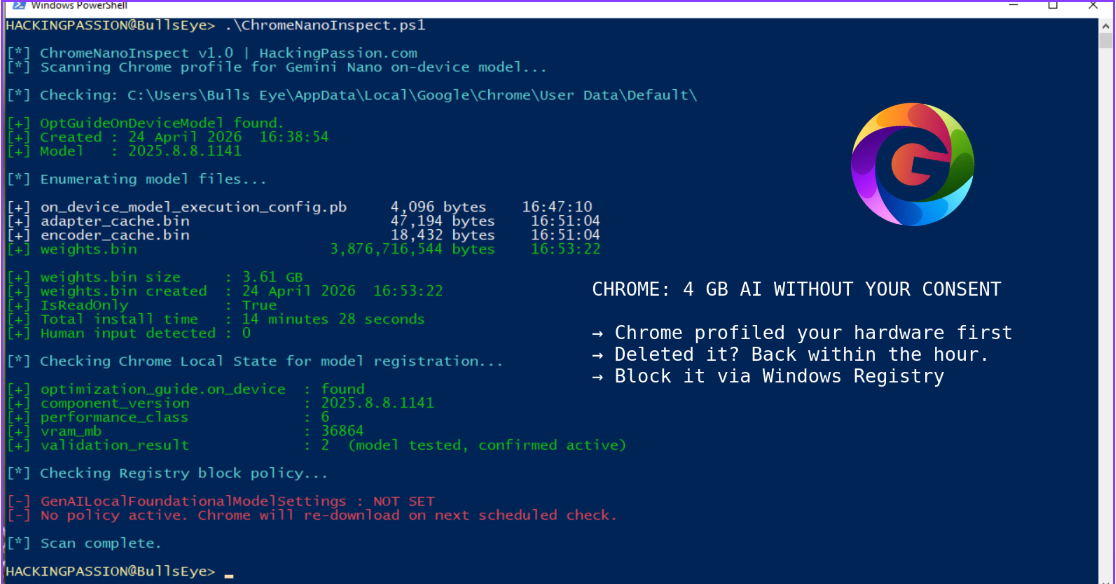
On 24 April 2026, three Chrome processes started simultaneously in the background. One downloaded a Certificate Revocation List update, which is a file browsers use to check whether certain security certificates have been cancelled and should no longer be trusted. Routine maintenance. One downloaded a browser preload-data update. The third downloaded weights.bin, along with adapter_cache.bin, encoder_cache.bin, on_device_model_execution_config.pb, and registered four additional internal model targets. Chrome batched all three in the same background update window, treating a standard security check and a 4 GB AI model as if they were the same kind of thing. Total time from the first folder being created to the last file landing in place: 14 minutes and 28 seconds. Human involvement: zero. The one that ships to everyone.
The file itself is called weights.bin. In an AI model, the weights are everything the model learned during training, the actual learned knowledge stored in one file, and without them the model is an empty shell that does nothing. This particular file holds Gemini Nano, Google’s on-device large language model, sitting in a folder called OptGuideOnDeviceModel inside the Chrome profile.
Before Chrome downloaded any of it, it had already read the machine’s hardware. GPU type, CPU type, system memory, GPU memory. Hanff’s audit machine was logged internally as performance class 6 with 36,864 MB of GPU memory. Chrome had quietly assessed whether the machine was powerful enough and added it to the list for the push, before any AI feature had appeared anywhere in the browser’s interface.
The folder name is worth a look. Google called it OptGuideOnDeviceModel, which stands for OptimizationGuide On-Device Model, internal Chrome shorthand that tells a person cleaning up their disk absolutely nothing. If Google had named the folder GeminiNanoLLM, anyone finding it during a storage cleanup would understand immediately what they were looking at. The current name does not allow that, and that choice belongs to someone who made it on purpose.
Chrome 147 added a button to the address bar labeled AI Mode. Anyone seeing that button in 2026, knowing that a 4 GB local AI model is sitting on the machine, would assume the button uses that local model and that searches stay on the device. That is the whole point of running AI locally. Neither of those things is true. The AI Mode button connects to Google’s cloud servers. Every query goes to Google. Gemini Nano is not part of that flow at all. What Gemini Nano actually powers are things like the “Help me write” suggestion that appears when right-clicking inside a text field, tab group name suggestions, smart paste, and page summaries, features buried in right-click menus that most people never find. The download costs 4 GB of storage and bandwidth. The AI feature people actually interact with sends the data to Google regardless.
Two internal Chrome settings make clear this was not an oversight. The setting OnDeviceModelBackgroundDownload is what triggers the silent download. The setting ShowOnDeviceAiSettings is what makes the settings page visible where the behavior can be found and turned off. Both are switched on by the exact same update package. The settings page where someone could refuse the download only becomes accessible at the same moment the download begins. There is no point before that where Chrome says anything.
Chrome also keeps a file in the profile folder called Local State. Inside it is a section called optimization_guide.on_device. It records which version of the model was installed, whether the model ran successfully when Chrome tested it, and the hardware score Chrome assigned to the machine. Chrome ran Gemini Nano and logged the outcome before any AI feature was visible to the user.
Reports of this folder and the weights.bin file had been circulating in community forums for over a year before Hanff published his findings. What changed in 2026 is the scale and the forensic proof. People had seen it, but nobody had caught Chrome doing it on a profile with zero human input and documented it at the kernel level.
Deleting weights.bin buys time, nothing more.
Chrome keeps track of which profiles are supposed to have the model in that Local State file. On macOS, Chrome runs a background process called a LaunchAgent that automatically checks in with Google’s servers every hour. On Windows it works through a scheduled update task that does the same thing. Either way, the next time that check runs, Chrome reads the Local State file, sees the profile is still on the list, and starts downloading again. On Windows the file is also set to read-only, which means Windows will not allow deletion until that setting is changed first.
The proper way to stop it is to tell Chrome not to download it in the first place, not to delete the file after the fact.
To check whether the file is already on the machine:
Windows:
| |
macOS:
| |
Linux:
| |
To stop Chrome from re-downloading it on Windows, open the Registry Editor and navigate to:
| |
Create a new DWORD value named GenAILocalFoundationalModelSettings and set it to 1, then restart Chrome.
On macOS and Linux, the easiest way is through Chrome’s own settings. Open Chrome, go to Settings, then System, and turn On-device AI off. That is the official toggle Google added for this. Alternatively, open chrome://flags, search for Enables Optimization Guide On Device, set it to Disabled, and restart Chrome. Keep in mind that flags can reset after major Chrome updates, so the Settings route is more reliable.
Since 2002, EU law has been clear on this. The ePrivacy Directive says storing software on someone’s device requires their prior consent, with one narrow exception: when the file is strictly necessary for something the user explicitly asked for. Chrome works perfectly without Gemini Nano. That exception does not apply. The GDPR adds that data processing must be transparent by default and that the baseline should always be the minimum necessary, not whatever serves the company’s roadmap. California’s CCPA and the UK’s equivalent laws take the same position. If EU regulators decide to act on this, they can fine Google up to 4% of global annual revenue. Alphabet’s verified 2025 revenue was $402 billion, which puts the maximum fine at more than €14 billion.
This is the second time in two weeks Hanff documented the same pattern. Two weeks earlier he found that Anthropic’s Claude Desktop, when installed, writes a Native Messaging bridge into seven Chromium-based browsers simultaneously, including Chrome, Brave, Edge, Arc, Vivaldi, Opera, and Chromium, without asking. A Native Messaging bridge is a connection that lets a program installed on the machine talk directly to browser extensions, bypassing the normal browser security layer. Anthropic’s case affected millions of Claude Desktop users. Google’s case affected hundreds of millions of Chrome users. Both companies made the same call: the user’s machine is a place to roll out their products.
For what it is worth: Firefox does not install Gemini Nano. Brave is built on Chromium but removes Google’s update infrastructure entirely, so Brave users are not affected by this. Safari asks before installing anything similar, which is how it should work.
My opinion: Everything you type into the visible AI button goes straight to Google’s servers. And if this is what turned up from one researcher looking closely at a single browser profile, the question of what else is sitting on that machine and what it is all capable of is one nobody has fully answered yet. I do not think we are anywhere near the end of this.
Silent installs, persistence mechanisms that survive deletion, and how to detect and analyze that kind of behavior on a system are things my ethical hacking course covers step by step, alongside post-exploitation, privilege escalation, LOLBins, and staying hidden after a breach:
Hacking is not a hobby but a way of life. 🎯
Sources:
- Alexander Hanff, “Google Chrome silently installs a 4 GB AI model on your device without consent” thatprivacyguy.com
- Google Chrome Help, “Manage on-device Generative AI models in Chrome” support.google.com
Stay updated
Get the latest posts in your inbox every week. Ethical hacking, security news, tutorials, and everything that catches my attention. If that sounds useful, drop your email below.