 HackingPassion.com
Does Google Control Your Email?
Ethical Hacking Complete Course Zero to Expert
Hack like black hat hackers. Penetration testing, Kali Linux, WiFi and web hacking, and the hacker mindset behind it.
→ Take the full courseAnyone on the internet can send an email that looks like it came from your bank, your boss, or you, and the system that delivers it will not check whether that is true.
The reason is not a bug someone forgot to fix. Email was built in 1982 to trust whoever was talking, back when a few hundred computers were online and the people running them knew each other, and that trust was never taken back out.
I got this question on social, and I thought it was a great one. “The more you think about it, the better it gets”:
How certain are you that Google isn’t controlling or meddling with delivery of your emails? Since everyone is using GMail nowadays. May I suggest that you do some posts about email, how it works, how it is used to hack accounts, phishing, alternatives to Gmail (look at Atomicmail too), etc.
So I went digging. To answer whether Google controls your mail, you first have to understand how email works, because the real answer is more interesting than a simple yes or no.
Email was built to trust everyone
Email runs on a protocol called SMTP, the Simple Mail Transfer Protocol. Jon Postel wrote the specification in August 1982. A few hundred machines were connected at the time, many of them at universities and research labs, and the people running them trusted each other. The protocol was built around that. A sending server announces who a message is from and who it is for, the receiving server agrees, and the mail goes through. Nothing checks whether the sender is telling the truth, because in 1982 there was no reason to lie.
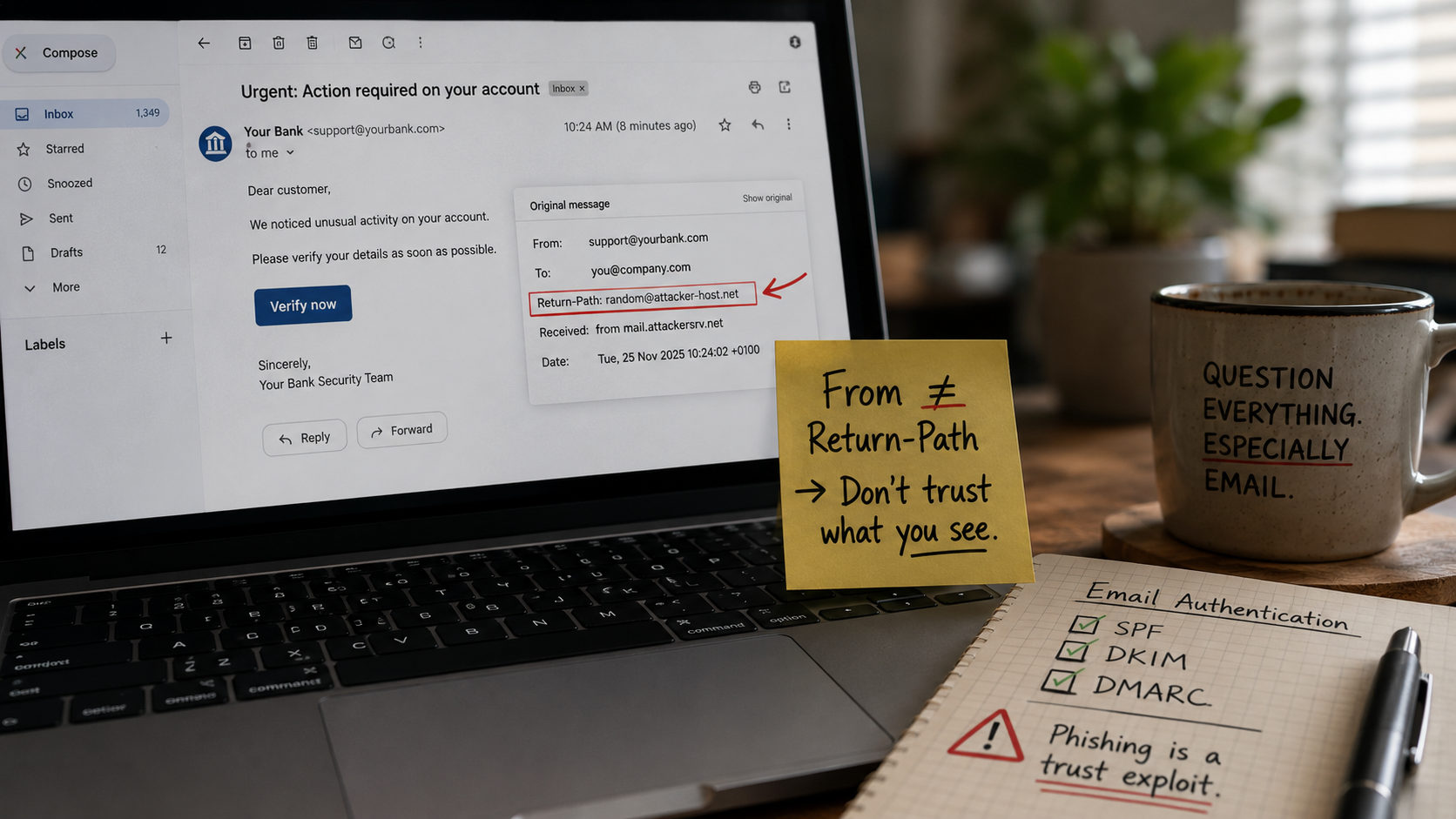
Here is the part that causes the trouble. An email carries two separate from addresses, not one. One is the address the mail servers use behind the scenes to move the message and send back bounces. That one is called the envelope sender, or the Return-Path. The other is the from line you actually see at the top of the mail, the one that shows up in your inbox.
Nothing in the old protocol says those two have to match. So someone can route a message from their own server and put your bank’s name on the from line, and SMTP treats it as normal. The address you read and the address that sent it are not the same thing, and they never had to be.
| |
The server moving this message sees attacker.example. The person reading it sees support@yourbank.com in bold. Both are accepted. That split between the envelope and the visible From is what spoofing is built on, and it is why phishing keeps working.
The name on that from line can be anything the sender types. Your bank, your boss, or your own address, so a message can look like you sent it to yourself, or like it came from a colleague at your own company. Mail that looks internal tends to get trusted, and attackers know it.
The three layers that came later
Since SMTP itself trusts the sender by default, three extra checks got bolted on over the years to do the job it never did. They do not fix SMTP, they sit on top of it. All three are trying to answer one question the original never asked, whether this sender is actually allowed to use this domain.
- → The first one checks which servers are even allowed to send for a domain. The owner publishes that list out in the open in DNS, and the receiver checks the sender against it. This is SPF, the Sender Policy Framework. The catch is that it only looks at the behind-the-scenes envelope address, not the from line you see, so a mail can pass SPF and still show a fake name in your inbox. That gap is why the other two had to follow.
- → The second one proves the message was not changed on the way and really came from the domain. The sending server signs it with a private key, and the matching public key sits in DNS for the receiver to check. This is DKIM, DomainKeys Identified Mail. Alter anything in the signed part, or sign with the wrong key, and the check fails.
- → The third one makes the first two actually count. It says the from line you see has to line up with the domain SPF or DKIM verified, a match it calls alignment. This is DMARC. The owner sets what happens to mail that fails, and gets reports showing who is sending in their name. This is the piece that ties the other two together.
A DMARC record is a single line of text in DNS, and it reads plainly once you know the parts:
| |
The p tells receivers what to do with mail that fails the check. none means do nothing, quarantine means send it to spam, reject means refuse it outright. The rua is the address where the daily reports are sent. A domain on p=reject with aligned SPF and DKIM is hard to impersonate. A domain on p=none, or with no record at all, can be spoofed, and the recipient has no automatic way to know.
You can read all of this on mail you already have. Open the message headers and find the line that records the checks:
| |
Three passes means the mail really came from the domain in the from line. A dmarc=fail, or no authentication results at all on a message that claims to come from a bank or a colleague, is a strong reason to stop. Checking a domain takes two commands:
| |
How email is used to break into accounts
A protocol that trusts the sender is the foundation, and attackers have built a whole craft on top of it. The methods have moved a long way past the obvious scam mail with bad grammar. AI writes the lures now, in clean language and the right brand tone, so the spelling mistakes people were taught to watch for are mostly gone.
Before any of that, an attacker needs an address to aim at, and finding one is the easy part:
- → Scraped from websites, social profiles and old posts.
- → Pulled with open tools that collect the addresses tied to a domain in seconds.
- → Bought from the lists that float around after a data breach.
A work address tends to follow a pattern, firstname.lastname at the company, so one known name often gives up the rest.
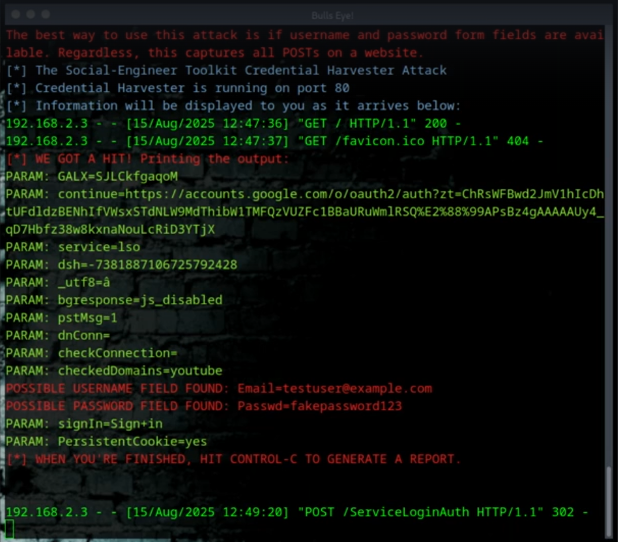
The oldest move still works, the fake login page. A message arrives with a reason to hurry, a locked account, a failed payment, a document waiting, and a link to what looks like the real login page for a service the target uses. The page is a copy. Whatever gets typed into it, username and password, goes straight to the attacker. The convincing part is not the email, it is the page, because a login screen that looks right makes people stop questioning it.
The link is not always a link anymore. A growing share of phishing hides the destination inside a QR code in the mail or an attached PDF, which slips past scanners that only read text and pushes the target onto a phone, where the real address is hard to see. Reports put this kind of attack up about four hundred percent between 2023 and 2025.
For a while, two factor authentication shut this down. Even with your password, an attacker could not get past that second code, so stealing the password stopped being enough.
So attackers found a way around it. Instead of a dead copy of the login page, the fake page became a live middleman sitting between you and the real site. You log in on the genuine page without knowing it, you pass the real code from your phone, and the site hands you back a little token that tells your browser to keep you signed in, so you do not have to log in again on every click. That token is the session cookie. The middleman grabs it on the way through. This is what gets called adversary in the middle.
From there the attacker drops your token into their own browser and walks straight into the account. They need neither the password nor the second code, because you already did both for them. Tools like Evilginx and rented kits like Tycoon 2FA turned this into a point and click job that takes little skill. In October 2025, Microsoft blocked more than thirteen million emails tied to one of these kits alone.
There is a defense that holds against this. A passkey or a hardware security key is tied to the real web address it was set up for, so a relay sitting on a lookalike domain cannot pass it along. The codes that do get relayed, the ones from an authenticator app or a text message, are the ones this attack feeds on. Phishing resistant keys break the relay, which is why they are the one form of second factor that stands up to it.
Now the part that answers the reader’s question most directly. An attacker who gets into an email account often does not bother with any other password. They go to the bank, the social accounts, the cloud storage, and click “forgot password.” The reset link lands in the inbox they now control. They read stored mail for anything useful, and they message the contact list with requests that genuinely came from the account. One mailbox is the recovery point for everything else a person has online, which is why an email account is one of the most valuable things an attacker can take.
There is a quieter route in that needs no trickery at all. When a company is breached, the addresses and passwords spill out together and end up in lists that get tried in bulk against other sites. It works because people reuse passwords, so one leak from a forgotten forum account can open a current bank login. Checking whether an address has already turned up in a breach takes a few seconds on a site like Have I Been Pwned.
When the target is a company, the same trust gets turned into wire transfers, and the numbers get serious. This one has a name, business email compromise. In January 2024 an employee at the engineering firm Arup got a message that looked like it came from the company’s chief financial officer, asking for a confidential transfer. He was suspicious, which was the right instinct.
So the attackers put him on a video call with the CFO and several colleagues to calm him down. The people on that call were real time deepfakes, built from public conference footage of the real ones. Reassured by the meeting, he made fifteen transfers worth about twenty five million dollars. There was no break-in, and no password was stolen. The thing he used to check the request was the attack itself.
Arup’s own technology chief said afterward that out of curiosity he made a deepfake of his own face in about forty five minutes, using free software.
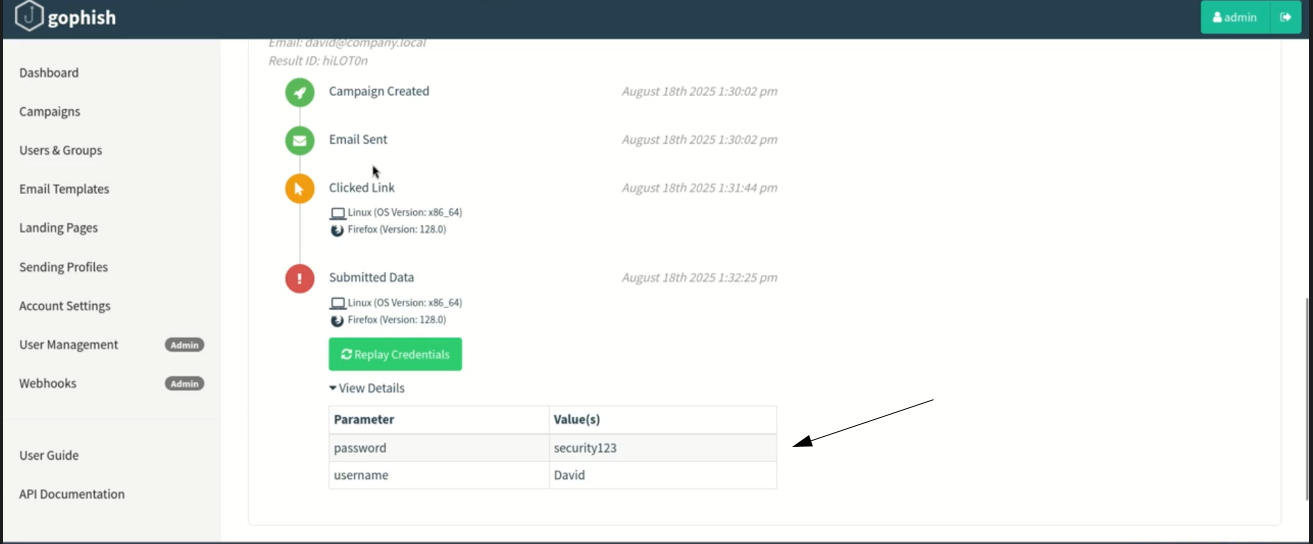
None of this is hand built per victim anymore. The kits are rented for somewhere between a hundred and a thousand dollars a month, they ship with dashboards that track who opened a message, who clicked the link, and who typed their password, and they update themselves to slip past filters. The same tracking a marketing team uses to measure a campaign is what a phishing operator uses to measure a theft.
SPF, DKIM and DMARC help a great deal, and any domain you run should have them set up. They still do not catch everything. Researchers keep finding cracks. In 2024, weaknesses in shared hosting let attackers slip past all three checks while faking the from line, because the checks were looking at the wrong spot. So treat a passing check as a good sign, not as proof a mail is safe.
So does Google control your email?
Not by opening one of your messages and changing the words. The control is bigger and quieter than that.
Google and Yahoo set the rules a sender has to follow before their mail is even allowed near a Gmail inbox. Send more than a few thousand messages a day, and SPF, DKIM and DMARC are no longer optional, a one click unsubscribe is required, and your spam complaints have to stay under a set line. Miss any of it and your mail gets slowed down, then bounced. Microsoft brought in the same for Outlook about a year later. The exact year is not the part that matters. What matters is who makes the rules now. A few providers decide what a trustworthy sender looks like, and the rest of the internet falls in line to get through.
Run your own mail server and you feel this fast. Without clean SPF, DKIM and DMARC, a matching reverse DNS record and a good reputation, the mail just quietly disappears into a filter, and the sender never even sees an error.
So the answer is yes, in the way that matters. Not secret tampering with your messages, but control over the conditions that decide whether a message reaches a person at all.
What Google does inside your inbox
The other half of the question is about reading, not delivery, and the history here is easy to get wrong. For years Google did scan the contents of consumer Gmail to aim advertising, and that is where the reputation comes from. It stopped that specific practice in 2017. So the worry as people usually say it, that Google mines your mail for ad keywords, has been out of date for a long time.
What replaced it is quieter and wider. Google still reads message content to filter spam and phishing, to power features like suggested replies, and more recently to feed its AI assistant. The assistant can summarise a long thread, draft a reply in your own style, and pull details out of older mail. Google’s position is that it does not train its main AI models on personal email, and that the assistant works in an isolated space and keeps nothing afterward. That is a real distinction, and it is narrower than it sounds, because not training the public model on your mail is not the same as not reading your mail.
There is a regional split that matters here. In the EU, the UK, Switzerland and Japan, these smart and AI features are off by default and have to be switched on by hand, because data protection law requires consent first. In the United States it is the other way around. The features arrive already switched on, and a person has to go into the settings and opt out to stop them. The setting belongs to the account holder in both cases, and opening it takes a minute.
Put the two halves together and the reader’s instinct was pointed at something real. The same company that decides whether a message reaches an inbox is also the company whose assistant now reads what is inside it, and with the share of mail running through Gmail, that is a great deal of everyday correspondence sitting with one provider.
Where to put mail you want kept private
There are options, and the limits matter as much as the features.
- → Proton Mail is the one I recommend, and one I use myself, private mail included, and to be straight with you, I am a Proton partner, so a sign up through my link supports the work here. It is based in Switzerland, owned by a non profit foundation rather than an advertising company, and built on end to end and zero access encryption, which means the body of a message is encrypted in a way Proton itself cannot read. The apps are open source and independently audited, there are no ads, and there is a free tier. The limits: end to end encryption is automatic only between Proton users, sending to Gmail means a password protected message or ordinary mail Google can still read, the subject line and the addresses are not end to end encrypted because the protocol needs them to route the mail, and under a Swiss court order Proton can be made to log an account’s IP.
- → Tuta, formerly Tutanota. German, end to end encrypted, open source, usually cheaper. No affiliate tie, listed for balance.
- → Atomicmail, which the reader asked about. Young, started in 2024, right claims on paper, but no confirmed independent audit, an unclear owner, and reports of mail showing as sent but never arriving. One to watch, not one I will place next to Proton yet. Do not confuse it with Atomic Mail Sender, an unrelated bulk mailer that is sold as legitimate marketing software but scrapes addresses and rotates proxies to dodge filters, which sits on the attacker side of this story.
What to do
- → Open the headers on a suspicious message and read the
Authentication-Resultsline. Admarc=fail, or no results at all, on mail claiming to be from a bank or a colleague is your signal to stop. - → Check your own domain if you run one. The two
digcommands above show whether SPF and DMARC are published. A missing orp=nonerecord means the domain can be impersonated, and fixing it is a DNS change, not a rebuild. - → Treat any login link in an email as suspect, and reach the site by typing the address yourself. The same goes for a QR code in a mail, which hides where it sends you. A relay that bypasses MFA only works if the victim signs in through it.
- → Where a service offers a passkey or a hardware security key, turn it on. It is the one second factor the relay attack above cannot pass along.
- → Use a separate password for each account and let a password manager carry them, so one leaked password does not open the rest.
- → Open the Gmail settings and look at the smart features and AI toggles, especially outside Europe where they default to on. Turning them off also turns off some inbox sorting, so it is a trade, and it is yours to make.
- → Keep sensitive correspondence, the kind with bank details or anything you would not hand to a stranger, on a provider that cannot read it.
- → Never act on a change of bank details, or any urgent money request, that arrives by email or video alone. Confirm it on a number you already had, not one in the message. Arup shows that even a face on a call can be faked.
Cloning a login page in minutes, harvesting the credentials as they land, forging mail from any address, running a tracked phishing campaign that shows who opened, clicked and typed their password, registering lookalike domains that pass for the real thing, and turning one stolen mailbox into a way into the rest of a network, are what you build with your own hands in my ethical hacking course, attack by attack, step by step:
Hacking is not a hobby but a way of life.
Stay updated
Get the latest posts in your inbox every week. Ethical hacking, security news, tutorials, and everything that catches my attention. If that sounds useful, drop your email below.