 HackingPassion.com
Fake GitHub Security Tools Infected Over 2,000 Windows Machines
Ethical Hacking Complete Course Zero to Expert
Hack like black hat hackers. Penetration testing, Kali Linux, WiFi and web hacking, and the hacker mindset behind it.
→ Take the full courseMore than 2,000 Windows machines have been taken over by the security tools their owners cloned from GitHub and built themselves. The people getting hit are cybersecurity professionals, paid to stop exactly this. The fake repositories have been going up for two years, and some are still online today.
The trap works the way these people already work. A researcher needs a scanner, a reverse proxy, a script to clean up the output of another tool. They search GitHub, they find a repository that looks right, they clone it, and they build it. That last step is the one that ends it. The moment they build it, or even only open it, the machine is no longer theirs.
Doctor Web pulled the malware apart on November 5, 2026, and named the loader that runs it all Trojan.Loader.3261. The researchers found the malicious code hidden inside three kinds of project files, and each one fires in a different way.
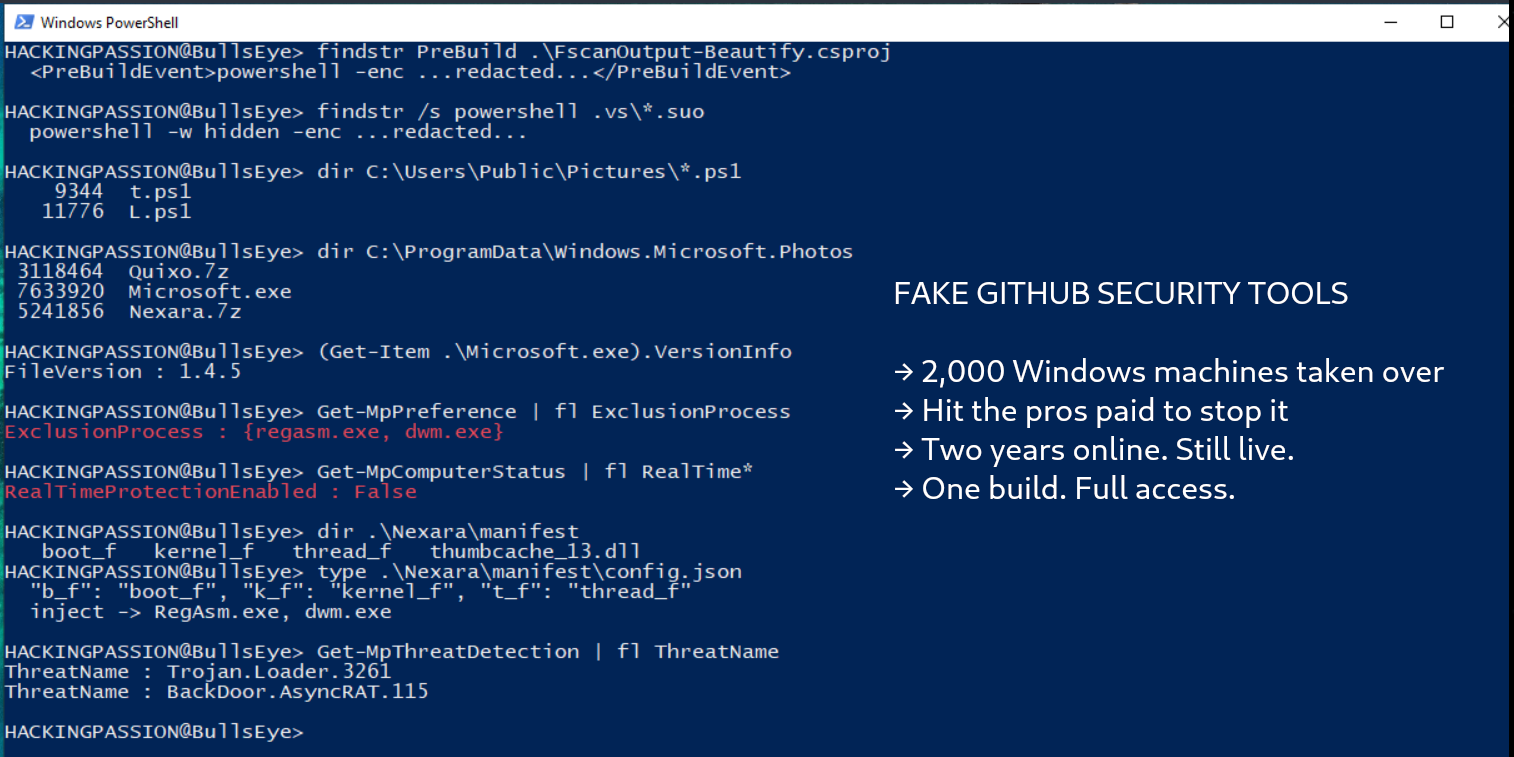
In a Visual Studio C# project, the trap sits in the .csproj file as a pre-build event. A pre-build event is a command the project runs before the compiler even starts, meant for ordinary things like copying a file or stamping a version number. Here it runs a PowerShell command instead, the second the developer hits build.
In the same project there is a second file, the .suo, that holds another PowerShell command. The .suo lives in a hidden .vs folder that a developer rarely opens and that a file manager hides by default. In October 2023, Zhiniang Peng of Sangfor showed that a crafted .suo file can run code when a Visual Studio solution is simply opened, before anything is compiled at all. Microsoft did not treat that as a vulnerability. It said opening a project from an untrusted source is an insecure operation, and that users should turn on the trust settings to protect themselves.
The third path is for the Python and Go versions of these fake tools. There the malicious code is pushed far off the right edge of the file, behind a long run of whitespace, so a developer scrolling through the source sees a blank line and reads straight past it.
Once any of those three fires, a PowerShell script lands on disk and reaches out. It pulls an encrypted link from the attackers’ own servers and, alongside them, from ordinary places: YouTube, Telegram, Google Docs, GitCode and Pastebin. Traffic to those everyday sites looks like nothing on a corporate network. The decrypted link downloads an archive called Quixo.7z, which unpacks into a folder dressed up to look like a Windows photo component.
Inside that archive sits Microsoft.exe, and this is the program that does the damage. Doctor Web found it at version 1.4.5. It is built with Electron, the same toolkit behind many everyday desktop apps, so on the machine it looks like one more normal program. Then it goes after the defenses, one by one. It turns off Windows Defender, User Account Control, the pop-up warnings, System Restore and the Volume Shadow Copy Service that backups lean on.
The loader goes further. It puts RegAsm.exe and dwm.exe on Defender’s exclusion list, so the code it later hides in them is never scanned. It tries to remove three security products, McAfee, ESET and Malwarebytes. And it rewrites the Windows hosts file so the machine can no longer even reach the websites of antivirus makers. When it is done, the machine has no guard left and no way to call out for a new one.
Getting that code to run without setting off an alarm is a job on its own, and the loader has a trick for each guard. It makes its own process look like a child of explorer.exe, the program behind your desktop, so it passes for something Windows started itself. It flips a setting in the registry to slip past Smart App Control, the check that is meant to block untrusted apps.
Security tools work by hooking into Windows and watching what runs through. So the loader quietly pulls those hooks back out. It reads a clean copy of ntdll.dll, a core Windows file, straight from disk and uses it to undo them. It calls Windows directly, underneath the layer where the watching happens, a move known as Halo’s Gate. And it switches off two parts of Windows, called ETW and AMSI, that would otherwise let a scanner watch what is running. The payloads end up tucked inside trusted programs like RegAsm.exe and dwm.exe.
What it drops is built to pay off in more than one way. The loader installs two separate copies of the AsyncRAT backdoor. They are identical except for the network port each one uses, and the researchers say this could let two operators hold the same machine at once, each through its own port. One infected computer, two operators, neither of them the person who bought it.
Alongside the backdoors comes a clipboard stealer. It watches for a cryptocurrency wallet address being copied and swaps in the attackers’ address, so money meant for one wallet lands in another. On each swap it grabs a screenshot and sends it to a Telegram bot, together with the title of the active window, the username and the machine’s IP address.
The last piece is an information stealer, and what it goes after is exactly what sits on a security professional’s laptop. It checks first whether it is running in a sandbox or a virtual machine. If the coast is clear, it collects browser data, the saved sites and passwords in FileZilla, the MobaXterm.ini file full of saved SSH sessions, Total Commander’s FTP logins, VPN settings, messenger files, gaming accounts and Discord tokens. All of it gets packed up and sent out through the Telegram bot. These are the keys to other people’s networks, held by the people paid to defend them.
The campaign began somewhere else entirely. In the early days the fake repositories were bots and cheats for crypto games, including one built around the Telegram game Catizen, going after people chasing a quick token. For readers without the right setup, some of those repositories even walked them through installing Visual Studio and cloning the project, step by step.
At some point the operators turned toward a richer target and started dressing the same malware up as scanning tools, security testing tools and log analysis scripts. The researchers also found a component that is not finished yet, built to install the loader as a Windows service and re-download it if it is ever removed. Whoever runs this is still building.
These repositories are still out there. Checking the ones in Doctor Web’s published indicators this morning, two days after the report, several were still live. One is advertised as a lightweight script to parse and clean up the output of Fscan, a network scanner with nearly 15,000 stars that security testers rely on. Another lifts its description straight from a genuine open-source tool, so it reads as legitimate at a glance. Two of the nine example repositories now return a 404. The rest were still there.
Researchers have run into this same toolkit before. In June 2025, Trend Micro wrote about a campaign it called Water Curse, with at least 76 GitHub accounts pushing fake penetration-testing tools. It used the very same parts: a pre-build event in a .csproj, an Electron app, a scheduled task that relaunches a Microsoft.exe on a timer, code slipped into RegAsm.exe, and Telegram used the same way to carry the stolen data out.
The overlap runs down to the internal file names. Trend Micro found the same hidden modules in 2025, boot_f, kernel_f and thread_f, and could only guess what some of them did. Doctor Web has now taken the same pieces apart. The file names and the methods line up that closely, but that does not prove the same people are behind both.
In security, working out who did it is one of the hardest problems there is. Tools get shared, sold and copied, and the same tricks can belong to one group or to several using the same playbook. What we can be sure of is how the malware works, not whose hands are on the keyboard.
Hiding code behind a long stretch of whitespace is older still. In February 2025, Kaspersky wrote up GitVenom, hundreds of fake GitHub projects where the Python payload sat behind about 2,000 tab characters. One of the attackers’ wallets took in roughly 5 BTC, about 485,000 dollars at the time.
Handing a security researcher a Visual Studio project with a trap inside is an old idea. In January 2021, Google’s Threat Analysis Group described a campaign it put down to a government-backed group in North Korea. The attackers made contact, offered to work together on research, and sent over a project with a malicious DLL wired to run through the build events. That is Google’s read on that 2021 case, and nothing here ties it to the GitHub campaign running now.
After that, Microsoft added a trust setting you can switch on, one that makes you approve a project from an untrusted source before it opens. It stays off unless you turn it on yourself. A warning that appears on its own came later, in Visual Studio 2022 version 17.12 from November 2024, and only when the file carries a Mark of the Web, the little tag Windows puts on anything you download. Code pulled straight down with git clone often has no such tag, so no warning shows up.
So the defense comes down to a habit. Before opening a cloned project, look inside the project file itself. In a Visual Studio project, open the .csproj in a plain text editor and check for a pre-build event you did not expect:
| |
A line like that, calling PowerShell or a script before the code even compiles, has no legitimate reason to sit in a tool you cloned minutes ago. Older projects tuck the same command inside a plain <PreBuildEvent> tag, so look for either. Delete the hidden .vs folder before you open the solution, so a planted .suo cannot run. Scroll Python and Go files all the way to the right, past where the text seems to end. And do all of it on a throwaway virtual machine with a clean snapshot, never on the laptop that holds your working keys. Doctor Web published the full list of indicators, the four attacker domains, the IP addresses and the file hashes, in its malware-iocs repository, and its products detect and remove this family.
Want to read the traffic a machine quietly sends out, and catch the kind of suspicious activity this malware leaves behind? My Ethical Hacking Complete Course Zero to Expert takes you there step by step: reconnaissance, scanning, exploitation and traffic analysis, hands-on, from your first day with no Linux or hacking background.
→ Join my complete ethical hacking course
Hacking is not a hobby but a way of life.
Sources:
Stay updated
Get the latest posts in your inbox every week. Ethical hacking, security news, tutorials, and everything that catches my attention. If that sounds useful, drop your email below.