 HackingPassion.com
File Notification Attacks Leak Keystrokes, Websites and WhatsApp Photos on Windows, Linux, Android and macOS
Ethical Hacking Complete Course Zero to Expert
Hack like black hat hackers. Penetration testing, Kali Linux, WiFi and web hacking, and the hacker mindset behind it.
→ Take the full course95.7 percent of the sites you opened in Firefox showed up for another account on your Windows PC, and 32 percent of the ones in Edge. An Android app with zero permissions saw your WhatsApp photos arrive. Windows has done this since 2000.
Microsoft’s answer: by design.
Researchers at Graz University of Technology in Austria took this apart on four operating systems: Windows, Linux, Android and macOS. Windows, Linux and macOS each built their own version, Android builds on the one from Linux, and each of them leaks. Their paper will be presented at ACM CCS, one of the big security conferences, in The Hague in November, and the code to reproduce it is already public.
The feature behind it is a normal part of each of these systems. When a file changes, the operating system can tell a program about it straight away, so that program does not have to keep checking. A text editor uses it to notice that a file was changed by something else. A file manager uses it to refresh the folder you are looking at. Backup and sync software uses it to know what to upload, and virus scanners use it to know what to scan. On Windows the function is called ReadDirectoryChangesW, on Linux it is inotify, on Android FileObserver, and on macOS FSEvents.
To watch a folder, a program needs permission to read that folder. That is the check. On Windows and Linux the researchers found that the check stops at the folder. Once you are allowed to watch a folder, you get told about the files inside it, including files you are not allowed to open.
The watcher gets the name of each file, its path and the exact moment something happened to it, without the contents. That turned out to be enough.
On Windows, the researchers made an ordinary account without admin rights on a Windows 11 24H2 machine and pointed the watcher at C:\, the root of the drive. From that moment the account received the full path of each file that was created, changed or renamed anywhere on the system. That includes the files inside another user’s home folder, which that account cannot open.
Browsers keep data for the websites you visit in your own AppData folder, and Firefox names those folders after the website. Visit target.com and a folder like this gets touched:
| |
The watching account reads the website name straight out of the path, while you are still on the page. Across the top 1,000 websites, Firefox created such a folder for 95.7 percent of them. The researchers caught the visits with an F1 score of 97.8 percent, a measure that counts both the visits they missed and the ones they got wrong. Edge only makes these folders for sites that use one specific kind of browser storage, called IndexedDB. It made one for 32 percent of the sites, which gave an F1 score of 48.5 percent. On both browsers there was not one false positive: a site that showed up in the list had been visited.
Windows itself leaks too. Each time a program starts, Windows updates a file in the Prefetch folder that carries the program’s name, so a launch of SSH or Edge shows up by name. And when Windows Defender runs its first full scan, it touches the files on the disk one by one. Each file it touches shows up for the watching account with its full path, other people’s documents and videos included.
Zoom gives away your meetings the same way. Sitting in a waiting room keeps updating one of its database files, joining the live meeting creates a separate database for that session, and leaving removes it again. In the researchers’ measurements the watcher never used more than 0.21 percent of the processor, too little to notice.
On Android, the researchers used a Google Pixel 9a and a Samsung Galaxy A54, both on Android 16, and an app that asked for no permissions at all. Android is supposed to keep apps apart. An app that looks at shared storage, the part of the phone where folders like Downloads live, only sees the files it made itself, and the private folder of each app is closed to the others.
FileObserver goes around that. Put a watch on shared storage and the app gets told about files it is not allowed to list, with their exact names and paths. That includes WhatsApp’s private media folder. WhatsApp downloads received photos, videos and documents there automatically, so the watching app learns the moment each one arrives. Sent media goes into a separate Sent folder, so the app also sees which way a file went. The file names give away more: a screenshot usually carries the name of the app it was taken in and the time it was taken. When those files are deleted, the app sees that too, and the researchers point out that this can reveal an attempt to hide a conversation.
The same trick shows when you download a file, take a photo or make a screenshot. Android has no fix for it.
Linux leaks the most. Of the three desktop systems, it is the only one that reliably sends a notification when a file is simply read.
The bypass for unreadable files works here too. A normal user cannot read /var/log/syslog, but the folder /var/log is readable, so a watch on that folder reports each change to the log. Point that at /dev/input, the folder where your keyboard exists as a file, and each key press produces two notifications: one when the key goes down, one when it comes back up.
The watcher only learns the moment of each key press. The time between two key presses depends on how your fingers travel across the keyboard, and that depends on what you are typing. In 2001, researchers at Berkeley used these timings to guess SSH passwords 50 times faster, and KeyTAR, published at IEEE S&P this year, rebuilds typed text from them. Six people typed a text they had never seen before, and the researchers caught their key presses with F1 scores between 93.1 and 100 percent. Two thirds of the notifications arrived within one millisecond of the key press, and often the notification arrived before the program that was recording the keyboard had even logged it.
When you type into an SSH session on a server, your terminal on that server is a file too, under /dev/pts. Another user on that server watched 402 key presses come in at 7.21 per second and caught all 402, without a single false one. A password typed at a sudo prompt stays out of it, because that prompt shows no text, and without text on the screen there is no notification. Linux Mint, though, shows an asterisk for each character by default, and each asterisk is text on the screen.
On KDE Plasma 6 with Wayland, the display system designed to stop programs from reading each other’s input, the researchers built a fake password window. Their program watched the helper file that starts when the system asks for your password. As soon as that file was read, the program drew its own password window on top of the genuine one. 374 milliseconds after the password request started, the fake window was on the screen. When the researchers reported it, the developers answered that their protection against windows jumping in front was never meant as a security measure.
Websites leak on Linux as well, through fonts. Firefox opens different font files for different sites, and target.com alone touched 657 of them on an average visit. Tested against the top 100 websites, with 750 other sites mixed in to make it harder, the researchers named the site with an F1 score of 87.9 percent. It also worked on the snap versions of Firefox and Chrome.
macOS gives away the least. A watcher there only sees world-readable files, the ones other accounts are allowed to open, and the researchers found no way into private folders, but Bluetooth devices being added, audio settings being changed, a network cable being plugged in and apps being installed or removed all still showed up.
For any of this, the watcher has to run on your machine already: a second account on a shared PC, a background service that got compromised, a poisoned package, or on a phone, an app you installed. On Android that last one is the easy part, because each app runs as its own user and this trick needs no permissions.
Microsoft’s reply to the researchers was that the behavior only shows file names and paths inside another user’s profile folder and does not expose file contents. To SecurityWeek it said an attacker would already need to run code under a separate account, and that this is not a security vulnerability.
File names and paths inside another user’s profile folder are exactly what gave away the websites. And the company has seen this problem before.
In February 2007 it was published as CVE-2007-0843. The description says the Windows function does not check permissions on the files inside a folder, so a local user can watch files they are not allowed to see and learn their names and access times. Windows 2000, XP, Server 2003 and Vista. That is the same behavior, written down more than 19 years ago.
The man who reported it back then was Vladimir Dubrovin, known as 3APA3A. He called it an insecure design, released a small tool called SpyDir with it, and wrote that it worked from the local network, through a shared folder, with a company file share as his example.
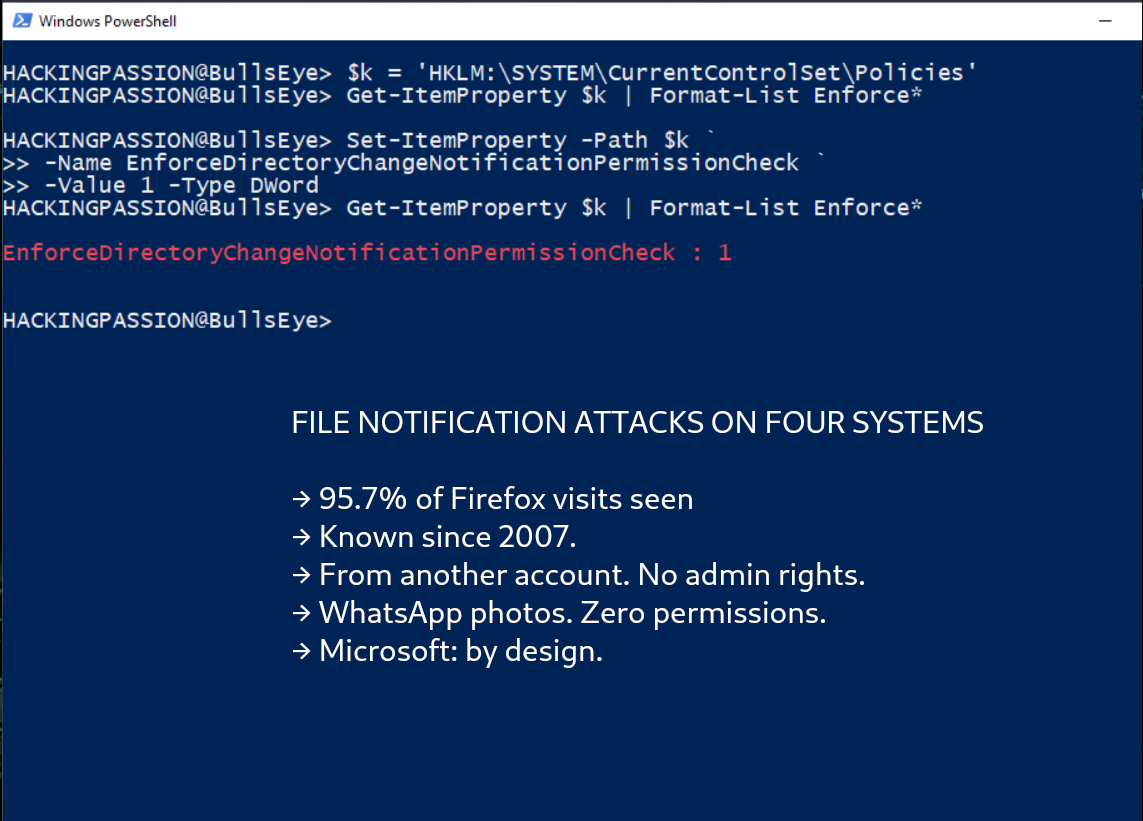
In April 2025 it came back, reported by a researcher named Sébastien Huneault. This time it got two CVE numbers, CVE-2025-21197 for NTFS and CVE-2025-27738 for ReFS, two Windows file systems, both rated 6.5, and a fix: a registry value called EnforceDirectoryChangeNotificationPermissionCheck. That fix ships switched off. The support page says it is disabled by default to prevent unexpected security risks or application disruption. In its answer about the new research, the company pointed to this same setting. Its own score for both 2025 CVEs lists it as an attack that works over the network, the same way the 2007 report described it.
A few months later the researchers sent in their report and got the by-design answer. They only learned about the April CVEs afterwards, and they write that as long as the setting stays off, which is the default, their Windows attacks work out of the box.
In August, at DEF CON, the Pwnie Awards nominated the company’s response to this research for Lamest Vendor Response. The other two entries in that category were also about Microsoft. The award went to its implied legal threats against Nightmare Eclipse, the researcher I wrote about earlier this month.
The paper is by Sudheendra Raghav Neela and six colleagues. One of them is Daniel Gruss, who was on the team that found Meltdown.
Linux is the only one that changed something. After the report, the kernel developers stopped sending read and write notifications for device files such as /dev/input. That fix is CVE-2025-68788, in kernels 5.10.248, 5.15.198, 6.1.160, 6.6.120, 6.12.64, 6.18.3 and 6.19. It closes the keystroke attack through /dev/input. The researchers point out that it covers device files only, and the rest of the file system leaks the same way it did before.
What you can do:
On Windows, switch on the fix that already shipped in April 2025. From a command prompt opened as administrator:
| |
- → It was left off to avoid application problems, so keep an eye on your software afterwards
- → On a shared PC, a separate account does not hide your Firefox browsing from the other accounts while this setting is off
On Linux:
- → Update your kernel. Distributions use their own version numbers (Ubuntu 24.04 got the fix in
6.8.0-110, 22.04 in5.15.0-173), so the test below tells you more thanuname -r - → Test it yourself with
inotifywait -m -e access,modify /dev/inputfrom theinotify-toolspackage, then type. No output means the fix is in - → On KDE Plasma, right-click the title bar of the password window, choose More Actions, Configure Special Application Settings, add Keep above other windows and set it to Force
On Android there is no fix, so the app itself is the only thing you control:
- → Remove apps you no longer use
- → An app that asks for nothing can still watch your storage, so a missing permission prompt does not make an app harmless
Install inotify-tools on your own Linux machine, watch /dev/input and type a few letters: do your keystrokes show up? My Ethical Hacking Complete Course Zero to Expert takes you there step by step: reconnaissance, scanning, exploitation and traffic analysis, hands-on, from your first day with no Linux or hacking background.
→ Join my complete ethical hacking course
Hacking is not a hobby but a way of life.
Sources:
File Notification Attacks, TU Graz | Microsoft: Access check enhancements for file paths | 3APA3A on Full Disclosure, 2007
Stay updated
Get the latest posts in your inbox every week. Ethical hacking, security news, tutorials, and everything that catches my attention. If that sounds useful, drop your email below.