 HackingPassion.com
GhostLock Delivers Ransomware Impact on Windows Without Touching a Single File
Ethical Hacking Complete Course Zero to Expert
Hack like black hat hackers. Penetration testing, Kali Linux, WiFi and web hacking, and the hacker mindset behind it.
→ Take the full courseGhostLock locks every shared file on any Windows network in minutes using nothing but a standard login, and every security tool watching stays completely silent. This has been possible for over 30 years. Microsoft is not going to patch this.
Security researcher Kim Dvash published the proof of concept in May 2026, after discovering the technique during a prior authorized red team engagement.
SMB is the protocol Windows uses to share files across a network. When a program opens a file over SMB, it tells Windows how it wants to share that file with other programs at the same time. Set that sharing mode to zero using a parameter called dwShareMode in the CreateFileW API call, and Windows grants an exclusive deny-share handle. While that handle is held open, every other process, user, or system trying to open the same file gets back one thing:
STATUS_SHARING_VIOLATION (0xC0000043)
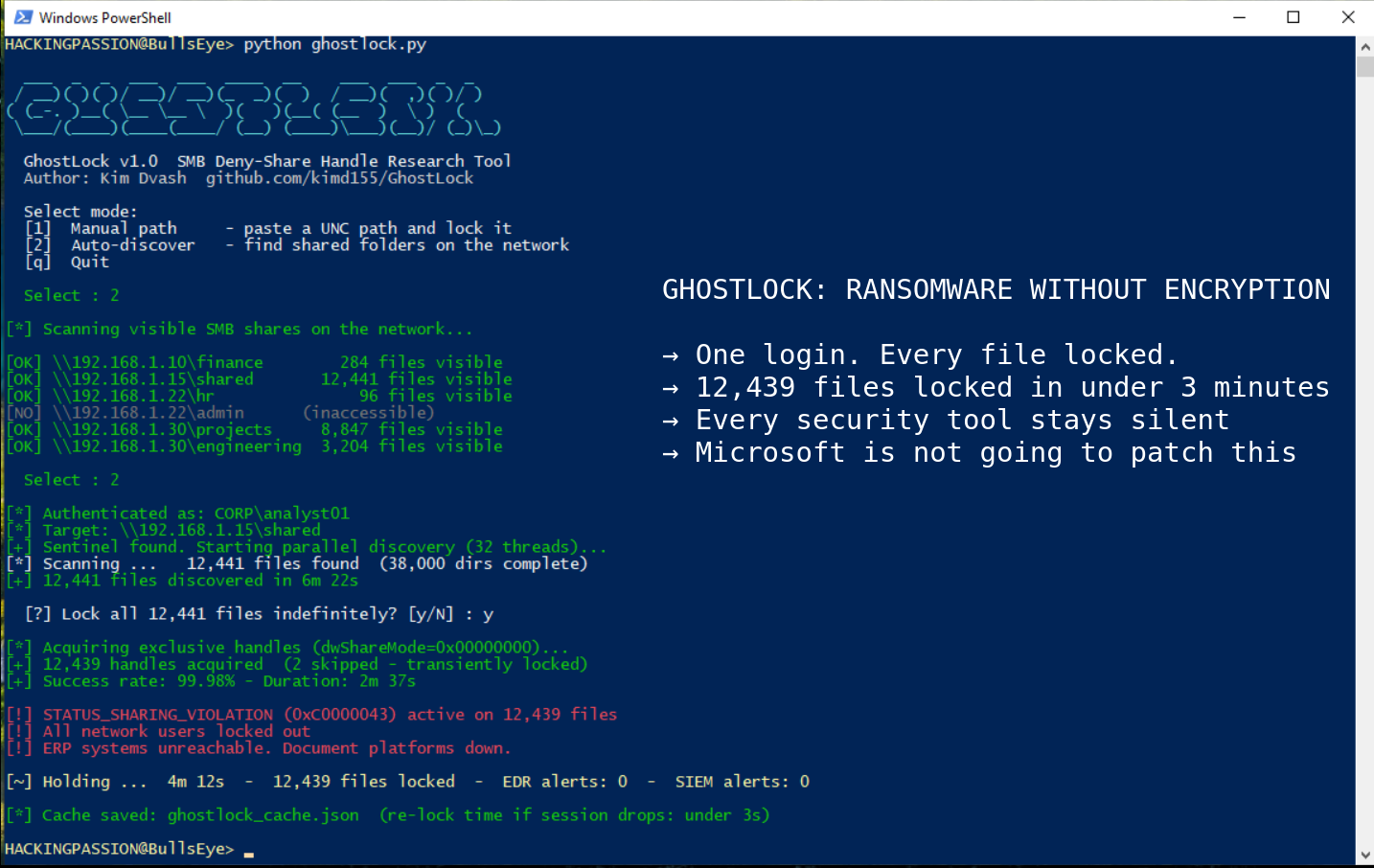
GhostLock calls CreateFileW with dwShareMode set to 0x00000000 on every file it finds across an entire SMB share, using 32 parallel threads, and keeps them all locked for as long as it wants.
Against a share containing 500,000 files, the tool mapped the full directory tree in 6 minutes and 22 seconds, then locked 498,203 files in 2 minutes and 37 seconds at a 99.6 percent success rate. At that point, every application on the network trying to open a locked file hits the sharing violation. ERP systems fail, document platforms stop responding, and shared workflows stall. From the outside it looks exactly like a ransomware attack.
The security stack sees nothing.
Ransomware detection was built on the assumption that causing damage requires writing to disk. Canary files fire an alarm the instant something writes to them, renames them, or deletes them. GhostLock opens canary files with read-only exclusive access. The file becomes inaccessible to the rest of the network, but no write event fires and the alarm stays silent.
This is the exact blind spot shared by the three most referenced academic ransomware detectors. CryptoDrop (IEEE ICDCS 2016) monitors file type changes and the randomness of written data. UNVEIL (USENIX Security 2016) analyzes write activity in sandboxed environments. ShieldFS (ACSAC 2016) is a filesystem layer that monitors write behavior and attempts to recover from shadow copies. All three were built on the same assumption: ransomware must write to disk. GhostLock never does.
EDR tools watch what processes do on individual endpoints. Their behavioral models are trained on ransomware patterns: bulk renames, data written in a scrambled unreadable pattern that looks like encrypted content, new file extensions spreading at scale, sequential read-then-write sequences. GhostLock’s profile is opening files one after another without writing anything. Every model reviewed in the research saw it as a normal file scan. All commercial behavioral AI products tested produced zero alerts.
NDR tools watch the traffic moving between machines on the network. Deep packet inspection on that traffic sees standard SMB2 CREATE requests that follow the rules exactly, with no WRITE, SET_INFO, or RENAME operations anywhere in the traffic. The traffic is indistinguishable from a user opening hundreds of Word documents in rapid succession, which on any active network is background noise.
DLP tools, which monitor and alert on bulk data transfers leaving the network, stay silent for a different reason. GhostLock opens files and reads essentially nothing from them, keeping traffic well below any threshold. The pattern looks like metadata inspection, not data theft, so nothing triggers.
The only reliable signal is inside the NAS session management table. A NAS is the file server where shared drives actually live, and its session table tracks how many files each connected user has locked at that moment. A legitimate application opens a file, finishes its work, and closes the handle. GhostLock holds half a million handles simultaneously and never lets go. No normal application ever does this. But this metric is almost never forwarded to a SIEM, the platform where all security alerts get centralized for the security team. It sits in the storage management interface, invisible to the security team.
This behavior has existed in Windows since NT 3.1 in 1993. Microsoft Office, SQL Server, version control tools, and build systems all rely on it. Restricting it would break the file integrity model across the entire Windows ecosystem. There is no CVE filed for GhostLock. Microsoft is not going to patch this.
This affects any Windows network with shared file storage and domain accounts. That is not just large enterprises. Schools, hospitals, government offices, small businesses, non-profits, anywhere people share files over a Windows network is in the same position. The attack requires nothing more than a standard login and network access to a shared drive.
To run this, an attacker needs a standard domain account with read access to a file share. After a successful phishing campaign, that is exactly what most attackers already have. Getting in is enough.
A conventional ransomware group needs C2 infrastructure to deliver decryption keys and handle payment. GhostLock gives an attacker identical leverage with none of that. The attacker holds a list of file handles. Everyone on the network is locked out, and the only way back in is if the attacker closes the connection. That is exactly the same pressure as ransomware encryption. The attacker just holds a connection open. That is all it takes.
When a security team identifies a compromised account, the standard first move is disabling it in Active Directory. That stops new logins, but an existing SMB2 session stays alive until it times out, which depending on platform configuration can take 15 to 60 minutes. Disabling the account does not release the locks.
Recovery requires a storage administrator to locate the offending session in the NAS session table and terminate it manually. Most organizations keep the storage team and the security team on separate runbooks with no shared plan for this. If there is no runbook ready, four to eight hours before operations are back to normal is a realistic estimate.
The forensic investigation makes it worse. Incident responders will look for what ransomware always leaves behind: encrypted files, renamed files, modified timestamps, new extensions spreading across directories. None of that exists here because nothing was written to disk. The only place the attack shows up at all is in application-level logs, where affected software reports STATUS_SHARING_VIOLATION errors, and only if those logs are being collected in the first place. Teams can spend hours chasing ransomware activity that simply never happened.
GhostLock also serializes the full discovered file list to a local JSON cache after the first scan. If the session gets terminated before the account is disabled, the attacker reconnects and re-locks the entire share in seconds using that cached list, with no rediscovery scan needed. Terminating the session alone is not enough. The Active Directory account needs to be disabled at the same time to prevent an immediate reconnect.
Organizations running DFS Namespaces, a Windows feature that ties multiple file servers together under one shared path, face an even bigger problem. One attacker session can spread across every connected file server from a single entry point.
What to build right now:
The primary detection control is getting the data about how many files each connected user has locked at that moment out of the NAS and into a SIEM. Every major enterprise NAS exposes this through management APIs already used for capacity planning. A starting alert threshold of 500 simultaneously locked files per session is reasonable, with graduated severity at 1,000 for high and 5,000 for critical. A starting Splunk query to adapt:
| |
The secondary signal: build a rule in NDR tools that alerts when a single source IP generates above a threshold number of SMB CREATE requests with zero corresponding WRITE operations over a rolling 30-minute window. A backup agent shows this pattern briefly at the start of a job. GhostLock sustains it indefinitely. How long it keeps going is what gives it away.
Build the incident response runbook before the incident. Steps to cover: locate the session in the NAS session table, correlate to an account via Active Directory logs, terminate the session on the NAS platform, disable the account in parallel, and verify that file lock counts are back to normal. Both the security team and storage team need pre-granted access to the NAS management interface and need to have walked through this together at least once before it matters.
MITRE ATT&CK mapping:
- → T1486 (Data Encrypted for Impact): GhostLock produces equivalent availability impact without encryption
- → T1499 (Endpoint Denial of Service): sustained exclusive handle holds create a protocol-level denial condition
- → T1078 (Valid Accounts): the technique uses legitimate low-privilege domain credentials, not an exploit chain
How attackers get in through phishing, move through a network using valid credentials, abuse legitimate Windows behavior to stay under the radar, and escalate impact without triggering a single alarm is exactly what my ethical hacking course covers step by step:
Hacking is not a hobby but a way of life. 🎯
Sources: GhostLock GitHub · GhostLock Whitepaper Zenodo · CreateFileW Microsoft Docs
Stay updated
Get the latest posts in your inbox every week. Ethical hacking, security news, tutorials, and everything that catches my attention. If that sounds useful, drop your email below.