GhostPoster Malware: How Browser Extensions Hide JavaScript in PNG Icons
Want to learn ethical hacking? I built a complete course. Have a look!
Learn penetration testing, web exploitation, network security, and the hacker mindset:
→ Master ethical hacking hands-on
(The link supports me directly as your instructor!)
Hacking is not a hobby but a way of life!
Your browser extension logo just became malware. Not the code. The actual image file. A PNG icon sitting in your toolbar, looking normal, hiding JavaScript that takes over your browser. Over 1 million victims through GhostPoster. Part of a larger operation hitting 8.8 million. Seven years undetected. 🧐
Last week, researchers revealed the full scope of a campaign they call GhostPoster. Koi Security published the first findings in December 2025. LayerX followed up with additional discoveries on January 15, 2026. And it is worse than anyone thought.
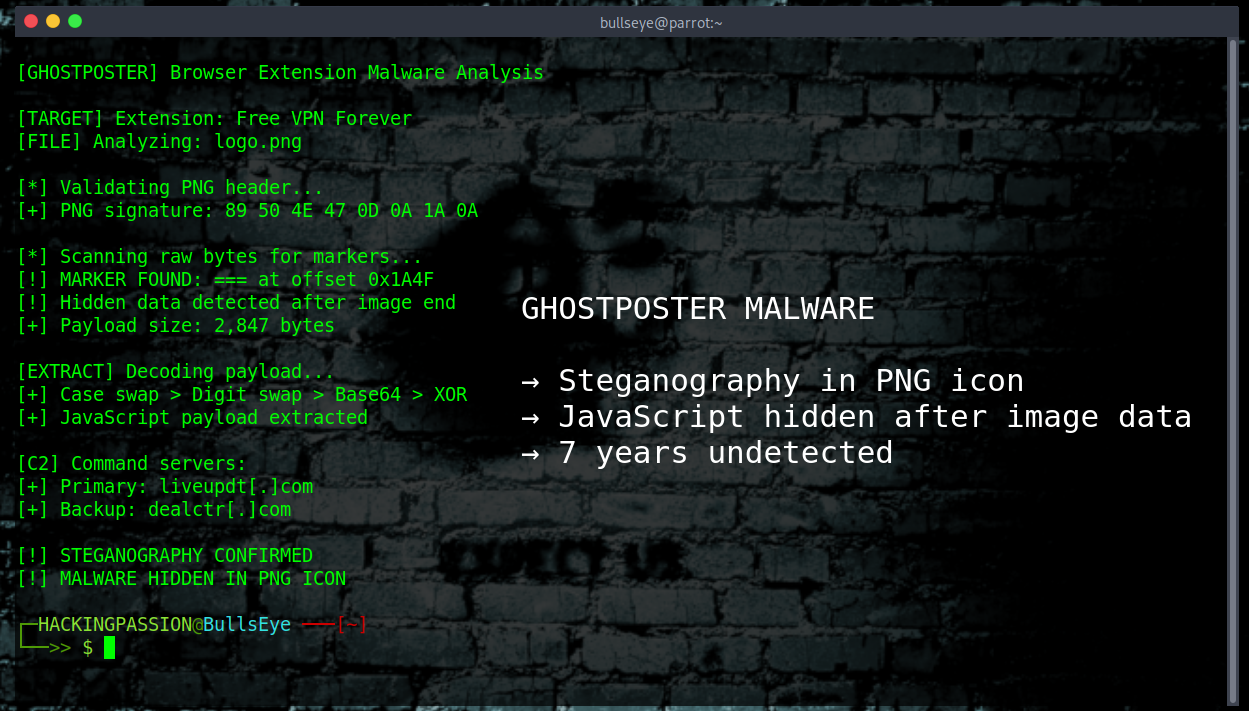
The trick is simple but brilliant. Every browser extension has a logo. A tiny image people glance at and never think about. The attackers hid malicious code inside the PNG file, right after where the image data ends. The browser shows the icon normally. Security scanners see a valid image. But the extension reads its own logo, searches through the raw bytes for a marker, and runs whatever comes after.
The marker is three equals signs: ===
Some variants use four greater-than signs: >>>>
Everything after that marker is not image data. It is JavaScript waiting to run.
This is steganography. Hiding data inside something that looks innocent. Code reviewers checking the extension’s JavaScript files find nothing. Automated scanners see nothing wrong. The malware lives inside an image that looks perfectly normal in the toolbar.
But they did not stop there.
The code in the logo is not the actual malware. It is just a loader. A small program that grabs the real payload from command servers. Primary server: liveupdt[.]com. Backup: dealctr[.]com.
The loader does not call home right away. It waits 48 hours. Even then, it only grabs the payload 10 percent of the time. Researchers watching network traffic might see nothing suspicious for days. The malware is patient. Inconsistent behavior is harder to catch.
When the payload finally arrives, it goes through custom encoding. Letters swap between uppercase and lowercase. Numbers 8 and 9 get exchanged. Then Base64 decoding. Then XOR encryption using a key from the extension’s runtime ID. The result gets stored in browser storage. Persistence achieved.
What does the malware actually do?
It strips security headers from every website visited. Content-Security-Policy, gone. X-Frame-Options, gone. These headers protect against clickjacking and XSS attacks. The extension removes them silently on every page.
It injects Google Analytics tracking everywhere. Tracking ID: UA-60144933-8. It logs the extension installation date, how many days the victim has been infected, which shopping sites are visited, and a unique browser ID. Hidden div elements show up in pages with IDs like extwaigglbit and extwaiokist. Tracking data that scripts can read.
It hijacks affiliate links on Taobao[.]com and JD[.]com. Someone clicks a product link. The extension swaps it. The original affiliate gets nothing. The attackers get paid. The victim still ends up on the same product page. Still buys. The only difference is who earns the commission.
It injects invisible iframes that load attacker-controlled URLs for ad fraud, click fraud, and extra tracking. The iframes appear, do their job, and vanish after 15 seconds.
It bypasses CAPTCHA. One method fakes user interaction. Another loads an external solver. The malware needs to look human to keep running.
The campaign started on Microsoft Edge back in 2020. Then it spread to Firefox and Chrome. The extensions look useful.
- → Free VPN Forever with 16,000 installs
- → Google Translate in Right Click with 522,398 installs
- → Translate Selected Text with Google with 159,645 installs
- → Ads Block Ultimate with 48,078 installs
- → Floating Player PiP Mode with 40,824 installs
On Opera, a fake Google Translate extension by developer “charliesmithbons” reached nearly one million installs. Same infrastructure. Same malicious behavior. Still communicating with mitarchive[.]info and gmzdaily[.]com.
Free VPNs, translation tools, ad blockers, weather apps, and screenshot utilities. The categories people trust most.
But GhostPoster is not alone.
Researchers traced the infrastructure and found connections to two other campaigns. Same group. They call the threat actor DarkSpectre.
ShadyPanda hit 5.6 million users through Chrome and Edge. These extensions ran clean for three to five years. They earned Featured and Verified badges. Built trust. Then one update weaponized everything. One extension called WeTab, 3 million installs, tracks every URL visited, every search query at keystroke level, every mouse click with pixel coordinates, browser fingerprints, and page interactions. It sends everything to 17 domains including Baidu servers in China.
The Zoom Stealer hit 2.2 million users through extensions that access 28 video platforms including Zoom, Microsoft Teams, Google Meet, Cisco WebEx, and GoToWebinar. These extensions scraped meeting URLs with passwords, participant lists, speaker names, titles, bios, photos, and company info. They stream meeting data in real time over WebSocket connections. Not consumer fraud. Corporate espionage.
Combined: 8.8 million victims over seven years.
There are still 85 or more sleeper extensions sitting in browser stores right now. They look legitimate because they are legitimate. For now. They are building trust, collecting users, earning badges. Waiting.
Researchers found signs pointing to China. Command servers on Alibaba Cloud. ICP registrations in Hubei Province. Chinese comments in the code. Development activity matching Chinese timezone patterns. Affiliate fraud targeting Chinese e-commerce platforms.
But here is the thing about attribution. In cybersecurity, attribution is one of the hardest problems. IP addresses can be spoofed. Tools can be shared. Languages in code can be faked. What we know for sure is how the malware works. Not necessarily who is behind it. This is my opinion.
Mozilla and Microsoft removed the extensions after disclosure. Google confirmed removal too. But store takedowns only stop new downloads. Extensions already installed keep running. The malware is still active on devices right now.
How to protect yourself.
- → Check your installed extensions in Chrome, Edge, and Firefox
- → Remove any VPN, translator, or ad blocker you do not recognize
- → Check chrome://extensions or about:addons for anything suspicious
- → Watch for high CPU usage or strange network traffic from your browser
Fewer extensions, smaller attack surface. That simple.
The extensions that promised privacy delivered surveillance. The icons that looked trustworthy hid code. And the gap between what security tools see and what actually runs is exactly where GhostPoster lives.
Hacking is not a hobby but a way of life. 🎯
→ Stay updated!
Get the latest posts in your inbox every week. Ethical hacking, security news, tutorials, and everything that catches my attention. If that sounds useful, drop your email below.