 HackingPassion.com
GhostTree Makes Windows Defender Stop Scanning With Two Lines of Code
Ethical Hacking Complete Course Zero to Expert
Hack like black hat hackers. Penetration testing, Kali Linux, WiFi and web hacking, and the hacker mindset behind it.
→ Take the full courseGhostTree makes Windows Defender stop scanning. Two lines of code, no admin rights, and malware sitting right next to it goes completely undetected. A Varonis researcher published it today, confirmed it works, and Microsoft’s first response was that this does not count as a security issue. Then they patched it anyway.
Windows lets you create a folder that points to another folder. The operating system follows that pointer as if the destination is real. Most applications and scanners follow junctions transparently unless they explicitly check for reparse points, which most do not. The feature has been built in for decades and has a perfectly legitimate purpose: backward compatibility, keeping old software happy when file locations change. The Windows name for it is an NTFS junction. The part that matters for this attack: any standard user account can create one. No admin rights needed. Write access to a folder is enough, and most users already have that in their own profile and in shared directories.
The problem starts when a junction points back to its own parent directory. That creates a loop. A folder that contains itself, over and over, with no bottom. Scanners that do not explicitly check for reparse points or implement recursion limits have no way to know they are stuck in a loop. It follows the junction, lands back at the parent, sees the junction again, follows it again. The scanner keeps generating new valid paths and never finishes. The files it was supposed to find never get looked at.
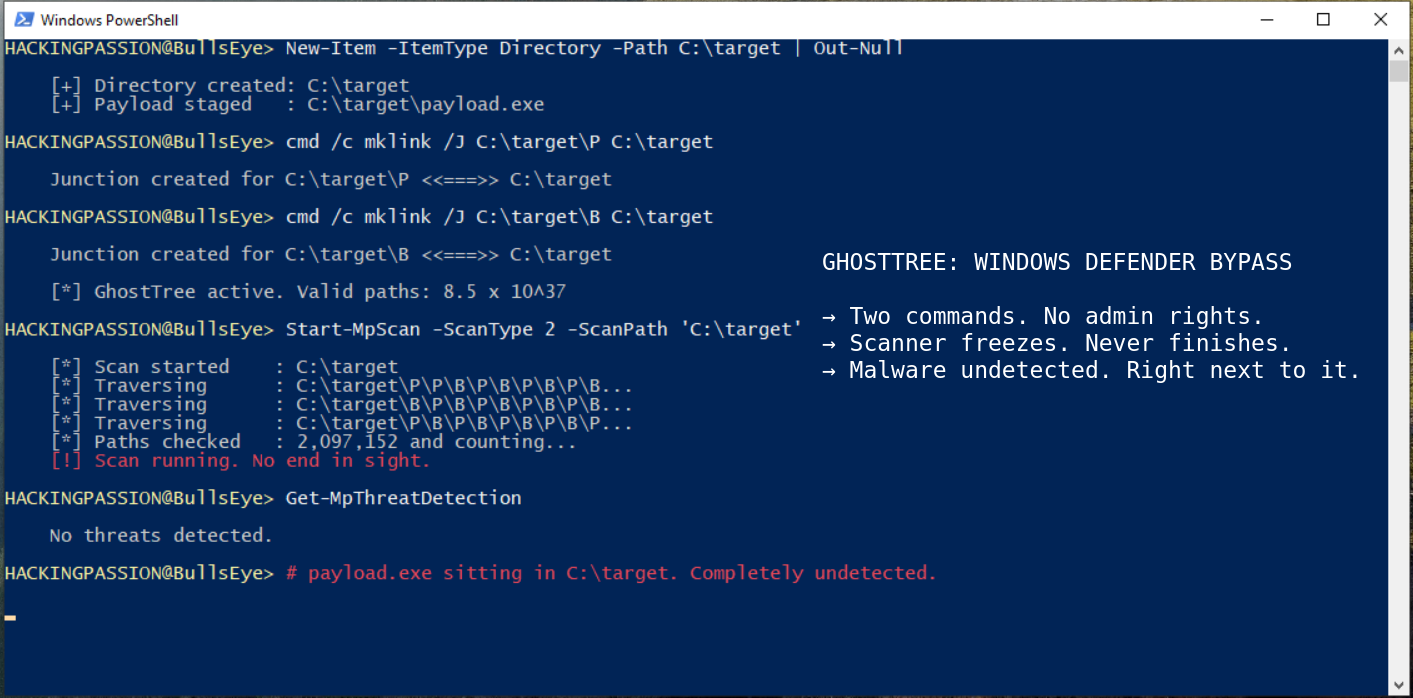
The simpler version of this trick works with a single command. Point a child folder back to its parent and the loop is set. This is called GhostBranch. One command:
| |
That one line is enough to make a folder unscannable. GhostTree adds a second junction:
| |
Now the scanner sees two possible directions at every level, and both lead back to the same place. Windows limits path length to 260 characters for most tools, which caps the depth at roughly 126 levels. With two choices at every level, the total number of paths the scanner can follow becomes 2 to the power of 126. That works out to roughly 8.5 × 10^37. The estimated number of atoms in the human body is around 10^27. GhostTree produces more possible scan paths than there are atoms in a human being, from two commands and a standard account.
Security researcher Dolev Taler tested this directly against Windows Defender. The folder scan hangs. Defender keeps running and real-time protection still works for everything else, but that folder never gets finished. Malware sitting in the parent directory goes completely unexamined. Any EDR product that works through folders one by one without loop detection or a depth limit hits the same wall, and many of them do not have either.
The endpoint detection and response market is worth $6.33 billion in 2026 and heading toward $18.68 billion by 2031. Every organization spending that money is betting on one thing: when the scanner starts, it finishes. GhostTree costs two commands, needs no elevated access, and runs on any Windows machine where a standard user has write access to a folder.
The researcher reported the issue to Microsoft. Microsoft said bypassing Defender does not cross a security boundary. This is not a one-time decision. It is their actual written policy. Microsoft splits security features into two categories. A security boundary is something they are required to fix. A defense-in-depth feature is something they try to protect but are not obligated to patch when someone finds a way around it. Windows Defender antivirus falls into that second category. Bypasses do not have to be fixed. They patched it anyway.
This reasoning has been appearing and then being quietly abandoned all year.
In early April 2026, a researcher going by Chaotic Eclipse dropped working exploit code on GitHub after Microsoft’s Security Response Center reportedly ignored their vulnerability report. The code gave any standard user account full SYSTEM-level access on a fully patched Windows machine by turning Defender’s own cleanup process against itself. The exploit was called BlueHammer.
When Defender detects a malicious file, it starts cleaning it up using the highest level of access on a Windows machine: SYSTEM privileges. That cleanup is a file operation, and file operations have a tiny gap between when the path gets checked and when the actual write happens. That gap is called a race condition, and specifically a time-of-check to time-of-use flaw. BlueHammer wins that race by using a feature called an opportunistic lock to freeze Defender’s cleanup halfway through, then slips in an NTFS junction that quietly swaps the target path from a temporary folder to C:\Windows\System32. When the lock releases and Defender continues, it is already pointing at the wrong place. Defender, running as SYSTEM, writes the attacker’s payload into a system directory it was never supposed to touch. The payload replaces a legitimate system file and the attacker has full SYSTEM access from a standard user account on a fully patched machine. Microsoft assigned this CVE-2026-33825, CVSS score 7.8, and patched it in the April 14, 2026 Patch Tuesday update. CISA added it to the Known Exploited Vulnerabilities catalog on April 22 and required federal agencies to patch by May 6.
Two days after that patch shipped, Chaotic Eclipse published two more: RedSun and UnDefend, both released on April 16.
RedSun targets a different part of Defender. When Defender’s cloud protection flags a file, Defender tries to restore it to where it originally came from. That restoration is also a file operation running with SYSTEM privileges. RedSun wins the same kind of race using NTFS junctions and opportunistic locks, steering Defender’s write straight to C:\Windows\System32. Same result as BlueHammer: full SYSTEM access from a standard account. Microsoft has not assigned a CVE and there is no patch. As of May 12, 2026, RedSun works on fully patched Windows 10, Windows 11, and Windows Server 2019 and later, including systems with all April 2026 updates applied.
UnDefend works differently. It does not go for SYSTEM access. Instead, it quietly jams the pipeline that keeps Defender’s threat database up to date. Defender keeps running and your security dashboard still shows everything as green and fully protected. But the signature database has stopped updating. Any malware that comes in after the block takes effect goes completely unrecognized. Defender cannot flag what it has never seen. Microsoft has not assigned a CVE and there is no patch for UnDefend either.
Huntress Labs documented active in-the-wild use of all three tools starting April 10, 2026, after attackers got in through VPN accounts with no MFA.
The chain Huntress observed: escalate first with BlueHammer or RedSun, then deploy UnDefend to blind the endpoint to anything that comes next. The scanner keeps reporting green while the attacker has SYSTEM access and the signature database quietly stops updating. That combination is what makes this more than a collection of individual bugs.
The same argument, that bypassing Defender does not cross a security boundary, keeps coming back. So does the researcher. And when a patch does follow, it arrives quietly.
This problem goes back further than any of these names. In January 2002, security researchers posted on BugTraq, a security mailing list, that antivirus products could not scan files once the folder path got too long. Past a certain number of characters, the scanner would just stop. Norton, Sophos, and others from that time all hit the same wall.
GhostTree solves the same problem differently. Instead of a path too long for the scanner to handle, it creates a path that never ends. Twenty-four years, same flaw in how scanners are built, same outcome.
What to check and what to do
You can see NTFS junctions from the command line. This command lists all reparse points and junctions on a drive:
| |
A folder tagged JUNCTION somewhere it has no business being is worth a closer look. A junction pointing back to its own parent has no legitimate reason to exist under normal conditions.
Your logging tools still catch junction creation even when the scanner cannot see past it:
- → Watch for reparse point or junction creation in user-writable directories, especially
%TEMP%,%USERPROFILE%\Downloads, and%APPDATA% - → Sysmon Event ID 1 on process creation logs for
mklink.exeorcmd.exewith junction arguments, particularly from non-administrative accounts - → Recursive directory traversal by scanner processes that run unusually long or never terminate
Most SIEM rules do not include junction creation by default. It needs to be added manually.
For BlueHammer, check that Microsoft Defender Antimalware Platform is at version 4.18.26050.3011 or later. RedSun and UnDefend have no patches from Microsoft as of this writing. For those two, watching file system behavior and your logging is what you have right now.
| |
Endpoint scanning has always been one layer of defense among many. GhostTree makes that impossible to ignore. Most security strategies assume the scanner finishes what it starts. Two commands from a standard account are enough to break that assumption, and that has been true for twenty-four years.
Going from a standard user account to full SYSTEM access using Windows’ own built-in tools is exactly what the privilege escalation sections of this course cover, hands-on:
Hacking is not a hobby but a way of life. 🎯
Sources: Varonis Threat Labs | Microsoft MSRC CVE-2026-33825
Stay updated
Get the latest posts in your inbox every week. Ethical hacking, security news, tutorials, and everything that catches my attention. If that sounds useful, drop your email below.