 HackingPassion.com
Your Gitea Docker Runner Gives Up Root Even With Privileged Mode Off
Ethical Hacking Complete Course Zero to Expert
Hack like black hat hackers. Penetration testing, Kali Linux, WiFi and web hacking, and the hacker mindset behind it.
→ Take the full courseA Docker container on a Gitea build runner can break out to root on the host, the setting built to stop that does nothing, and there is no patch yet. CVSS 9.9. A working proof of concept went public the same day the flaw was disclosed. The attacker only needs permission to run a workflow on a Docker-backed runner. The setting that fails here is privileged: false. It switches off one flag and leaves the rest of the dangerous options live. This is CVE-2026-58053.
Gitea is a self-hosted Git platform, a version of GitHub that runs on your own server instead of someone else’s cloud. It is popular with companies and individuals who want their code on hardware they control. It ships with a CI/CD system called Gitea Actions, the part that builds and tests your code automatically when you push.
The thing that actually runs those jobs is called act_runner. It sits on a machine with Docker installed, waits for work, and when a job comes in it spins up a fresh Docker container and runs the build steps inside it. The container is supposed to be isolated. Code runs inside, the host stays separate, and when the job finishes the container is destroyed. That separation is the whole idea. And that separation is what breaks.
In a Gitea workflow you get to hand the job container some extra Docker settings, in a field called container.options. Whatever you put there goes straight to the part of Docker that decides what a container is allowed to touch on the host. That part has a name, HostConfig, and the runner passes your text right into it.
To lock the runner down, operators set privileged: false in the runner config. Privileged mode is the Docker setting that gives a container almost full access to the host, so turning it off feels like the safe move. And it does turn off that one flag. The problem is that it stops there.
The runner forces the Privileged flag back to false and cleans up bind mounts, which map host folders into the container. Everything else in container.options is passed through unchanged. That includes the options that matter most:
- →
--pid=hostshares the host’s process list with the container - →
--ipc=hostshares the host’s memory channels - →
--cap-add=ALLgrants the container the full set of Linux capabilities - →
--security-opt seccomp=unconfinedremoves the syscall filter - →
--security-opt apparmor=unconfinedremoves the mandatory access controls
So an attacker writes a workflow with a job container that looks like this:
| |
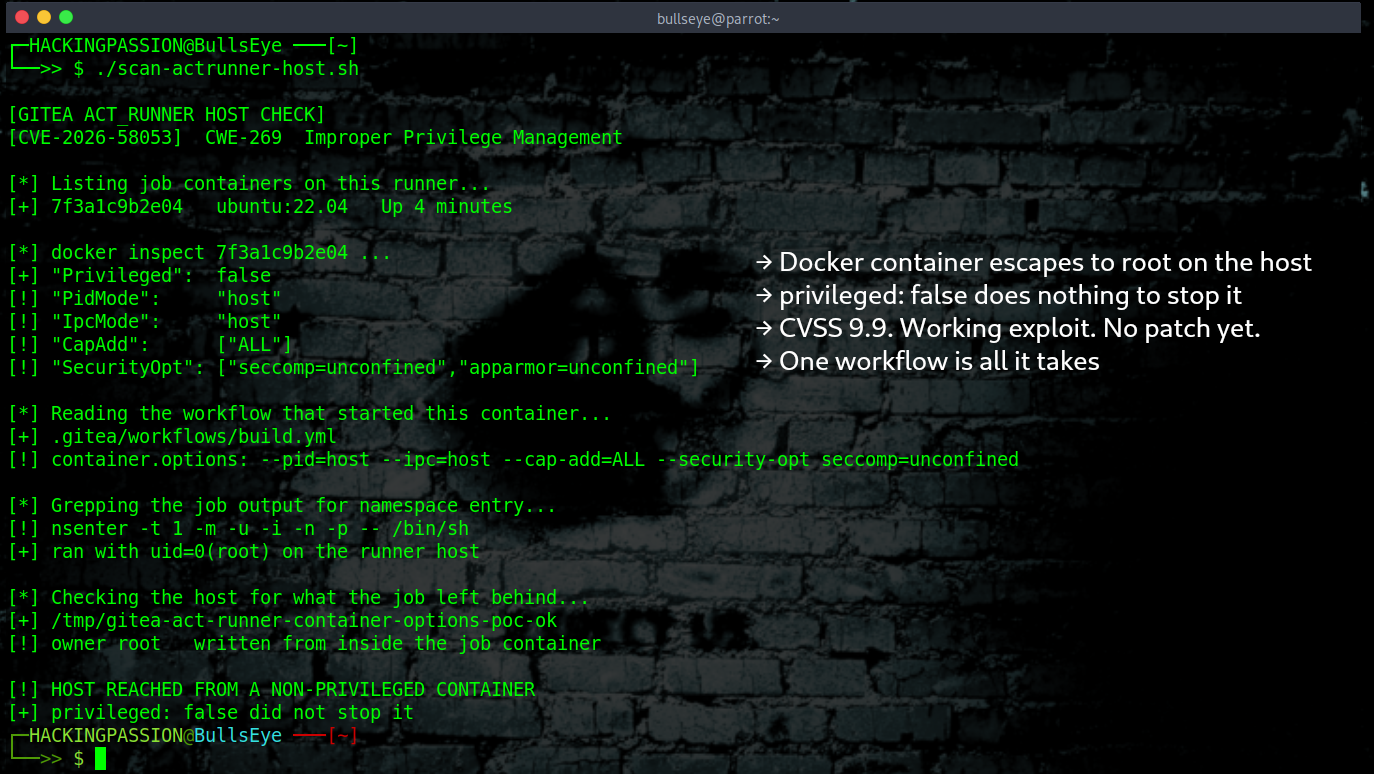
The runner sees privileged: false, forces that one flag off, and builds the container with the rest of the options switched on. Now the container can see every process on the host and do almost anything the system allows. From there it takes one command. nsenter steps across into the host itself and runs as root. The job just walked out of its box.
Here is what the container’s security settings look like once the runner finishes setting it up:
| |
Privileged is false, and the rest of that list is what actually decides what the container can reach. The isolation was never really there.
The attacker did not exploit a bug in Docker or the Linux kernel. The runner allowed the dangerous options on its own, the ones it should have refused. That is why the official advisory calls it a hardening bypass and not a container escape. The runner gave away its own protection.
People have complained for years that act_runner is risky for another reason. It hands job containers the Docker control line, the socket, and that alone can be a way onto the host. This is not that. The proof of concept does its escape with that socket left out completely. The way through is the container options on their own. So the careful operator who pulled out the socket and thought the runner was safe is still wide open.
One more point that is easy to get wrong. This lives in the runner, not in Gitea itself. Upgrading your Gitea server changes nothing here, because the fix has to happen at the runner, on the machine that talks to Docker.
Gitea is not the only project that uses this style of runner. Forgejo, the fork that runs Codeberg and a good chunk of self-hosted setups, builds its CI on a runner that grew from the same code and carries the same privileged and options settings. The advisory names Gitea act_runner, not Forgejo, and Forgejo has added its own runner hardening over the years, so this is not confirmed there. If you run Forgejo or Codeberg runners, watch that project’s advisories.
Gitea has been patching a lot lately. The last few releases fixed dozens of security holes, and one of them, found last month in the part that stores container images, left private images readable on more than 30,000 Gitea servers that anyone could reach over the internet. That gives you a rough idea of how much self-hosted Gitea is out there. Plenty of those servers run a build runner too, often one shared across many projects, and that is the door this flaw opens.
The damage depends on what the runner can reach. On a shared build host that often means repository secrets, deployment keys, credentials for internal systems, and whatever other jobs are running on the same machine. Root on the build server is usually not where an attack stops but where the attacker pivots to the next system.
The danger is highest where runners are shared. A public instance that takes workflows from outside contributors, or one build host that several teams push to, is where this turns serious. There are no reports of it being used in real attacks yet, only a public, working exploit.
You are affected if you run a Docker-backed act_runner with privileged: false and accept workflows from people you do not fully trust. What to do while there is no official patch:
- → Stop sharing Docker-backed runners with repositories you do not fully trust. Give untrusted workflows their own isolated, single-tenant runner.
- → Move to Docker-in-Docker in rootless mode, which gives the runner its own limited Docker daemon with no direct line to the host.
- → Use ephemeral runners that register for one job, run it, and tear down, so a compromised job cannot stick around.
- → Restrict who can trigger workflows on shared runners to trusted users.
- → If you maintain runner config, treat
container.optionsas untrusted input. Reject or strip host namespace flags (--pid=host,--ipc=host,--uts=host,--network=host), capability expansion (--cap-add), security profile overrides (--security-opt), host devices (--device), and inherited volumes (--volumes-from). - → Watch Gitea’s channels for the patch and apply it as soon as it lands.
To check whether this has already been used against you, look through your workflow files and job history for container.options that should not be there, like --pid=host, --cap-add, or --security-opt unconfined, and for nsenter calls in job logs. There is no official detection guidance yet, so treat these as signs based on how the exploit works rather than proof.
The lesson underneath this one is plain. A security setting that only does half its job can leave you worse off than nothing, because you stop looking. You believe you are covered. You are not. privileged: false looked like protection. It flipped one flag and left the rest wide open.
Privilege escalation, how an attacker turns a limited foothold into full root control, and what they do once they are in, is the kind of thing I teach hands-on in my ethical hacking course: → Join my complete ethical hacking course
Hacking is not a hobby but a way of life.
Sources:
Stay updated
Get the latest posts in your inbox every week. Ethical hacking, security news, tutorials, and everything that catches my attention. If that sounds useful, drop your email below.