 HackingPassion.com
GreatXML Turns Windows Defender's Offline Scan Into a BitLocker Bypass
Ethical Hacking Complete Course Zero to Expert
Hack like black hat hackers. Penetration testing, Kali Linux, WiFi and web hacking, and the hacker mindset behind it.
→ Take the full courseNightmare-Eclipse is back again, this time with a BitLocker bypass called GreatXML that runs straight through Microsoft’s own antivirus. On a Windows machine that has run a Defender offline scan even once, the recovery mode hands over a command shell with full access to the encrypted drive, while BitLocker still reports the disk as locked and protected. Microsoft has no patch for it. He published GreatXML the day after RoguePlanet, right after the June Patch Tuesday where Microsoft had just fixed his first BitLocker bypass, the largest Patch Tuesday yet at close to 200 fixes in a single day.
This is his eighth working Windows zero-day since early April. I have covered the earlier ones here, from BlueHammer and RedSun to YellowKey and, two days ago, RoguePlanet. The backstory is a fight with Microsoft over how it treats the people who report bugs, which I wrote up in full when the count reached six. This post stays on the new bug and what it does.
That first bypass was YellowKey, CVE-2026-45585, and Microsoft had only just patched it. It worked through WinRE too, the small repair mode that loads before Windows does. A few files in the right place, a reboot into that mode, and the encrypted drive fell open. GreatXML takes a different route to the same spot.
Neither one cracks the encryption. The math behind BitLocker holds up fine. The weak spot is everything around it, the recovery partition that BitLocker has to trust to work. The NCSC in the Netherlands made that exact point about YellowKey, the problem sits in the parts around BitLocker, not in the encryption.
Here is how GreatXML works. Windows Defender has a feature called the offline scan. When a normal scan cannot clean something nasty, Defender reboots the machine into a special pre-boot state and checks the disk from outside the running system, where malware cannot hide or fight back. Useful feature. The problem is the state it leaves behind.
Once a machine has run a Defender offline scan even once, the researcher says it stays open from that point on. The attack itself is short. A doctored setup file lands on the recovery partition, the machine reboots into that repair mode, and a command shell opens with full read and write access to the BitLocker drive.
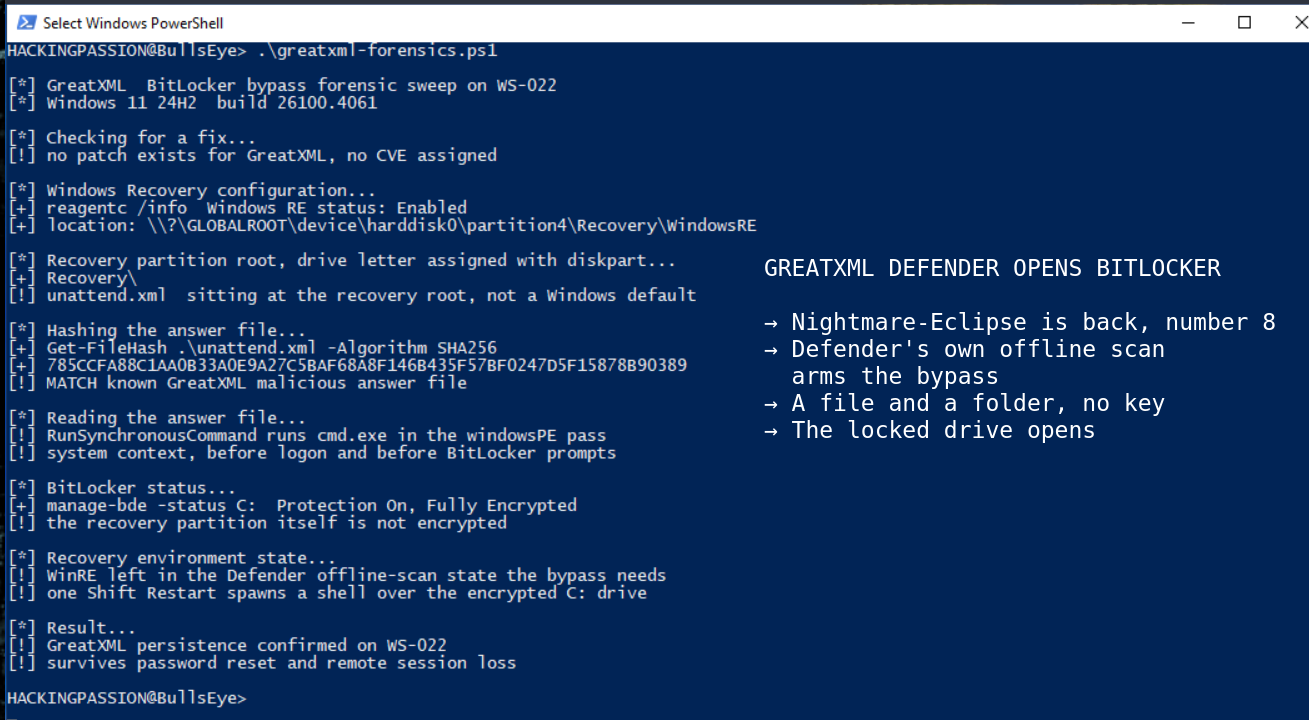
His own writeup boils it down to this:
- → Make sure a Defender offline scan has run on the target at some point
- → Copy
unattend.xmland the Recovery folder to the root of the recovery partition - → Reboot into
WinREwith Shift + Restart - → A shell spawns with unrestricted access to the encrypted volume
The name GreatXML comes from that setup file. unattend.xml is Microsoft’s own thing, the file that factories use to install Windows on a thousand machines without a person clicking through setup each time. It does exactly what it was built to do. It just does it in the wrong place, inside the recovery environment that BitLocker has to trust.
This works because of a gap in what BitLocker locks and what it leaves open. BitLocker scrambles the Windows drive, but the recovery partition that holds WinRE is left unlocked, so files can be dropped onto it without unlocking anything first. And WinRE runs with all the power it needs to fix a broken machine, before any login gets in the way. It trusts that unattend.xml the way it was built to during setup, so it reads the file and does what it says.
He found it by accident. Four hours from first noticing something off to a working exploit, and a four hour accident that opens BitLocker says enough about how thin the trust around that recovery environment is.
Checking this on a machine is simple. An admin command prompt shows where WinRE lives and whether it is switched on:
| |
That shows which partition holds the recovery files. Give it a temporary drive letter, list its root, and the state is clear. A clean one has no unattend.xml and no stray Recovery folder sitting there. If either shows up, that is a finding. Treat it like one.
Now for the part that decides how serious this is. Planting the files needs administrator rights. In running Windows the recovery partition has no drive letter, and giving it one needs an elevated prompt, so a standard user cannot reach it at all. That rules out the stolen-laptop picture where someone walks past the lock with nothing in hand.
GreatXML is not a way in. It is a way to stay in. Someone who already got administrator on a machine can plant the files once and walk away. The access sticks. A password reset does not clear it. Losing the remote connection does not clear it. The files just sit in the recovery partition, untouched by the cleanup that normally follows a break-in.
And once those files are in place, the stolen-laptop angle comes back in a different form. Anyone who later gets physical access can hold Shift, hit Restart from the lock screen, drop into the recovery environment, and read the encrypted drive. It does not ask for a login, a PIN, or the recovery key. The difference with a normal stolen laptop is that this one had to be set up from the inside first, by someone who already had admin.
There is also some doubt about whether it works every time. An analyst who has tested his earlier exploits followed the steps, and the shell only showed up the next time an offline scan ran, not right away. The bug is real and people can reproduce it. What sets it off exactly is still being worked out.
The usual advice for a bypass like this is to switch BitLocker from TPM-only to TPM+PIN, so the drive asks for a PIN at startup before it unlocks. Microsoft gave that advice for YellowKey, and the GreatXML coverage repeats it.
There is a catch. The researcher says he already beat TPM+PIN with YellowKey. On his blog he laid out a version that gets past the PIN too. It runs a small program inside WinRE that spits out special transaction files, those go onto the recovery partition, and then he waits. The owner comes back, types in the PIN, and the machine gets forced to crash straight back into WinRE. The transaction files kick in and overwrite files inside the encrypted drive with whatever he wants.
He never released that one, he says, because he uses BitLocker himself. His point was simple. BitLocker is solid. The weak link is the software propping it up around the edges.
That last part is a claim, not released code. Read it that way. There is no PoC to test it against, but it does put a question mark over the one fix that the writeups, this one included, keep pointing to.
Microsoft’s side belongs here too. It says it knows about the report and is digging into whether the claims hold up and how far they reach.
On the disclosure itself it has not budged. Dumping working exploit code for unpatched bugs breaks the rules of coordinated disclosure and puts customers at risk. And that risk is not just talk. Three of his earlier exploits turned up in break-ins at companies that had no part in his fight.
Then it went further. In a late-May post Microsoft set the release of his exploit code next to the words criminal activity and said its Digital Crimes Unit would keep bringing cases, working with law enforcement. Much of the field read that as Microsoft calling a researcher a criminal, and the backlash was immediate. On June 1 the company walked it back and said it had no intention of going after people who do or publish security research, only those who break the law and cause real harm.
Both are on the record, and the harder one came first.
The fight has spilled onto the places where he posts his code too. Microsoft owns GitHub, and in late May it pulled his repository and suspended his account. GitLab dropped his mirror days later.
He did not stop. On June 8 he opened a fresh GitHub account and put RoguePlanet and GreatXML straight back up, and the community set him up with Git servers of his own at projectnightcrawler.dev and churchofmalware.org, both running on Gitea. The code is on all of them now. That is his point. Once it is public, taking down an account does not pull it back.
He is not working alone anymore either. Around the end of May, other researchers started slipping him bugs, and one of those turned into the second BitLocker fix in that same June 9 update. It is called Bitskrieg, CVE-2026-50507, and it goes a step further than YellowKey, breaking the Secure Boot trust chain on its way past the encryption. It came from Jonas Lykkegaard, the researcher behind the HiveNightmare bug from a few years back, working alongside Nightmare-Eclipse.
So that one Patch Tuesday shut two BitLocker bypasses at once. YellowKey from him, Bitskrieg from the pair. Microsoft named no one in the advisory, so the link rests on Lykkegaard’s own post and outside analysis of the patch.
I am not going to cast him as a villain or a hero. He is anonymous, and attribution is one of the hardest problems in security. IP addresses can be spoofed, tools can be shared, names in code can be faked. What can be verified is how the code behaves, not who is typing it.
For weeks he had been pointing at July 14, Microsoft’s next patch day, as the moment for something much bigger. On June 9 he called it off. The mass-disclosure is not happening, and what people braced for has turned into smaller drops like this one. He has also said he is still sitting on a batch of memory corruption bugs in Defender, plus more in other parts of Windows, so this is probably not the last of it.
What to do about GreatXML, since there is no patch and no CVE:
- → Switch BitLocker from TPM-only to TPM+PIN. The honest caveat from above stands, the researcher claims he beat that too with
YellowKey, but it still raises the bar against the PoC going around right now. - → Watch the recovery partition for anything that was not there before, since that is where the attack files land.
- → Treat an unplanned boot into
WinREas a security event, not background noise. - → Keep admin rights tight, since planting the files needs admin in the first place. Cut that level back to the few accounts that need it.
- → Limit physical access to laptops that carry anything sensitive.
An admin PowerShell prompt shows how BitLocker is set up on a drive:
| |
To add a PIN to a drive that is already encrypted:
| |
Climbing from a normal account to full control, planting access that survives cleanup, and abusing the trusted parts of a system that defenders rarely watch, that is the core of penetration testing. It is what I teach in my ethical hacking course, from the first day with zero experience to thinking like an attacker.
Hacking is not a hobby but a way of life.
Sources:
Stay updated
Get the latest posts in your inbox every week. Ethical hacking, security news, tutorials, and everything that catches my attention. If that sounds useful, drop your email below.