 HackingPassion.com
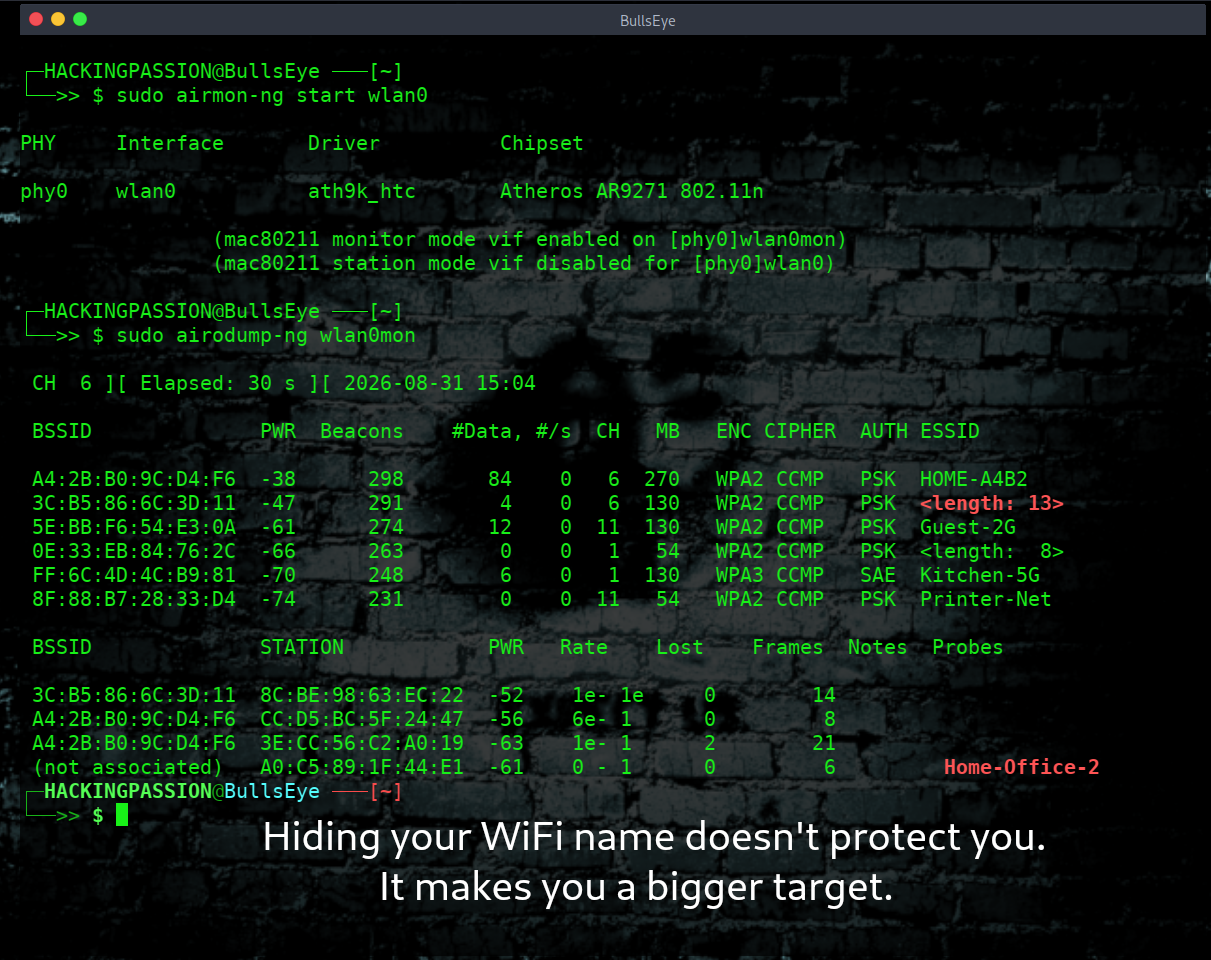
Hiding your WiFi name doesn't protect you. It makes you a bigger target.
Ethical Hacking Complete Course Zero to Expert
Hack like black hat hackers. Penetration testing, Kali Linux, WiFi and web hacking, and the hacker mindset behind it.
→ Take the full courseHiding your WiFi name doesn’t protect you. It makes you a bigger target. People think hiding their SSID (WiFi network name) is secure. It’s not. Your devices leak the SSID anyway. Your phone constantly searches for hidden networks, and it keeps doing that everywhere you take it.
Hiding the name does not make your network quiet. It makes your phone loud.
And your phone goes with you. To work, to the doctor, to the supermarket, to your friend’s house. The one setting you switched on to protect your home is the thing your phone shouts about your home when it is nowhere near it.
What a Hidden Network Really Does
Your router never shuts up. About ten times a second it calls out to the room: I am here, I am on this channel, this is how I scramble my traffic, and this is my name. Your laptop is not asking for that. It is just listening, catching those calls, and putting them in the list you see in the corner of your screen. The call has a name. It is a beacon.
Now switch on hide SSID, or disable SSID broadcast, or whatever your router brand calls it.
The router does not go quiet. It calls out just as often as before, at the same rate, from the same box. It only leaves the name blank. Your network is still on the air, still telling anybody who listens which channel it is on and how it scrambles its traffic. The only thing gone is the name.
The network did not disappear. It just stopped introducing itself.
See It for Yourself in 30 Seconds
Open any WiFi scanner. Run airodump-ng for 30 seconds. Hidden SSIDs show up instantly.
Do it on your own network and look at the SSID column. Your hidden network is right there, and where the name should be you get the length of it instead, something like a bracketed 8. The scanner already has the hardware address, the channel, the signal strength, the encryption and the number of devices connected to it. On most routers it even knows the name is eight characters long. It just does not have the letters.
Hidden networks still broadcast. Every second. Tools like Wireshark, Kismet, or airodump-ng see everything instantly.
Those three tools do three different jobs. airodump-ng is your overview: what is in range, on which channel, how it is encrypted, and which devices are hanging off it. Kismet is the patient one. It sits there and listens without ever opening its mouth, watching the chatter between a router and the devices already on it, and it writes the missing name in by itself the second one of those devices joins or comes back. Wireshark is where you go to look at a single message and read it word for word.
Not one of the three needs your password, and not one of them touches your network.
Attackers notice hidden SSIDs. It tells them someone tried to be “secure” without knowing how WiFi works. That makes you interesting.
Think about that blank name in a scanner on a normal street. The other networks there are still wearing the names their providers gave them. Yours is the one that went to the trouble of hiding, which means somebody in that house thinks about security and believes they have done something clever. People who believe that usually have something else worth finding.
You did not become invisible. You became the odd one out.
So Why Do People Do It?
If it protects nothing, why is this setting switched on in so many houses? And it is a lot of houses. The Hamburg researchers point at a study that found up to 44 percent of the networks detected in some areas were hidden. Four answers, and only one of them survives.
It feels obvious. What you cannot see, you cannot attack. Good instinct, wrong place. The network is still shouting ten times a second, it just left the name out of the sentence.
It was in the manual. Router manuals and security checklists pushed this for years. Look at what the official guidance actually said. In its 2008 wireless guide, NIST told organisations to change the default network name to something that does not identify them, because the factory names are published and easy to look up. Change it. Not hide it. And they printed the warning right next to it: attackers can capture the name by listening in, so do not rely on it to protect your network. That was 2008. NIST published new WLAN guidance in 2012, and in that document the word SSID does not appear once.
The neighbours. You would rather not have your name sitting in a list on the phones of your neighbours. That is a fair worry and it has an answer, but the answer is renaming, not hiding, and I will come back to it.
The router is busy. This one is true. It is the only one that is, and it has nothing to do with security.
How Your Phone Finds a Network, and Why Hiding Breaks It
Your phone can find a network in two ways, and the difference is everything.
The first way is to listen. The routers around it are calling out their names ten times a second, so your phone just sits there, catches those calls, and checks them against the networks it already knows. It says nothing. It gives nothing away. Somebody with a scanner in that room learns nothing about your phone, because your phone never opened its mouth.
The second way is to ask out loud. Your phone sends a short question into the room, and that question is called a probe request. It comes in two shapes. It can ask the room in general, with the name left blank: who is there? Then the routers answer with their own names. Or it can ask about one specific network by name: is the one called Home-Office-2 here right now?
For a normal network, the general question is enough. The router is already shouting its name, so your phone just listens and matches. It never has to say the name of your house out loud.
For a hidden network it does not work. No name went out in the call, so there is nothing to match against, and asking the room in general gets you an answer as blank as the call was. Your phone has one option left. It has to say the name itself and wait to see if anything answers.
That is not your phone being stupid. A better phone would do exactly the same, because there is nothing else to do. Microsoft writes it out in its own driver documentation. A device that picks up a call with the name left out goes and fetches that name by asking for it, either straight at the router or shouted into the room.
So you took the name off your router. And handed it to your phone to carry around.
It broadcasts the name you tried to hide. Everywhere you go. Not once, but each time it goes looking, which is constantly, in each room you walk into. The name of your house, offered to whoever happens to be listening, far from home.
What an Attacker Actually Does with This
He is not going to wait around for your phone to walk past him.
He comes to your street instead and takes the name off a device that is already connected. All he needs is one thing on your network. A laptop, a TV, a thermostat, a doorbell. Anything at all.
Then he knocks it off the network on purpose.
Routers and devices are constantly sending each other little housekeeping notes. Joining now. Leaving now. Your connection is over. Those notes have a name, management frames, and there is a feature that is supposed to seal them. The Wi-Fi Alliance puts it like this on their own site: without Protected Management Frames, all management frames are sent unprotected in the open. On WPA2 that feature is optional, and optional means it is often not on.
They describe the attack too. Pick up the router’s hardware address, which anybody can do by listening on the channel for a moment. Then pretend to be that router and tell the devices on it that the connection is over.
He needs nothing beyond being in range, without your password and without ever setting foot inside your network.
Now look at what the aircrack-ng documentation lists as the reason to do this. The very first item on that list is recovering a hidden network name. The second is grabbing handshakes.
| |
One burst. Your device believes the router dropped it, falls off, and does the one thing it was built to do. It reconnects. And to reconnect to a hidden network, it has to say the name.
Seconds later, the name you hid is sitting in clear text in somebody’s capture file, put there by a person who never touched your network and never came closer than the pavement.
WPA3 shuts down this particular trick, and here is why.
One feature seals those housekeeping notes, so a router and a device can spot a forged disconnect and throw it away. It is called Protected Management Frames. On WPA2 it exists, but switching it on is optional. The Wi-Fi Alliance calls the normal WPA2 setting “capable”: devices that support it will use it, devices that do not can still connect without it. Run WPA3-Personal on its own and it is mandatory. No choice about it.
But do not read that as a fix for the rest of this article. That seal only covers messages sent after your device and your router have agreed on a key. The questions your phone shouts into a room it has never been in come before any of that, so they are not covered by it. The Hamburg researchers put it in one line: probe requests are not protected.
So WPA3 stops somebody knocking your device off the network to grab the name. It does nothing about your phone carrying that name around town.
What an Attacker Is Actually After
Attackers don’t care about your network name. They care about cracking your encryption.
The name is just something they need on the way. What they actually want is the moment your device and your router agree on a key. When a device joins a WPA2 network, the two of them swap four short messages to settle on the key for that session. Record those four messages and you can walk away with them, sit at home, and start guessing your password against them offline. No further contact with your network. The aircrack-ng tutorial is built around collecting exactly those four messages.
And there is no clever maths shortcut here like there was with WEP. It comes down to guessing, one password at a time, which is why a long random password holds and a dictionary word falls over in an afternoon.
Here is where your network name comes back into it. That key is not your password. Your device builds it by taking your password, mixing your network name in with it, and hashing the result over and over. NIST spells it out for WPA2 with a shared password: the key is generated by combining the network name with a passphrase, then hashing this multiple times.
So the attacker does want your name. Not to know where you live. He needs it as an ingredient, because without the exact name he cannot turn a single guess into the key he is trying to match.
And NIST puts a number on the rest of it in that same paragraph. A passphrase shorter than about 20 characters gives relatively low security and is open to dictionary and rainbow attacks. That is where the 20 characters below comes from, and it is not a round number somebody made up.
That handshake comes three ways. Sit and wait until somebody’s phone joins by itself, which means transmitting nothing at all. Or knock a device off so it reconnects right now, which is the same deauth: the exact move that pulls your hidden name out of the air is the move that hands over your handshake.
The third way works on an empty house. In August 2018 the developer behind hashcat published it. Ask the router itself for a single frame, take one value out of the reply, and go home to guess against that. His own words: capture of a full four-way handshake is not required, and no regular users are required either, because the attacker talks directly to the access point.
So a laptop, a TV or a doorbell on your network is what gets your hidden name out. For your password, an attacker does not even need that.
Hiding the name does not add a step for the attacker. It adds nothing at all.
The Part That Surprised Me
An old attack works by eavesdropping on what your phone is asking for. Your phone calls out for a network it knows, an attacker hears the name, and he stands up a fake access point using that exact name. Your phone recognises it, connects on its own, and everything it does now runs through a box belonging to somebody else. He can read it, change it, and put a fake login page in front of you.
Attacks like this are known as KARMA. MITRE catalogues the technique as evil twin, T1557.004, and describes it in those terms. Listen for the networks a device is asking after, then answer with the same name and pretend to be the one it trusts.
For years that worked on almost any phone in the street, because phones used to shout out the names of everything they had ever joined.
That is over. A 2022 paper out of Hamburg measured how far it went. The researchers took apart what phones actually put on the air, and their finding fits in one sentence. Older devices might send the names of networks they had joined before. Newer devices send only the names of hidden networks. Everything else goes out as an empty wildcard.
Only the hidden ones.
Your phone has not stopped calling out network names. It has narrowed the list down to one kind, and hidden networks are that kind. If yours is the only hidden network your phone knows, then your network name is the single name it is still saying out loud, in each room you carry it into. The same change that ended this attack for other people is what leaves your name standing there on its own.
You are keeping a dead attack alive, on your own phone, using the name of your own house.
The Manufacturers Say It Themselves
None of this comes off a hacker forum. It is written down by the people who build the gear.
A hidden name is not a password, and it does not secure anything. Once a device is connected to a hidden network it keeps calling out unasked to the routers around it, which leaks your name everywhere you go. And a secret name makes your network more interesting to crack, not less, while the tools that uncover it are free to download.
That is ASUS. Their own support page about hidden network names, updated December 2024, points one and three.
They mention two more things that never come up. You lose the 6 GHz band, or you cripple it. Finding a network up there works differently, and combing 59 separate channels for something that refuses to say who it is is no way to search. And your connections get worse, not better: on Windows a hidden network often loses out to a different one even when you told it to connect automatically. The power drain gets a point of its own on their list. All that automatic probing costs battery, on the device and on the router.
Microsoft says it too, and not in some archived document. On their developer pages, last updated in May 2025, right next to the sample settings for joining a hidden network, sits the note. They do not recommend configuring a network to hide its name, because there are minimal security benefits, it is trivial to find the network name, and clients may have trouble connecting and roaming. The typo in that sentence is theirs.
Apple is the bluntest of the three. On their page of recommended router settings, updated in July 2026, hidden network gets one instruction: set to disabled. Their reasoning is this whole article in two lines. Hiding the network name does not conceal the network and does not secure it. And because of the way devices search for networks, a hidden network can give away information that identifies you and the hidden networks you use, such as your home network. Connect to one and your iPhone may put a privacy warning next to it.
They document the mechanism as well. Your iPhone uses a made-up hardware address while it scans, so that number cannot be used to follow you around. Then comes the exception, printed in their security guide: those scans are not disguised when your phone is trying to connect to a network it already knows.
The protection switches off at exactly the wrong moment.
It breaks stuff. Guests can’t connect. Your own devices have problems. You get no security. Just inconvenience.
And that is not a small thing. A network that will not say its name cannot be tapped from a list, so anybody who wants on has to type it by hand, exactly right, before they even get to the password. One typo and it just fails, with nothing on screen to tell them why. The phone, the laptop, the printer, the console, your friend on the couch. One at a time, each time.
Hiding your SSID is fake security. Feels safe. Isn’t safe.
Your Network Name Is a Location
Your network name matters for a second reason, and this one actually holds up.
People drive and walk around collecting WiFi networks with a GPS running alongside. It is called wardriving, it has been a hobby since the early 2000s, and it all ends up in public databases. WiGLE has been taking submissions since 2001. You can search it by network name, and each hit comes with coordinates on a map.
I pulled their live numbers while writing this. 2,007,914,362 networks on that map, put there by 730,418 people. And 239,211 of them went in today alone.
Two billion front doors, and a quarter of a million added while you were reading the news.
And it is not only names sitting in a database. The Hamburg team stood in a busy shopping street and listened. In 252,242 probe requests they found 106 different first and last names, called out 3,339 times between them. Ninety-two holiday homes. Three e-mail addresses. The name of a local hospital, in two spellings, fifteen times, which tells the person listening that somebody was admitted there. And nearly twelve percent of the network names people had saved were long strings of digits, almost certainly router passwords typed into the name field by mistake, now being read aloud in the street.
So think about what your network is called. Your surname in it. Your house number. The name of your company. Anything that belongs to you alone turns that name into a search term, and the result of that search is your front door.
Hiding it does not save you here either. One reconnection and the name is back in the air for anybody who bothered to send a single frame.
The answer is not to hide the name. The answer is to give it a name that says nothing about you.
Renaming is not a magic word either, and you should know where it stops. In 2024 two researchers in Maryland pulled the exact locations of more than two billion routers out of Apple’s positioning service in the space of a year. A global snapshot, they showed, can be built in a matter of days. That one runs on the hardware address of your router, not on its name. Hiding does nothing there. Renaming does nothing there either.
What to Do Instead, Tonight
→ Rename your network to something that identifies nothing. Not your name, not your house number, not your company, not your street. And get the brand out of it. A name that still carries the maker your provider shipped tells somebody which router is in your hallway before they have scanned anything. That tells them which default passwords and which known holes are worth a try.
→ Add
_nomapto the end of the name. Google documents this themselves: a network name ending in_nomapis left out of their location service. WiGLE hides networks with_nomapor_optoutin the name. Google writes on that same page that other companies can see the method and asks them to respect it, so it is not a guarantee and some will ignore it. It costs you one rename.→ Turn the hiding off. It protects nothing, it keeps your phone calling out your network name in each building you walk into, it costs you the 6 GHz band, and it turns adding a new device into a chore.
What actually protects WiFi?
- → WPA3 encryption (or WPA2 if your router is older)
- → Strong password (20+ random characters)
- → Disable WPS
- → Change default router password
- → Update firmware regularly
That WPS line is the one people skip, so here is why it matters. WPS is the shortcut that lets a device join with an eight digit code instead of your password. Eight digits sounds like a hundred million guesses. It is not.
Stefan Viehböck took it apart in December 2011 and found two problems stacked on each other. The router tells you when the first four digits are right, so the code can be attacked in two halves instead of as one number. And the eighth digit is only a checksum of the first seven, so it is not a guess at all. A hundred million drops to eleven thousand. On the routers he tested that had no lockout, he went through the lot in under four hours.
Your twenty character password protects nothing while that is sitting next to it.
The Other Side of Your Router
Your router has two sides. One faces your street, and that is everything up to here. The other faces the internet, and hiding a name does absolutely nothing for it.
The name is being kept off the pavement. Meanwhile the login page of the router itself, or the camera, or the NAS, or a forgotten debug port behind it, can be sitting wide open to the world.
That side is searchable too. Not by name, by address. Knock on a port and most devices answer with a little scrap of text that says what they are, what software they run and which version. Shodan spends its life knocking on those ports and writing down the answers.
I wrote a tool for this called Shodan Eye. You give it a keyword and it hands back the address, the port, the owner, the location and the full answer for everything Shodan knows about. It comes with a dorks file, a list of ready made searches, and some of what comes back is grim. Cameras with the username admin and no password. Machines already logged in as root over Telnet. Android devices with the debug bridge wide open on port 5555.
Go and look at your own address from the outside. Five minutes. It is the half of the check that hiding a network name was never going to cover, and there is a full write-up of the tool on my site.
When Hiding Does Make Sense
To be fair, there is one situation where it earns its keep, and the router makers name it themselves. Live somewhere crowded, with people constantly trying to connect to your network, and your router burns part of its capacity turning them away all day. Keep the name out of their list and most of those attempts stop before they start.
That is convenience. It is a way of being left alone, and there is nothing wrong with wanting that.
It is not security. It does not belong on a list of security measures. Know which of the two you are buying, and know what it costs you.
Attackers don’t care about your network name. They care about cracking your encryption.
Focus on real security. Not fake tricks.
Stop following bad advice. Learn what works.
Set up monitor mode on your own network tonight and watch your own devices announce themselves, then learn what somebody does with that.
My Ethical Hacking Complete Course Zero to Expert takes you there step by step: reconnaissance, scanning, exploitation and traffic analysis, hands-on, from your first day with no Linux or hacking background.
→ Join my complete ethical hacking course
Hacking is not a hobby but a way of life.
Sources:
Stay updated
Get the latest posts in your inbox every week. Ethical hacking, security news, tutorials, and everything that catches my attention. If that sounds useful, drop your email below.