 HackingPassion.com
Lenovo ThinkPlus Fingerprint USB Drive Sold as Encrypted Was a Plain SD Card Inside
Ethical Hacking Complete Course Zero to Expert
Hack like black hat hackers. Penetration testing, Kali Linux, WiFi and web hacking, and the hacker mindset behind it.
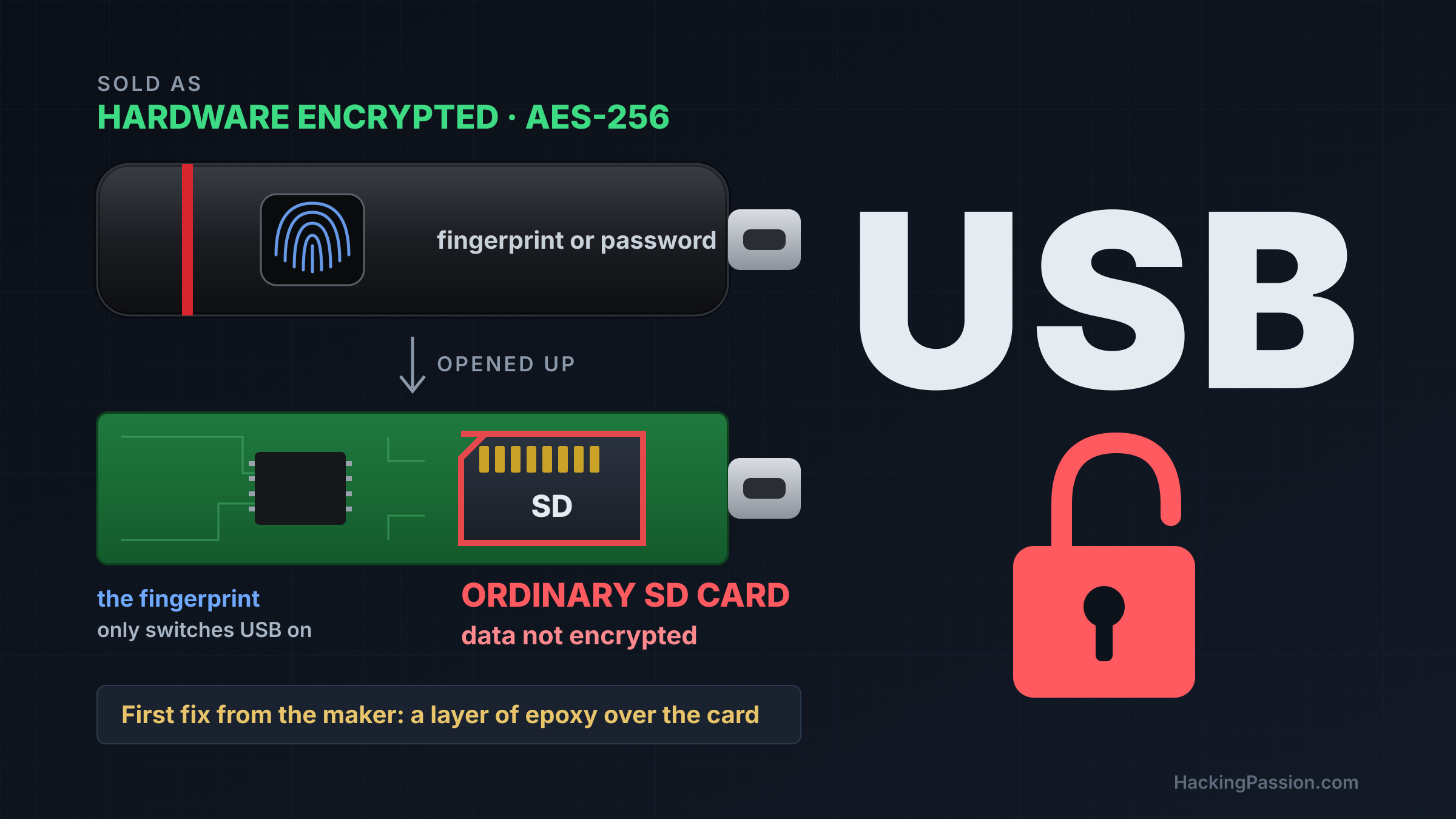
→ Take the full courseUSB encryption from five makers opened without the password. Lenovo, Netac, KakaSoft, Nexcopy, SecZure. A Lenovo USB stick with a fingerprint reader was sold as hardware encrypted with AES-256. Inside sat an ordinary SD card. Nothing on it was encrypted. The fingerprint only switched the USB connection on.
The stick is the ThinkPlus FU100, a small black stick with a fingerprint sensor on top that opens with a finger or a password. It is marketed as hardware encrypted with AES-256, and a sales listing promises fingerprint protection, password protection and anti-leakage. Someone who bought one to carry private files had good reason to believe the fingerprint locked those files.
Xusheng Li develops a reverse engineering tool and its debugger. In 2025 he took an FU100 apart. Under the plastic was a small circuit board with an SD card on it. The data on that card was not encrypted in any way. The fingerprint reader decided one thing: whether the stick connected to the computer or stayed silent. The files on the card did not depend on it. Lenovo later described the flaw in its own advisory as a weakness that lets someone with physical access read the data stored on the drive.
He reported it to Lenovo on August 2, 2025. On August 27 a temporary fix was ready. It was a layer of epoxy over the SD card. A proper fix was planned for December.
The FU100 was the first case in a talk he gave in March 2026 at RE//verse, a conference for reverse engineers. One of his first slides said: do not trust encrypted USB drives, check what the vendor claims yourself.
The second Lenovo device was the ThinkPlus TSD303, an external SSD that also opens with a fingerprint or a password. Inside is a standard M.2 SSD, and here the data is encrypted. The weak point was the password. When the Lenovo program on the computer asked the drive for it, the drive sent the correct password back over the USB cable in plain text. The program then compared it with what the user typed. On his slide, the captured USB packet shows his test password in the last bytes, readable as text. Whoever could watch that traffic, or the memory of that program, could read the password and open the drive with it.
Three months after his report, Lenovo sent him a fix to test. In that version the drive sent an encrypted blob where the plain password used to be, and at first he took it for a hash of the password. He traced it back with the debugger. The blob came from SM4, a block cipher similar to AES, and its key was derived from something that looked like a timestamp. In his test that key was 2021012700000000. He fed the blob and that key into a decryption tool, and his test password came out. The fix was incomplete, because the program could derive the key, and so could someone who took the program apart.
His slide lists ten devices built on the same software kit, with the vendor names blacked out. The TSD303 is one of them, and the slide notes that other vendors using the kit are affected in the same way. Six of those devices sent the password in plain text. Two stored the data unencrypted on a micro SD card. Two sent the password with AES encryption that still gave it away.
The official description of the talk names one more brand among the devices he researched: Lexar, with its F35 Pro fingerprint stick. His slides black out the vendor names, so they do not show which failure belongs to it. The older Lexar F35 already had a CVE in 2022, CVE-2021-46390. The stick compared the password itself, but it sent the result back to the program on the computer, and three South Korean researchers changed that result so a wrong password got through.
The talk also covered the storage company Netac. It offers a program called NetacLockFile for its drives, a software tool that promises to encrypt files with the user’s password. It puts the locked files in container files on the stick, and in his test the program itself sat on the stick next to them.
He locked a PDF with it and opened the result in a hex editor. Part of the file was still readable. He worked out the pattern: of each block of 48 bytes, 16 were encrypted and 32 were left as they were. For his slide he put his own photo through it. The encrypted version is grainy, and his face is still easy to recognize.
Then he went looking for the key. He used time-travel debugging, a method that records a program while it runs so the run can be stepped through forwards and backwards afterwards. He followed the encrypted bytes back to the function that produced them, and from there to the key. The trail ended at constants inside the program file itself. The AES-256 key was a fixed 32-byte value embedded in the executable. The password was checked separately and had no part in the key. A copy of the same program was enough to open a locked file without the password.
He reported the fixed key to the company on October 19, 2025. No response came and no patch, and after more than 90 days he made it public in the talk.
In October 2026 he came back to the same program with OpenAI’s Codex, connected to his reverse engineering tool. He gave it one prompt: this is a file encryption utility, analyze its crypto system and see if it is secure. In about seven minutes it found the fixed key in the executable. The program wrote the user’s password into its diagnostic logs. It checked passwords with MD5. It encrypted blocks of 16 bytes one by one without an initialization vector, so identical input blocks produce identical output. Its SM4 option used another fixed key. In its fast mode, files larger than 1,024 bytes were only partly encrypted, in formats such as PDF, ZIP, PNG, JPEG, WAV and MPEG.
He then pointed the same setup at two products he had never studied. Both are copy protection. A company puts training material or legal documents on such a stick and hands it out, so that the person who gets it can view the files but not copy them.
KakaSoft USB Copy Protection 5.6.0.299 offers three levels. Normal hides and locks the files and does not encrypt them. High scrambles at most the first 16,385 bytes of a file with a key of a single byte, which allows only 256 possible keys, and it leaves the rest as plain data. Highest advertises 256-bit Blowfish encryption. The key for it comes from a salt in each file and an internal password, which the program builds from a seed stored inside itself with a modified version of MD5. The AI emulated that code, recovered the internal password, and decrypted the test file without the user’s password. That took about 26 minutes and six short prompts.
Nexcopy sells Copy Secure drives, and its product page says the protection is enforced in hardware, on the flash memory controller. On the drive he analyzed, Triple-DES protected the files. The key sat in a configuration file, and the viewer program opened that file with a fixed 32-byte certificate built into the app. The password sat in that same file as plain text, and the Mac viewer compared it with what was typed. The password and the check on the USB device only decided whether the official viewer carried on. Neither one went into the key. That took about ten minutes and five prompts.
He also went back to a drive he already knew. In 2024 he had written about YutianDun, a copy-protected USB drive sold by SecZure, in the magazine Paged Out!. It hides encrypted files from Windows Explorer and opens them through its own readers, which claim to block copying, screenshots and printing. A trace showed a login under a hidden account called Buffer, with the password 123456, before the administrator password had even been typed. That account does not appear in the user management screen. Behind that account sat another locked copy of the secret the file key is made from. The password 123456 unlocked it, and he decrypted the files. Further analysis turned up a second built-in account, System, with the fixed password SECZURE.COM. On two tested drives, both accounts opened the files without the administrator password. He calls it a backdoor from a technical perspective, and adds that this does not prove the maker meant harm.
When he published these findings in October 2026, he skipped the usual step of warning the makers first. His reason: a device that is already in an attacker’s hands cannot be recalled or updated easily.
This kind of mistake is old. In December 2009 the German security company SySS cracked a SanDisk USB stick that carried a FIPS 140-2 certificate. The CVE records from January 2010 describe SanDisk Cruzer Enterprise drives and three Kingston DataTraveler models. They validated passwords with a program running on the computer rather than in the drive hardware, and the drives of both brands also used a fixed 256-bit key. Sixteen years later, the sticks above repeat that mistake.
On these devices the password decided whether a program opened or a USB connection switched on. On most of them it had no part in the key that locked the files. When the key is a fixed value in the software, or the data is not encrypted at all, a password protects the program. The files stay open to whoever reads the card or takes the program apart.
Encryption that holds works the other way around. The key is derived from the password itself, through a deliberately slow function such as PBKDF2 or Argon2, so that each guess costs time. Or the check happens inside the drive’s own chip, and neither the password nor the key ever leaves it. Without the password there is nothing to compare and no key to find.
What to do:
- → Encrypt sensitive files yourself before they go on a stick, with software where the key comes from your password, such as VeraCrypt, BitLocker To Go on Windows Pro, or gpg
- → Count a fingerprint reader or a password screen on a stick as a lock on access, unless the maker shows that the key depends on it
- → Assume a copy-protected stick is readable for whoever receives it
- → Check whether your Lenovo model is on the list below
With gpg, one command does it:
| |
gpg asks for a passphrase and derives the key from it, and the result is contract.pdf.gpg. Without that passphrase, the file stays closed on any machine.
Lenovo published security advisory LEN-210545 on January 13, 2026, rated high, with three CVEs:
- →
CVE-2025-13453: some ThinkPlus USB drives let someone with physical access read the stored data - →
CVE-2025-13454: the ThinkPlus configuration software lets a local, logged-in user reach sensitive device information - →
CVE-2025-13455: the configuration software lets a local, logged-in user bypass device authentication and enroll an untrusted fingerprint
Affected models:
- → ThinkPlus FU100
- → ThinkPlus FU200
- → ThinkPlus TU800
- → ThinkPlus TSD303
Lenovo calls its fix a hardware-level solution. Owners call Lenovo’s service line in China, +86 400-640-1886, for a free upgrade. Lenovo checks the serial number, and the device is either sent back for replacement or gets a firmware upgrade on site. Lenovo advises backing up the data first, and wiping or formatting the device before it goes in. The second fix for the TSD303 arrived in December 2025, and in that version the drive checks the password itself. Netac never answered the report, and the talk slides list no patch. Neither Lenovo nor the researcher mentions attacks on owners.
On your own laptop, you can encrypt a file with AES-256 so that the key comes from your own password. My Ethical Hacking Complete Course Zero to Expert takes you there step by step: reconnaissance, scanning, exploitation and traffic analysis, hands-on, from your first day with no Linux or hacking background.
→ Join my complete ethical hacking course
Hacking is not a hobby but a way of life.
Sources:
Lenovo LEN-210545 | RE//verse 2026 slides | Xusheng Li, October 2026 research
Stay updated
Get the latest posts in your inbox every week. Ethical hacking, security news, tutorials, and everything that catches my attention. If that sounds useful, drop your email below.