 HackingPassion.com
Microsoft 365 Mailbox Rules Are Being Weaponized
Ethical Hacking Complete Course Zero to Expert
Hack like black hat hackers. Penetration testing, Kali Linux, WiFi and web hacking, and the hacker mindset behind it.
→ Take the full courseMicrosoft 365 mailbox rules are being weaponized as a core technique behind $2.77 billion in annual Business Email Compromise losses, and attackers are creating hidden rules that survive password resets, MFA enrollment, and session invalidation. A new Proofpoint report reveals that 10% of all compromised Microsoft 365 accounts get malicious inbox rules installed within seconds of the initial breach, targeting 400+ million users worldwide by abusing built-in email functionality no security tool will ever flag as suspicious. 😏
Here is what that looks like in practice. A password has been changed. Two-factor authentication is confirmed working. The IT team went through the account and marked the incident resolved. But somewhere in that inbox, a rule with the name “.” has been running quietly the whole time. Every email that came in got copied and forwarded to the attacker’s address. Has been for months. Not because of malware. Not because of a zero-day exploit. Because nobody checked the rules.
Inbox rules in Microsoft 365 are a completely normal feature. Most people have a few set up already: move newsletters to a folder, mark certain senders as read automatically, forward a copy of specific messages to a colleague. They run in the background, invisible, doing exactly what they were told.
When an attacker gets into an account, they do exactly the same thing and create a rule of their own. Proofpoint measured the time between an account takeover and the creation of a malicious rule, the shortest recorded was 5 seconds. It is fully automated. The rule might forward every incoming email to an external address they control, or move any message containing the words “invoice,” “wire,” “contract,” or “payment” into a hidden folder where the attacker can review everything at their own pace. Folders like Archive, RSS Subscriptions, and Conversation History are favorites because nobody ever opens them. The most dangerous variant does something much quieter: it deletes or buries incoming security alerts, MFA notifications, and password reset confirmation emails. The exact messages that would tell a victim their account is being accessed by someone else simply disappear before they ever land in the inbox, and the victim has no reason to suspect anything is wrong.
Proofpoint documented a real case that shows how fast this can spiral. An accounting specialist’s mailbox was compromised and a rule was created that automatically archived any email with “FW: Payment Receipt” in the subject line. From that account, the attacker ran an internal phishing campaign that reached 45 colleagues. One of those was the CEO’s assistant. A second mailbox was compromised. From there, a fraudulent payroll request went out while every reply and security notification was being silently hidden. The whole chain ran through two compromised accounts without either victim seeing a single warning message.
A password reset does not touch inbox rules. Neither does changing MFA settings. The rules are stored at the mailbox level, not at the credential level, and they are completely independent from the login credentials. So when a company resets the password, adds two-factor authentication, revokes the session, and marks the incident as resolved, every malicious rule in that inbox keeps running. Proofpoint confirmed cases where attackers had been locked out for months, but data was still leaving the organization every day through a forwarding rule nobody had removed.
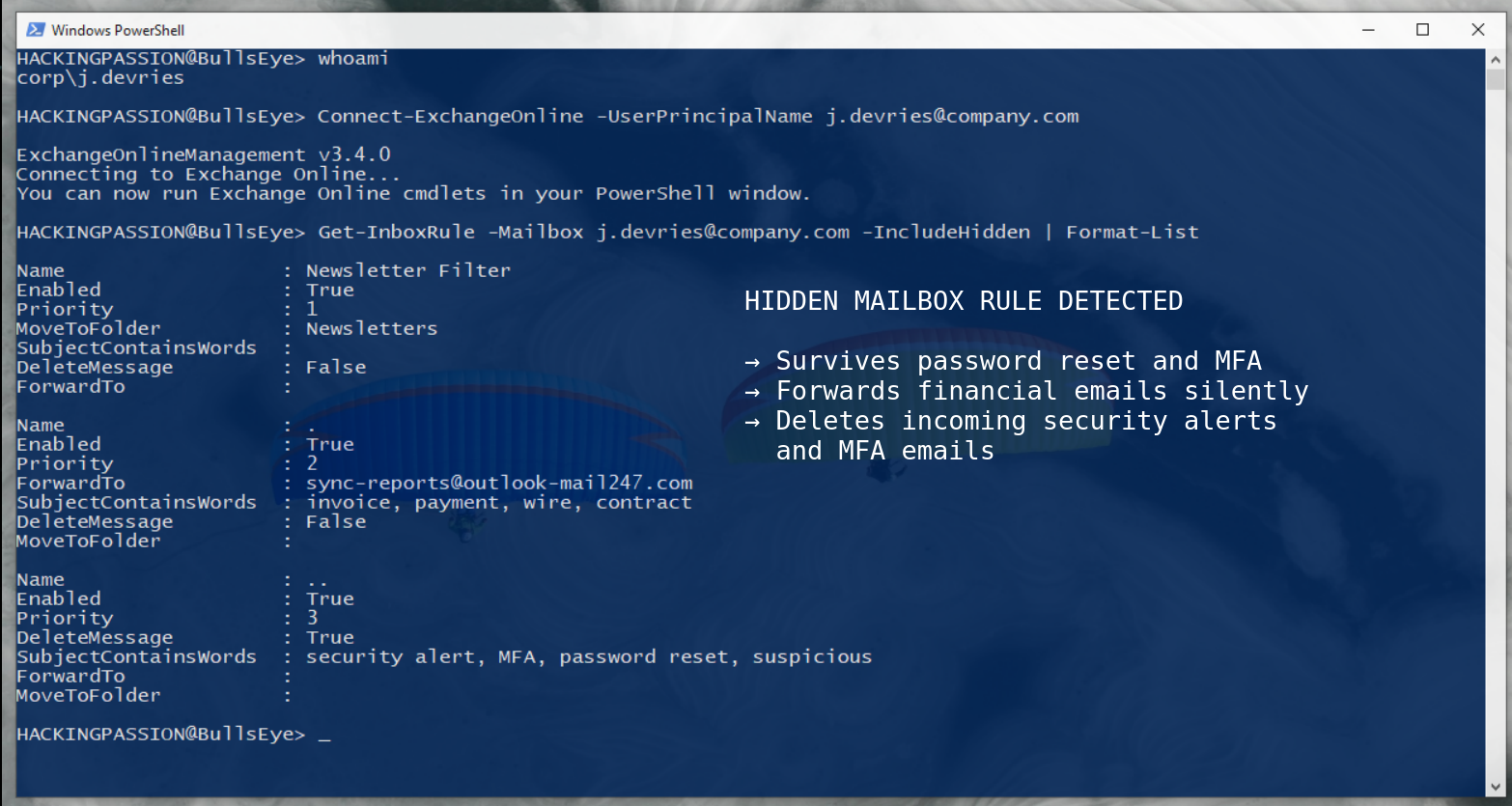
The standard Microsoft 365 admin interface does not show all inbox rules. There is a parameter in PowerShell that has to be added explicitly, and without it, an entire category of rules stays completely invisible to anyone investigating the mailbox. The command most administrators know is Get-InboxRule, but the command that actually finds everything is:
| |
That -IncludeHidden flag is the difference between thinking the mailbox is clean and actually knowing it.
The rules themselves are named to blend in. Proofpoint’s analysis found that attackers consistently use names like “.” or “..” or “;”, a single punctuation character, nothing more. Researchers describe this as a sign of overconfidence, and attackers historically expect nobody to go looking, so they put zero effort into making the rule look legitimate. One dot. That is the entire name of the rule that has been forwarding sensitive business emails for the past three months.
This scales well beyond individual accounts too. Modern attack frameworks use the Microsoft Graph API and Exchange Online PowerShell to create inbox rules across dozens or hundreds of accounts simultaneously. Once a batch of session tokens has been stolen through phishing, an attacker with basic scripting knowledge can establish persistence across every compromised account in minutes. Proofpoint built a working proof-of-concept tool called ATOLS (Account TakeOver Live Simulation) to demonstrate exactly this. It captures a session token through a phishing page, and the moment that token is captured, it automatically creates a malicious rule in the target mailbox. No credentials needed beyond the token, no manual steps, the whole thing runs by itself.
This technique has an official classification in MITRE ATT&CK: T1564.008, Hide Artifacts: Email Hiding Rules. Security teams at Huntress have their own name for it: Shadow Workflows. Rules running in the dark, doing damage nobody is watching for, and the FBI ranks Business Email Compromise as the second most costly cybercrime tracked in their 2024 report. Inbox rule abuse is one of the core techniques that makes BEC work at scale.
The quick check anyone can do right now: open Outlook, go to Settings, find Rules, and look at every rule that is listed. A single punctuation mark as a name, random characters, anything that was not deliberately set up by the person using the account should not be there.
The proper check for administrators runs through PowerShell:
| |
Run that for every account that has had any suspicious activity and for executive accounts as a routine check. The -IncludeHidden parameter is not optional if the goal is actually finding everything.
If something turns up:
- → Delete the unauthorized rule immediately and verify no additional rules remain
- → Revoke all active sessions and refresh tokens, not just the password
- → Check Entra ID sign-in logs for unusual IP addresses, unfamiliar devices, and anything that happened just before the rule was created
- → Review all OAuth applications that have mail read or write permissions on the account
- → Confirm that external auto-forwarding is disabled at the organization level in Exchange Online. This should be off by default, but verify it
- → Treat a discovered malicious rule as confirmation of a full compromise, not just a forwarding problem to clean up
A password reset was never incident response, it was always only step one.
Understanding how attackers maintain persistence after breaking into a system, how they stay hidden, escalate privileges, and keep access even after a reboot, is exactly what I cover in my ethical hacking course.
Hacking is not a hobby but a way of life.
Stay updated
Get the latest posts in your inbox every week. Ethical hacking, security news, tutorials, and everything that catches my attention. If that sounds useful, drop your email below.