 HackingPassion.com
Microsoft Store App Setup Assistant Was a Backdoor That Delivered Vinci RAT
Ethical Hacking Complete Course Zero to Expert
Hack like black hat hackers. Penetration testing, Kali Linux, WiFi and web hacking, and the hacker mindset behind it.
→ Take the full courseA Windows PC got a remote access trojan from an app that sat in the official Microsoft Store for 5 months. The user wanted a snipping tool. Reported on November 10, Microsoft called it no violation.
# TL;DR
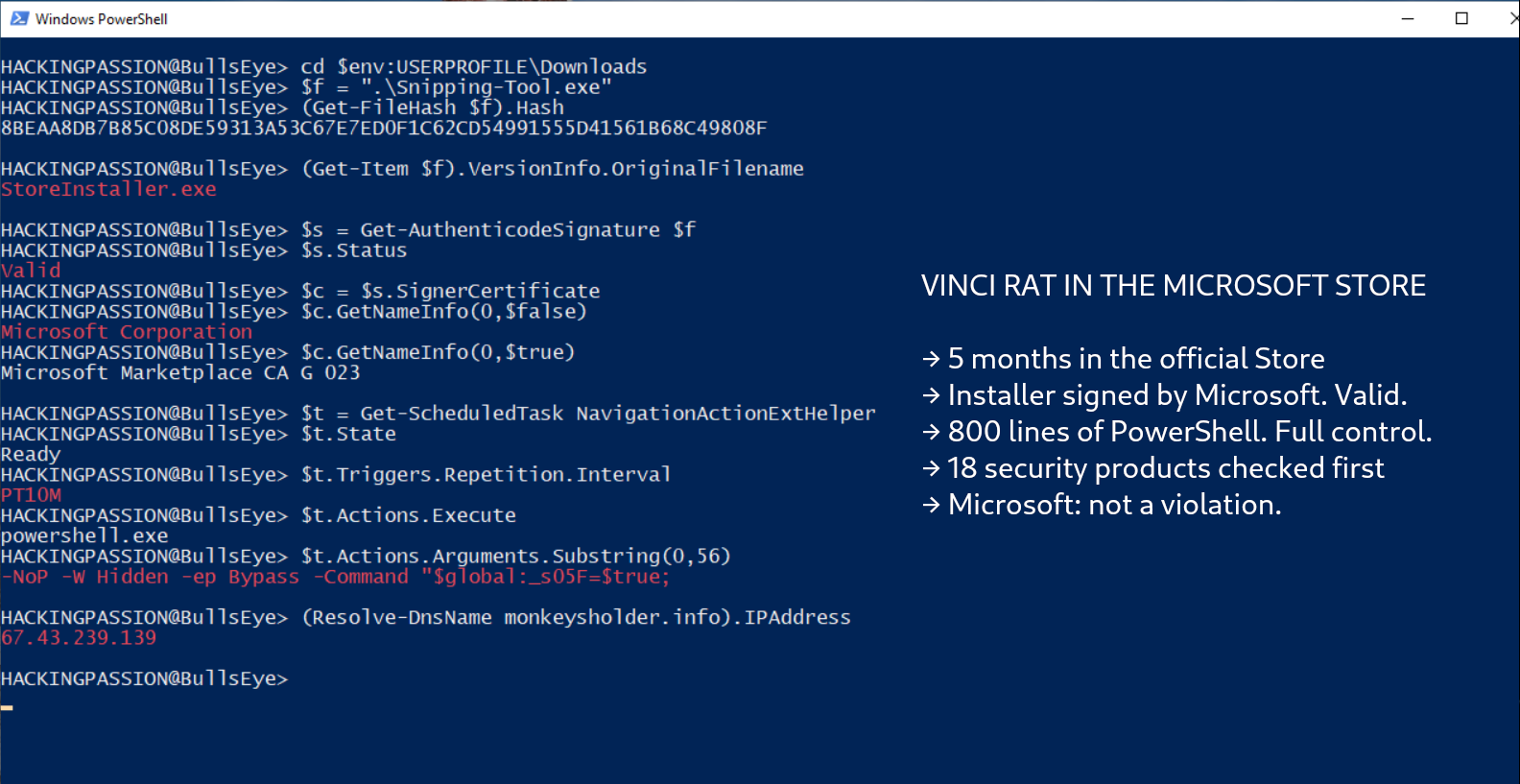
It started when someone at a company searched for a snipping tool. The search sent them on to a download page at snipp.codes-team[.]com. That page offered a file called Snipping-Tool.exe, and the file carried a valid signature from Microsoft.
For years, the advice has been the same: do not grab software from some random download site, get it from the official store. And this file did exactly that. Running it installed an app straight from the official Microsoft Store.
That app handed control of the PC to an attacker. eSentire’s Threat Response Unit investigated the intrusion in early November and published its analysis on November 24.
The app was called Setup Assistant. It was listed under the publisher name ETPS Ltd, in Utilities & tools, rated for all ages. In the Store it looked like a small, tidy helper for everyday use. The screenshots showed a world clock and a stopwatch. The clock gave the time in eight cities: London, New York, Tokyo, Sydney, Moscow, Dubai, Singapore and Los Angeles. The description also promised a way to see what is running on your PC.
The researchers noticed that the description was full of em dashes. They read that as a sign it was probably written by an AI model.
According to the package information, Setup Assistant went live in the Store on June 1, 2026. The domain for the fake download page was registered on March 21. By the time the researchers looked, the app had been in the Store for at least five months, and no check had caught it.
The Microsoft signature on that file has a plain explanation, and it is in Microsoft’s documentation. For a free app, the Store can make a small .exe that installs the app straight from the web, without opening the Store app. Microsoft calls it the Store Web Installer. Developers are allowed to offer that installer on their own website, behind a “Get it from Microsoft” badge.
On apps.microsoft.com it is the default download, so the Store website hands it to its visitors, the publisher included. Put it on a fake download page under a new name, and Windows finds a valid signature from Microsoft, because Microsoft made the file. That signature says who made the file, and nothing about who runs the page it came from.
The researchers call the file a Microsoft-signed store installer. The link to the Web Installer comes from Microsoft’s description of the feature.
Setup Assistant is built from the same JavaScript, HTML and CSS that websites are made of, packed into a desktop program with a framework called Electron. Someone had scrambled its JavaScript with Obfuscator.io, a free service that makes code unreadable for a person. The researchers unscrambled it with an open-source deobfuscator.
What came out was a backdoor, a program that lets someone else control the computer from a distance.
As soon as the app starts, it builds an ID for the victim. That ID is a SHA-256 hash of the computer name, the username and the word vinci. That word comes back again and again in the code, and the researchers named the malware after it. Then the app asks its server, setup-assistant[.]com, for its settings and reports the PC’s public IP address. It keeps sending a heartbeat, so the server knows the machine is online.
One of those settings is a list of file names to watch for in the Downloads folder. At the time of the analysis, that list held two names. One was MSTeamsSetup.exe, the installer for Microsoft Teams. The other was Reader_install.exe. When one of those files lands in Downloads, the app tells the server. Whatever the server sends back, the app runs, as JavaScript or as PowerShell, the scripting language built into Windows.
So on an infected PC, downloading Teams was enough to give the attacker a signal and a moment to run code.
The server can also start code on its own: the app checks in for an update command, and that command runs the attacker’s code too. PowerShell starts without loading the user’s settings and without stopping for questions. The code comes in one of two ways, through the program’s input or as a Base64 string:
| |
JavaScript from the server runs inside the app itself. Node, the engine that runs the app’s code, has a built-in function for that, vm.runInNewContext. Another setting lets the server pick a web address that the app then opens in the default browser.
The same domain behind the snipping tool page also has subdomains made to look like download pages for Teams and Roblox, teams.codes-team[.]com among them. The snipping tool was one lure out of several.
On the PC the researchers investigated, the server used that access to install the next stage, a small PowerShell script called a stager. Its job is to get the remote access trojan in and to keep bringing it back.
The first thing the stager does is switch off the check that lets antivirus read PowerShell scripts. Windows runs that check right before a script starts, after any scrambling in it has been undone. It is called AMSI, the Antimalware Scan Interface.
Inside PowerShell, the function that hands a script to that check is called ScanContent. The stager overwrites the address PowerShell uses to reach it, so a function of its own answers instead. From then on, the scripts that follow go past the antivirus without being read.
Then it hides its own window. It builds a second victim ID from the MachineGuid. That is a unique number Windows keeps in the registry under HKLM\SOFTWARE\Microsoft\Cryptography.
It also creates a scheduled task. That is a job Windows starts on its own, on a timer, and this one runs the stager again at 10-minute intervals. Inside the stager, the code for that task sits as Base64. The stager decodes that code first and writes the result into the task as plain but scrambled PowerShell. The task starts powershell.exe -NoP -W Hidden -ep Bypass -Command, followed by one long line of code. Kill the process, and ten minutes later it is running again.
Next it contacts monkeysholder[.]info and asks for the trojan. What comes back is hex-encoded and encrypted with a 4-byte XOR key. The stager decodes it, decrypts it and runs it with Invoke-Expression, straight from memory. It does not write the trojan to disk as a file.
That trojan is Vinci RAT, and it had not been described anywhere before. RAT stands for remote access trojan. This one is about 800 lines of PowerShell, and it gives whoever runs monkeysholder[.]info control of the PC.
First it takes a fingerprint of the machine. It collects the computer name and username, the Windows version, and the architecture of Windows and of the running process. It adds the language, the time zone, how long the PC has been on, and whether it belongs to a company domain. It tests whether it has admin rights by trying to create and delete a value under HKLM\Software in the registry.
Then it checks which security software is installed. It looks for 18 products by their install folders and registry keys, from Microsoft Defender, Kaspersky, ESET and Bitdefender to CrowdStrike and SentinelOne. That list goes back to the attacker, who knows what is watching the PC before sending anything else.
After that it waits for commands. What it can do:
- → Run commands through
cmd.exeand send the output back - → Drop files from the server on the PC, in
ProgramDataby default - → Start a program from a file, through WMI, a Windows management tool, or straight from memory without a file
- → Load a DLL, a file with code for other programs, with
rundll32.exeor directly into PowerShell - → Run hidden PowerShell scripts, from disk or as a Base64 command
- → Run shellcode, raw machine instructions, in memory
- → Open a reverse shell to a host and port the attacker picks
The reverse shell starts cmd.exe /K chcp 65001, a command prompt set to UTF-8, and connects it to the attacker’s machine. From that moment, the attacker types commands on their own screen and they run on the victim’s PC.
The trojan talks to its server over plain HTTP. The domain monkeysholder[.]info pointed to 67.43.239[.]139. Each request carries extra labels of its own, HTTP headers such as Client-Id and Request-Id. The content is XOR-encrypted with a key taken from one more header, Trace-Id.
On November 10, 2026, at 13:56 UTC, the researchers reported Setup Assistant through the Microsoft Store’s abuse form, with a link to the listing.
Microsoft wrote back:
“We’ve determined that it was not a violation of our terms.”
The rest of the reply spoke of another user’s shared content and invited them to report it once more. That is the wording for a complaint about something another user posted, and here it was the answer to a backdoor in the Store.
Microsoft’s own Store policy says something else. Section 10.2.2 says an app should not download a script from somewhere else and then run it, in a way that does not match what the app says it does. Setup Assistant presented itself as a world clock and stopwatch. It ran PowerShell from a server when a watched installer landed in the Downloads folder.
Section 10.2.3 says an app must not contain or enable malware as Microsoft itself defines it. In that definition, Microsoft lists a backdoor as malware: software that gives attackers remote access to and control of a device. The researchers pointed to that same definition in their writeup. The code is scrambled, and it works as a backdoor.
Section 10.2.9 of the same policy covers developers who submit their own download link for an app. Their installer has to contain the complete app. A small starter file that downloads the rest when it runs, a downloader stub, is not allowed. Microsoft’s page about the Store Web Installer calls it a stub installer. A developer may not hand in that kind of file. The Store generates one for free apps itself, and a store installer is the file this attack started with.
At the company where it started, the researchers’ 24/7 security team isolated the infected PC from the network and helped with the cleanup.
On November 28, the Store page for Setup Assistant, product ID 9mvx5x2kgfzf, showed “Product not found”, in both the US and the Canadian Store. A search for the name in the Store no longer brings it up. Who took it down, Microsoft or the people behind it, is not known. How many people installed it in those five months is not known either: neither the researchers nor Microsoft have published a number. The researchers have not linked it to a known group.
Earlier this month, on November 10, I wrote about the Store from another side. Paint had a code execution hole, and the fix Microsoft named on October 13 was never in the Store. A working fix only arrived there on November 6, 24 days after the hole was published:
What you can do:
- → Microsoft’s help page for Windows 10 and 11 tells you to open the Snipping Tool from Start by typing snipping tool, or to press Windows + Shift + S. No download needed.
- → Open Settings → Apps → Installed apps and look for Setup Assistant
- → Open Task Scheduler and look for a task that repeats at 10-minute intervals and starts
powershell.exe -NoP -W Hidden -ep Bypass -Command, followed by a long line of scrambled code. That task is separate from the app, so uninstalling the app leaves it in place. - → Search your DNS or firewall logs for
setup-assistant[.]com,monkeysholder[.]infoandcodes-team[.]com - → For admins: the researchers say a Store listing is no proof that an app is safe, and advise limiting Store installs with Group Policy, AppLocker, WDAC or Intune
- → Microsoft’s documentation adds that blocking
get.microsoft.comstops that web installer, and that switching off the Store app with theRemoveWindowsStoreregistry setting does not block installs of Store apps
Want to see a reverse shell and persistence from the attacker’s side? Build both in your own lab, on a Windows virtual machine you control.
My Ethical Hacking Complete Course Zero to Expert takes you there step by step: reconnaissance, scanning, exploitation and traffic analysis, hands-on, from your first day with no Linux or hacking background.
→ Join my complete ethical hacking course
Hacking is not a hobby but a way of life.
Sources:
eSentire: Vinci RAT Lives in the Microsoft Store | Microsoft Store Policies | Microsoft Store Web Installer
Stay updated
Get the latest posts in your inbox every week. Ethical hacking, security news, tutorials, and everything that catches my attention. If that sounds useful, drop your email below.