 HackingPassion.com
MiniPlasma Windows Zero Day Gives Any User SYSTEM Access on a Fully Patched Machine
Ethical Hacking Complete Course Zero to Expert
Hack like black hat hackers. Penetration testing, Kali Linux, WiFi and web hacking, and the hacker mindset behind it.
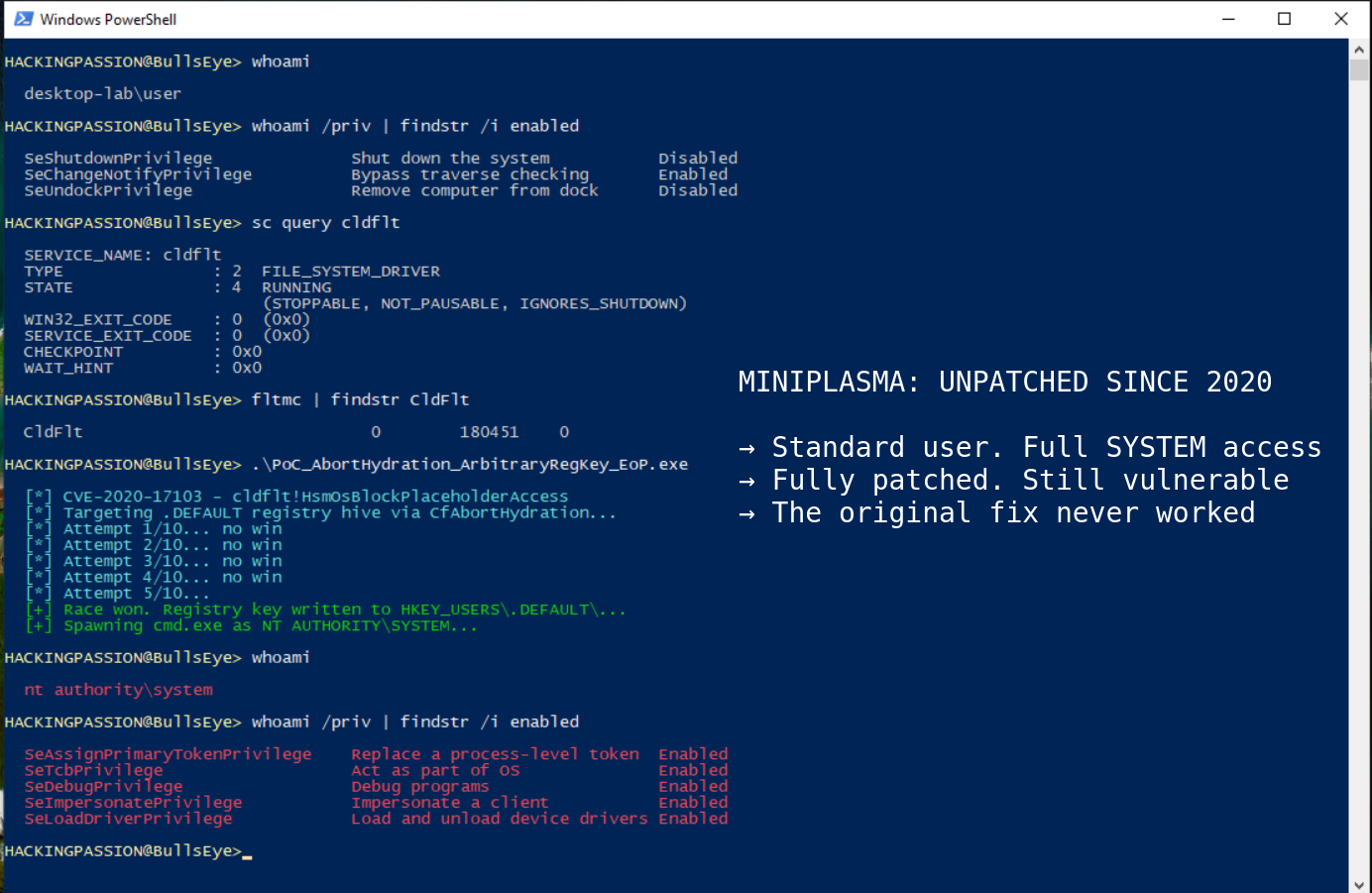
→ Take the full courseA Windows zero-day called MiniPlasma gives any standard user full SYSTEM access on a fully patched machine. Microsoft patched it in December 2020, assigned it CVE-2020-17103, and marked it as fixed. Five and a half years later, the original Google proof-of-concept runs on a machine with all current updates installed without changing a single line of code and opens a SYSTEM shell. Microsoft patched this in 2020. It’s still there.
Chaotic Eclipse, who goes by Nightmare-Eclipse on GitHub, found this by accident. The starting point was GreenPlasma, a different Windows exploit. Going back through the techniques used there, a friend pointed out that a function in a driver called cldflt.sys might still have the same problem that had been reported to Microsoft six years earlier. There was no way, was the first reaction. Microsoft would not just leave a reported bug sitting there for six years. The check happened anyway. Forshaw’s original proof-of-concept from 2020 ran without a single change. It just worked.
The PoC went public on May 15, 2026 via GitHub account Nightmare-Eclipse and the blog at deadeclipse666.blogspot.com. Each post is signed with a system called PGP, which works like a digital seal. It ties the content to a unique private key, so anything published can be independently verified and cannot be changed or forged after the fact. Forshaw found and reported this vulnerability. The researcher just proved it was never actually fixed.
Microsoft issued a standard statement about responsible disclosure and said nothing about why a six-year-old patch simply stopped working.
OneDrive Files On-Demand shows a file in your folder as if it is already on your machine, but it only downloads when you actually open it. The driver that makes that happen is the Windows Cloud Files Mini Filter Driver, cldflt.sys. A kernel driver sits very deep inside the operating system, below where most security tools look. This one is installed and running on machines with Windows 10 version 1809 or later, all versions of Windows 11, and Windows Server 2019, 2022, and 2025. OneDrive does not need to be set up or even installed. The driver is there regardless.
The bug is inside a function in that driver called HsmOsBlockPlaceholderAccess. The problem is a race condition, which means two operations run close enough together in time that one can slip in and interfere before the other finishes. Through an undocumented Windows function called CfAbortHydration, a standard user account with no special permissions can use that gap to write entries into a protected part of the Windows registry called the .DEFAULT user hive. The registry is where Windows stores the settings that control how the system behaves at the lowest level. Writing the right entries in the right place opens a command prompt running as SYSTEM. That is the highest level of access on a Windows machine. Full control, from a standard account, without entering any additional credentials.
The researcher tested it on fully patched Windows 11 and Windows Server 2025. Both produced a SYSTEM shell. An independent test on a Windows 11 Pro machine with the May 2026 updates applied produced the same result. Will Dormann confirmed on Mastodon that it works reliably on Windows 11 including build 26H1 with all current updates. One place it does not work: the latest Windows 11 Insider Preview Canary builds, which are early test versions Microsoft has not released publicly. That gap suggests a fix is being worked on internally, but Canary builds have no release schedule. Everything publicly available is affected right now.
Windows 11 crossed one billion users in January 2026, confirmed by Microsoft’s own earnings call. Add Windows 10 and Windows Server and that is over 1.4 billion active devices worldwide, all of them running cldflt.sys. There is no patch and no advisory.
This goes back to James Forshaw at Google Project Zero. That team hunts vulnerabilities in software from any vendor. Forshaw reported the issue to Microsoft in September 2020. Microsoft assigned it CVE-2020-17103 and shipped a fix in December 2020 as part of a batch of four minifilter driver bugs that went out together: CVE-2020-17103, CVE-2020-17134, CVE-2020-17136, and CVE-2020-17139. The fix for Windows 10 was included in KB4592438. Forshaw published a full technical breakdown on the Project Zero blog on January 14, 2021, titled “Hunting for Bugs in Windows Mini-Filter Drivers.” Google’s own bug tracker still lists CVE-2020-17103 as fixed.
It is not.
cldflt.sys has been a consistent target for years. CVE-2023-36036 in 2023, a privilege escalation in the same driver, actively exploited in the wild and added to the CISA Known Exploited Vulnerabilities list. CVE-2025-50170 in August 2025, another privilege escalation in the same component. CVE-2025-55680 in October 2025, a race condition found by Exodus Intelligence, patched that same month. Then December 2025 brought CVE-2025-62221. A use-after-free means the driver tried to use a block of memory it had already handed back to the system, which gives an attacker a window to put their own data there instead. Microsoft’s own Threat Intelligence Center found this one being actively exploited. The US Cybersecurity and Infrastructure Security Agency added it to their Known Exploited Vulnerabilities list on December 9, 2025 and told US federal agencies to patch by December 30. Also in December: CVE-2025-62454, another issue in the same driver.
On May 12, 2026, three days before MiniPlasma went public, Microsoft’s May Patch Tuesday fixed two more vulnerabilities in cldflt.sys: CVE-2026-33835 and CVE-2026-34337.
Microsoft has patched more than twenty vulnerabilities in the same kernel driver since 2022. Five months after CVE-2025-62221 was being actively exploited and landed on the CISA watchlist, Chaotic Eclipse showed that a bug reported in 2020 and closed as fixed had been sitting there the whole time, on machines that had just received all of those patches.
Security researchers at STAR Labs wrote in 2023 that cldflt.sys had been getting patches in almost each Patch Tuesday and had become a target for attackers, after two other Windows kernel drivers got heavily exploited. The driver handles complex input from regular applications, sits in a part of the system that is hard to monitor, and has a long track record of coding mistakes that lead straight to SYSTEM access.
Since early 2026, the researcher has been releasing Windows zero-days publicly. His first was BlueHammer, a Windows Defender privilege escalation tracked as CVE-2026-33825. Microsoft patched it after attackers started using it. After that came RedSun, another privilege escalation. Microsoft patched that one silently, without assigning a CVE or publishing any advisory, even though it was being actively exploited. Then UnDefend, a tool that crashes Windows Defender so it can no longer function, a denial-of-service attack aimed at the antivirus itself. On May 12 he published YellowKey, the BitLocker bypass covered on this page previously, alongside GreenPlasma, an incomplete privilege escalation targeting Windows text input handling. MiniPlasma came three days later.
The first three releases were each picked up by attackers within days. Once a PoC is public, anyone can pick it up and use it.
On April 25, 2026, a message went up about a dead man switch, built and activated before any of the disclosures started. A technical system stored outside his own location, set to automatically release a large volume of unpublished exploits if triggered. Getting it right before going live took a long time, he wrote. A big release is also promised for the June 2026 Patch Tuesday. Not one promise has been missed yet.
Microsoft has not responded with a patch or a workaround for any publicly released version of Windows.
| |
What to check:
- → Run
winverto see your Windows build. Anything that is not a Canary Insider Preview is affected. - → Check whether the driver is active on the system:
| |
- → Check where cldflt sits in the filter driver stack. It runs at altitude 180451, between the other drivers:
| |
- → Check the driver version on the system:
| |
- → On shared systems and servers, watch for standard user accounts opening SYSTEM-level shells or command prompts.
- → Watch for unusual access to the cloud filter driver from processes that have no reason to be touching it.
- → MiniPlasma is a race condition, so it does not land on the first try. Multiple failed attempts in logs before a successful one is a signal worth investigating.
- → On terminal servers and remote desktop environments where multiple users share a machine, any standard account is a potential path to SYSTEM until a patch is available.
What happens after getting SYSTEM, how credentials get pulled from memory with tools like Mimikatz, and how an attacker moves through a network without triggering alerts, all of it is covered step by step in the ethical hacking course:
Hacking is not a hobby but a way of life. 🎯
Sources: Google Project Zero | GitHub Nightmare-Eclipse/MiniPlasma
Stay updated
Get the latest posts in your inbox every week. Ethical hacking, security news, tutorials, and everything that catches my attention. If that sounds useful, drop your email below.