 HackingPassion.com
Mullvad Says Any Android App Can Send Your IP Past the VPN Kill Switch
Ethical Hacking Complete Course Zero to Expert
Hack like black hat hackers. Penetration testing, Kali Linux, WiFi and web hacking, and the hacker mindset behind it.
→ Take the full courseMullvad Says Any Android App Can Send Your IP Past the VPN Kill Switch
Your phone kept sending its address out on a 10 second timer while the VPN kill switch was on, to a server the app picked. Mullvad says any app can do it. Most phones from Android 12 on are open.
Android has a setting called Block connections without VPN. Switch it on and the phone is supposed to refuse to send anything at all the moment traffic would travel outside the tunnel. Fail closed. That promise is why people switch it on, and it is what a lot of you are relying on right now.
On 10 September Mullvad warned its own users about a leak that walks straight past it. An ordinary app from a store can make your phone send a small packet to an address of its choosing, over and over, 10 seconds apart. Nothing about it puts a prompt on your screen. The packet leaves over your normal Wi-Fi connection instead of the tunnel, and it carries the address your network gave you. The lockdown stays switched on and nothing on the screen changes.
The research behind it comes from Armin Šupuk, who published the full analysis on 29 July with his packet captures in it.
What gets abused here is a battery feature. When your phone keeps a connection open, something has to send a tiny packet now and then, otherwise the router in between decides the connection is dead and drops it. Waking the processor for that costs power, so Android hands the job to the Wi-Fi chip. The chip fires the packet on its own schedule while the rest of the phone sleeps. Android’s own documentation puts it in one sentence: it allows applications to request that the system periodically send specific packets on their behalf, using hardware offload to save battery power.
That is where the lockdown falls over. Blocking connections without VPN is a firewall rule, and a firewall rule works on traffic that comes from apps. This packet does not come from an app. It comes from the chip, underneath the layer where the rule lives, so the rule never gets to look at it.
Three lines of code are enough, and all three are documented public API:
| |
The app needs INTERNET and ACCESS_NETWORK_STATE, the two ordinary networking permissions that never put anything on your screen. Root stays out of it, so does a debugging bridge, and so does the privileged permission that Android has sitting there for exactly this feature.
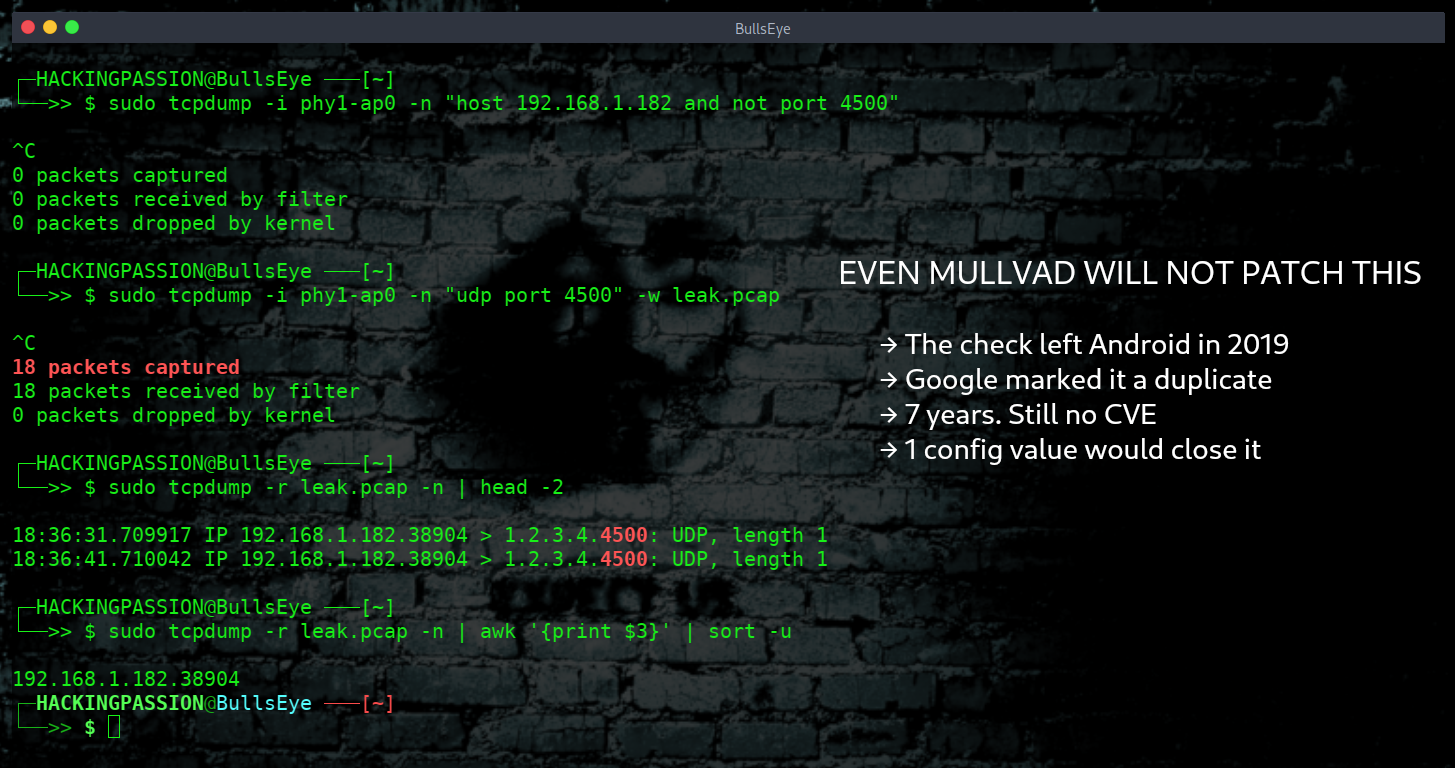
On a router standing next to the phone, the result looks like this:
| |
10 seconds apart, port 4500, a single byte of payload. The address on the left is the phone as the network sees it, and the address on the right is whatever the app decided to point at.
Android’s own rules say a phone that offers this has to handle at least three of them at the same time. On the devices he tested, once the system had taken its own, exactly one was left over for an ordinary app. The next app to ask gets ERROR_INSUFFICIENT_RESOURCES back, error code -32, so whoever arrives first keeps it. And 10 seconds is the floor rather than the only setting, because Android accepts anything up to 3600 seconds, which is an hour. An app that would rather stay quiet can drop back to once an hour and still pick up your address 24 times a day.
It keeps going, too. The researcher put the phone through what an ordinary day does to an app. He backgrounded it, locked the screen, forced it into idle, switched on battery saver, and dropped it into the restricted standby bucket where Android parks the apps it has given up on. The packets kept coming out. On one of the test phones a keepalive slot stayed alive for more than 24 hours and 32 minutes without a break. Force stopping the app ends it, and so does uninstalling it, losing the network or rebooting the phone. Those four are what it takes.
The researcher tested three phones from three different makers, all on Android 16: a Pixel 8 Pro, a Samsung fold and a Nothing phone. The offload feature itself lives in seven Wi-Fi firmware families, Qualcomm, Broadcom, MediaTek, Unisoc, Exynos and HiSilicon among them, which he works out at 91.24 percent of Android phones shipped between late 2021 and early 2026. The code that lets the request through is shared framework code, the same from Android 12 onward. The same phone on Android 17 still shows a free slot. He is careful about what that proves: the slot is there, the bypass itself he did not measure on that version.
This hole was not always there, and working out when it opened took reading seven years of commits.
In January 2019 the keepalive path went in for privileged callers only, and Android enforced the permission properly. In March the public version moved onto that same path. In April a check appeared: prove that the socket you are handing over is actually yours. In May someone reverted that check over worries about a deadlock between system services, and a simple quota per app took its place.
The ownership check never came back. What runs today accepts any file descriptor that is not null, and it does not meaningfully look at the resource id that comes with it. In a separate test, one that sits next to the main finding rather than inside it, he fed the system 0, -2, and the largest and smallest integers it can hold. It took each of them. That has been the state of things for seven years.
Researchers walked right past it a year ago. A 2025 study out of Waterloo swept the Android Automotive framework for permission inconsistencies and flagged this exact method, the one that takes a file descriptor. Its twin demands the privileged permission and this one does not. They reported the inconsistency and moved on. The thread from there to a VPN bypass stayed untouched until now.
He also counted who needs this feature at all. Across 4,679 separate sources on F-Droid and IzzyOnDroid, not one app uses these APIs. On Google Play he found 26 listings that looked like candidates and could get hold of nine of them. Two of those nine actually call them, together good for about 4.13 million installs, which works out at one Android user in ten thousand at most. Shutting the door would break close to nothing.
He writes out the repair as well, and it is not a big one. Make the public caller prove that it owns a live encapsulation socket, and have the system refuse a hardware offload onto the physical network when the lockdown for that app would have blocked the traffic anyway. Two rules, at the point where the request comes in.
His shorter version fits on one line. In the GrapheneOS issue tracker he points at a single configuration value, config_allowedUnprivilegedKeepalivePerUid. Set it to zero and ordinary apps get no slot. His own words for it: a one-line fix. Seven years open, one number to close it.
The researcher filed the report with the Android Vulnerability Reward Program on 15 May, and the team triaged it the same day. Extra validation material followed two days later. On 19 May it landed on an existing internal issue as a duplicate, number 386376240, which is not public: open it and all you get is a login screen. In June he told Google he was going to publish. Two update markers went into the file on 12 and 15 June, both redacted, and what came back to him carried neither a severity rating nor a fix date. The paper went out on 29 July. The flaw still carries no CVE number. CyberInsider asked Google for comment on this one and had nothing back by the time they published.
Mullvad put it in front of their own users on 10 September. Their sentence leaves little room: a newly discovered leak in Android allows any app to send traffic outside the VPN tunnel.
They also say straight out that they will not build a workaround into their own app. Anything they could build would have to send packets outside the tunnel itself, even if only to their own servers, and a malicious app can be running before the VPN app has started. Their advice is to install only apps you trust and, where possible, to run GrapheneOS.
This is the fourth time in four years that this same switch has come up short, and Mullvad has been there for all four.
- → October 2022. Android sends its connectivity checks outside the tunnel each time the phone joins a Wi-Fi network, lockdown or no lockdown. Mullvad’s conclusion at the time: there is nothing we can do in the app to fix the leaks, we can however inform our users that they exist.
- → May 2024. DNS traffic leaks outside the tunnel. Mullvad writes that the setting does not live up to its name, or to its documentation, and that it has multiple flaws.
- → April 2026. A QUIC cleanup path lets an app push data out past the lockdown. The Android security team closed that one as Won’t Fix. GrapheneOS shipped a fix in release
2026050400, commit7930a86931, by switching the optimisation off. Google’s comment to the press was that it only affects devices that have downloaded a malicious app, and that Play Protect protects users against known malicious apps. - → September 2026. This one.
Four times the same promise and four times roughly the same answer. The party that keeps closing these holes is a small Android fork, and not the company whose name is on the setting.
Even four is only what reached the press. In that same issue tracker a GrapheneOS developer writes that they have found and fixed at least ten more leaks that have not shipped yet, all of them by hand. He explains why this one is not at the top of the pile: there are leaks that happen without an app trying anything at all, and those come first. On money he is blunt. Google doesn’t pay us and isn’t going to pay you for VPN leaks. In the same thread the researcher writes that the man who found the April leak went unpaid as well and that his appeal came to nothing. Two known routes now push your address past the lockdown, and neither of them is being closed at the source.
Your messages stay inside the tunnel, and so do your browsing and anything you type. A single byte leaves the phone. What the far end collects is the address your network sees, the knowledge that your phone is switched on, and the rhythm of it, 10 seconds at a time. For a stalker or an investigator trying to tie an anonymous account to a person sitting in a particular house, that is not a small prize, but it is a very different thing from reading your traffic.
What you can do about it today:
- → Run GrapheneOS if your phone supports it. They have acknowledged this one and are working on a fix.
- → Keep your app list short and boring. This needs an app on your phone to work, and Google’s own answer rests entirely on that.
- → Force stopping the app ends it, and so does uninstalling it or rebooting the phone. Locking the screen does not.
- → Watch your own network. Put the phone on your Wi-Fi, capture on the router, and look for UDP heading to port
4500while the tunnel is up. One warning before you draw conclusions: 4500 is the standard port for IPsec NAT traversal, so a VPN that speaks IKEv2 or IPsec puts legitimate traffic there too, and the port number alone will not tell you which is which. - → Switching to a different VPN provider does not help. This happens below the VPN app, which is why no VPN app can stop it.
Put your phone on your own network, run a capture on the router, and watch what leaves while the tunnel is up. My Ethical Hacking Complete Course Zero to Expert takes you there step by step: reconnaissance, scanning, exploitation and traffic analysis, hands-on, from your first day with no Linux or hacking background.
→ Join my complete ethical hacking course
Hacking is not a hobby but a way of life.
Sources: Mullvad VPN | Šupuk, Android NAT-T keepalive VPN bypass | GrapheneOS issue 8617
Stay updated
Get the latest posts in your inbox every week. Ethical hacking, security news, tutorials, and everything that catches my attention. If that sounds useful, drop your email below.