Office Zero-Day Actively Exploited - CVE-2026-21509
Want to learn ethical hacking? I built a complete course. Have a look!
Learn penetration testing, web exploitation, network security, and the hacker mindset:
→ Master ethical hacking hands-on
(The link supports me directly as your instructor!)
Hacking is not a hobby but a way of life!
Microsoft Office zero-day actively exploited. Every version from 2016 to 365, including LTSC 2021 and 2024, over 400 million users. Attackers bypass all the protections Microsoft built to stop malicious documents. Just open the file, and they are in. Microsoft pushed an emergency patch on a Sunday. 🧐
CVE-2026-21509. CVSS 7.8.
Someone sends a Word document, an Excel file, a PowerPoint. The target opens it. No macro warning pops up, no “enable content” button appears. The embedded object just executes and the attacker has access.
Here is what happens under the hood. The document contains an embedded OLE object. When Office loads the file, it sees the object and tries to render it. This particular object points to Shell.Explorer.1, which is basically Internet Explorer wrapped inside your document. That embedded browser can load local files, execute scripts, and connect to remote servers. From there, attackers download and run whatever they want. All from opening a Word document.
Unlike previous Office vulnerabilities, the Preview Pane is not an attack vector here. The target has to actually open the file.
Microsoft has spent years building protections against this exact attack. OLE, the technology that lets you embed content between Office applications, has been abused by attackers for over a decade. Microsoft added mitigations to block dangerous embedded objects. This vulnerability bypasses those mitigations entirely.
COM objects are Windows components that programs can call. Think of them as building blocks. Office uses them to embed content, play media, show web pages inside documents. Each COM object has a unique ID called a CLSID. Attackers have known for years that certain COM objects give you code execution when embedded in Office files.
The fix tells the story. Microsoft blocked a COM object called Shell.Explorer.1. CLSID {EAB22AC3-30C1-11CF-A7EB-0000C05BAE0B}. This is the Microsoft Web Browser control, an embedded browser that can be placed inside Office documents. Red teamers have used this trick for years to get code execution through phishing documents. The OLE mitigations were supposed to stop it. They did not.
Security researcher Yorick Koster documented this exact technique back in 2018. He showed how Shell.Explorer.1 bypasses the file extension blacklist in Office 2016 and 365. Eight years later, attackers found a way around the protections that were supposed to block it.
MSTIC found this being exploited in the wild. That is Microsoft’s threat intelligence team. When they discover something, it usually means sophisticated attackers going after specific targets rather than mass spam campaigns. No public proof-of-concept exists yet, which is probably why attacks have stayed relatively contained. Microsoft has not said who is behind it.
The timing makes it worse. Office 2016 and 2019 reached end of support on October 14, 2025. Microsoft said no more security updates. Three months later they had to push an emergency patch anyway because attackers were actively exploiting exactly these versions. Millions of organizations still run Office 2016 and 2019.
Office 2021, LTSC 2021, LTSC 2024, and Microsoft 365 already have the fix. Restart your Office applications and the protection is active.
Office 2016 and 2019 need manual updates:
→ Office 2016: install KB5002713
→ Office 2019: Version 1808 (Build 10417.20095)
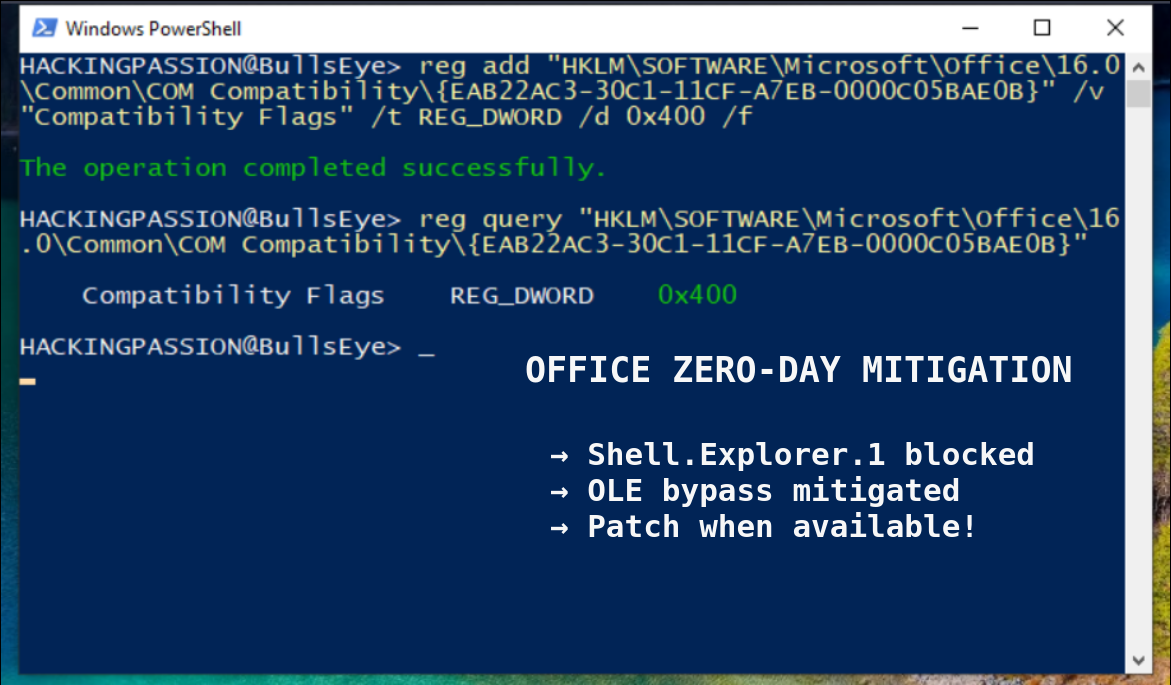
If patching is not possible right now, there is a registry workaround. Block the vulnerable COM object manually:
HKEY_LOCAL_MACHINE\SOFTWARE\Microsoft\Office\16.0\Common\COM Compatibility\{EAB22AC3-30C1-11CF-A7EB-0000C05BAE0B}
Add a DWORD value called Compatibility Flags, set it to 400. The exact path varies depending on 32-bit vs 64-bit Office and Click-to-Run vs MSI installations, check the Microsoft advisory for the correct location.
CISA added this to the Known Exploited Vulnerabilities catalog. Federal agencies have until February 16, 2026 to patch.
This fits a pattern that goes back over a decade. OLE vulnerabilities are a favorite of nation-state actors. CVE-2017-11882, the Equation Editor bug from 2017, is still being exploited in 2026. APT28, Russian military intelligence, used CVE-2023-23397 to steal NTLM hashes through Outlook. Storm-0978, a cybercriminal group based out of Russia, exploited CVE-2023-36884 to target European defense and government organizations. The specific vulnerability changes every time, but the method stays the same: malicious Office document, embedded object, code execution.
Attribution in those cases took months or years. Who is behind this one? Nobody knows yet.
OLE is 30 years old. Still dangerous. Still exploited. Still landing in your inbox.
Understanding how these attacks work is how you learn to spot them. Social engineering, phishing, malicious documents, I cover it all in my ethical hacking course:
Hacking is not a hobby but a way of life.
→ Stay updated!
Get the latest posts in your inbox every week. Ethical hacking, security news, tutorials, and everything that catches my attention. If that sounds useful, drop your email below.