 HackingPassion.com
Pass the Passkey Attack Bypasses Entra ID MFA Using a Windows Log
Ethical Hacking Complete Course Zero to Expert
Hack like black hat hackers. Penetration testing, Kali Linux, WiFi and web hacking, and the hacker mindset behind it.
→ Take the full courseSomeone could sign in as a company’s top admin by reading one Windows log file. The admin’s password and passkey were never touched. Microsoft called it medium severity and paid the finder 1,000 dollars. 🧐
Passkeys were supposed to make this impossible. Instead of a password you type, your device holds a secret key and proves who you are with it. The key is never typed and never sent to a website, so a fake login page has nothing to grab. That is why they are called phishing-resistant, and Microsoft is pushing them hard. On September 1, 2026 it switches passkeys on by default and starts nudging users still on text or voice codes to register one. That nudge can be snoozed. The hard deadline is February 1, 2027. After that, if a text or voice code is your only way in, you have to register a passkey before you can sign in, and companies cannot opt out.
Then a researcher took it apart, and he never had to break the secret key or crack any code.
Michael Grafnetter, from the security firm SpecterOps, showed his Pass-the-Passkey research at the Black Hat conference on August 5. He found three separate weaknesses in Windows 11 and in Entra ID, the login system companies use for Microsoft 365 and Azure. Two of them work together, and the result should not be possible. You sign in as someone else, right up to the highest admin account, and the company’s phishing-resistant login rule lets it through.
He named it Pass-the-Passkey after two old Windows attacks, Pass-the-Hash and NTLM Relay. They all share one trick. You never steal the secret itself. You grab a piece of proof the computer already made and reuse it, and the system accepts it because it looks exactly like a genuine login.
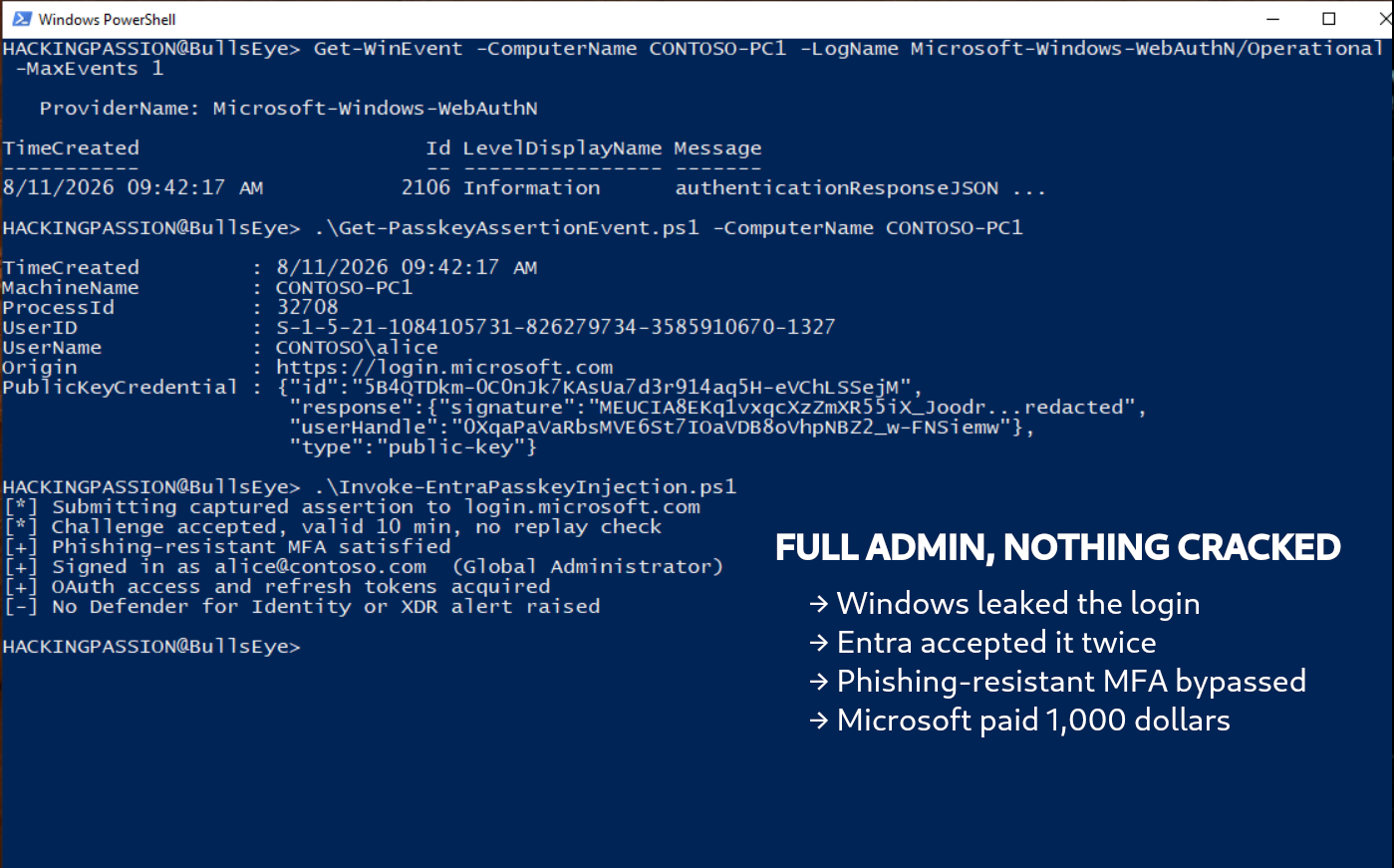
The first weakness is in Windows. Each time someone signs in with a passkey, Windows wrote the full proof of that login into a log file. Not a short note. The complete proof, the exact details a website checks before it believes the login is yours. This happened on Windows 10, Windows 11 and Windows Server.
And that log was easy to read. On the same computer, even an account with no special rights could open it. From another computer on the same network, sitting in a group like Remote Desktop Users or Event Log Readers was enough. It did not matter which passkey you used, a YubiKey, Windows Hello, a scan from your phone, they all got written down the same way. The only logins that stayed out of the log were the ones done in a private or incognito window.
This gets dangerous on a shared computer. Say a top admin signs in on a shared workstation or a jump box that other people use too. Someone with barely any rights in the cloud, but access to that computer, reads the admin’s saved login and sends it to Microsoft as their own. Now they are the admin.
That last step only works because of the second weakness, and this one is on Microsoft’s side. When you log in, the website is supposed to check that your proof is fresh and has never been used before. Entra ID did not. So the same login could be sent a second time, and Entra took it.
The passkey standard lists 25 steps for this login check, and a few of the steps that stop reuse are the website’s own job. Even Microsoft, which helped write the standard, skipped some. Other sites did not. GitHub tied each login to its own session back in January 2026, so a login grabbed on one machine is useless on another.
To keep things fast, Entra let each login stay valid for a few minutes. In testing it still worked after ten. Grafnetter’s dry note: even thirty seconds is plenty for an automated attack.
He ran the attack against a top-tier Microsoft security setup, the kind with extra monitoring switched on. The monitoring stayed silent.
SpecterOps and Microsoft do not agree on how bad this is. SpecterOps reported it as a way to take over an account and rated it 8.6 out of 10, high. Microsoft called it a smaller information leak, dropped the score to 6.5, and paid a 1,000 dollar reward. Its public note says an attacker “could potentially read small portions of heap memory.” That wording is misleading. The bug let you become the top admin of a company’s cloud.
There is a small irony in it. Grafnetter is a Microsoft MVP, a title Microsoft itself hands out. He reported three bugs to the company that gave him that title, took the 1,000 dollars, watched his 8.6 turn into a 6.5, and released his tools as open source anyway.
Microsoft did fix the log leak. Since July 14, 2026, patched computers cut the saved proof down to a stub, too little to reuse. Good. But the reuse side is only half closed. In May, Microsoft added a check that catches reused logins from hardware keys like YubiKeys. That check works by spotting a counter the key raises each time it signs in. Windows Hello, the face or PIN login built into Windows, never raises that counter, so its logins can still be replayed. Windows Hello is built into business laptops and needs no extra hardware, so plenty of companies run exactly that.
The third weakness Microsoft chose not to fix. When Windows asks you to approve a passkey, it shows which app is asking, so a careful person can check. Grafnetter found a way to make that box look like it came from a browser you trust, even from another account. Add a flood of these prompts until someone taps approve out of habit, and you have passkey fatigue. Microsoft marked it low and closed the case.
Some of this needs no Microsoft bug at all. Malware already on your computer can ask Windows for a passkey login itself, and point it at any site it likes. Windows shows you the normal prompt, you approve with your face or PIN like always, and the login goes to the attacker instead of the website. Patching does not stop this, because nothing is broken. Windows is doing what it was built to do.
The reach goes further than your own desk. When you use Remote Desktop to log into another Windows machine, Windows passes passkey prompts back to your own computer, and that pass-through is on by default. So malware on a server you connect to can make a passkey prompt pop up on your laptop, where you are far more likely to approve it. Hyper-V does the same over its enhanced session.
Staying in is even easier. An attacker with enough access can add an extra passkey to a valuable account, using the same admin tool a company uses to hand out keys to new staff. That passkey is a login of its own. It keeps working after the victim changes their password, and it sits there until someone notices and deletes it.
Grafnetter was not the only one that week. Two more findings landed at the same time and point the same way.
- → Dirk-jan Mollema showed that malware inside a Windows session can borrow the machine’s Windows Hello key without asking for a new PIN or fingerprint, and use it as a passkey against Entra.
- → Unit 42 went after Google’s synced passkeys. The worst version steals a master key that protects the synced passkeys, and Google has no way to cancel it. Steal it once, and the copies keep working.
None of this makes passkeys worse than passwords. They are still the better choice. The lesson is that the secret key was never the weak spot. The software around it was. If you run Windows or Entra:
- → Install the July 2026 updates, starting with admin machines and any shared or jump computers.
- → Give your most important accounts a physical hardware key, not a synced passkey. For a top admin, the convenience of syncing is not worth it.
- → Limit who can read the Windows event logs, and check the remote-access groups.
What to look for:
- → passkey logins landing in the
Microsoft-Windows-WebAuthN/Operationallog (Event ID 2106), and who can read it - → Entra logins from Windows Hello that carry no device ID
- → new devices added to an account out of nowhere
This one query, from Mollema’s writeup, flags the Windows Hello logins with no device attached:
| |
Grafnetter also released two free scripts with the research. Get-PasskeyAssertionEvent.ps1 shows whose logins are sitting in your logs, and Invoke-PasskeyCircuitBreaker.ps1 watches the log live and can freeze the browser or cut its traffic the moment a passkey login is signed.
Want to see how attackers land on a Windows machine and pull the credentials straight out of memory? You start at the basics and build up from there. I cover Windows, privilege escalation, post-exploitation, and pulling credentials straight off a machine you have landed on, step by step, in my ethical hacking course:
→ Join my complete ethical hacking course
Hacking is not a hobby but a way of life.
Sources:
Stay updated
Get the latest posts in your inbox every week. Ethical hacking, security news, tutorials, and everything that catches my attention. If that sounds useful, drop your email below.