 HackingPassion.com
Google Password Manager Passkeys Hijacked by Malware on Windows
Ethical Hacking Complete Course Zero to Expert
Hack like black hat hackers. Penetration testing, Kali Linux, WiFi and web hacking, and the hacker mindset behind it.
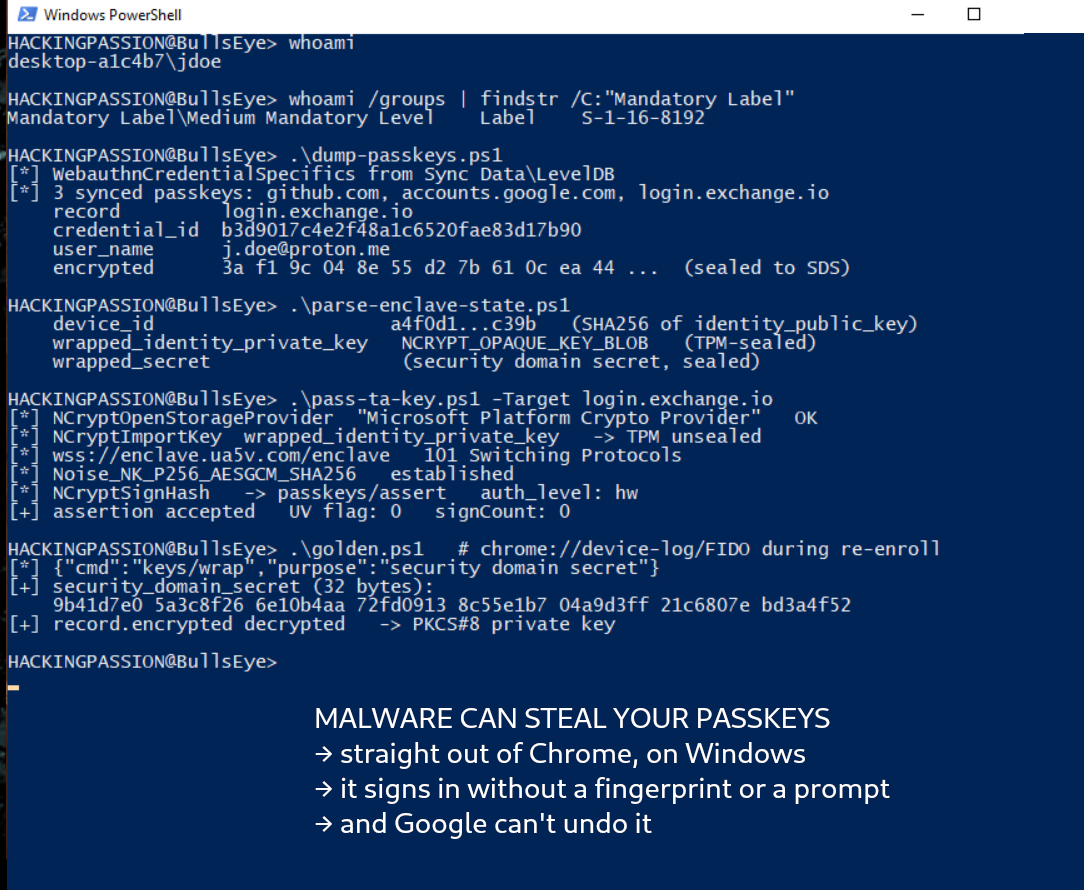
→ Take the full courseOne 32-byte key protects the passkeys synced to your Google account. On Windows, a researcher lifted it out of Chrome’s memory and signed into a crypto exchange with no fingerprint and no PIN. Google cannot change that key or take it back. 🧐
A passkey sells one promise. No password to phish, no shared secret on the website’s server to leak, and a private key that stays with you. Your face or your fingerprint releases it. That part holds. What the marketing skips is that a synced passkey does leave your device, in encrypted form, so Google can copy it to your other devices. This research is about that copy, and it starts the moment something is already running on your computer. Not with administrator rights. As you, in the account you are signed into right now.
Arie Olshtein at Palo Alto Networks’ Unit 42 published it on August 3, in three attacks he named Pass-ta-key, Silver Pass-ta-key and Golden Pass-ta-key. None of them breaks the cryptography. The signatures they produce are perfect. What breaks is the machinery around the maths. The work covers Google Password Manager in Chrome on Windows, on machines with a TPM security chip.
Here is how it works.
Chrome keeps your synced passkeys in an ordinary database inside your profile folder. Reading it needs no special rights.
| |
Each record holds the site, your username there, the credential identifier, and your private key in encrypted form. An attacker opens that file and walks away with a list of where you bank, which exchange holds your coins, and which shops you log into, before running a single cryptographic operation. That list decides which of the three attacks is worth the effort on you.
Your computer has a TPM, a small chip that holds keys software cannot read back out. Windows 11 requires one, so most recent machines carry it, laptop or desktop. Chrome uses it to prove to the server that a login is coming from your machine. That proof is called the identity key, and it should never leave the chip.
It leaves anyway.
The cause is one missing argument. Chrome creates the key by calling the Windows function NCryptCreatePersistedKey without giving it a name, and an unnamed key is never stored in the chip. The Chromium source says so, right above the call:
| |
That TODO is still open. So Chrome exports the key, the chip wraps it in a key that never leaves the hardware, and Chrome writes the wrapped blob to a file called passkey_enclave_state. Only your machine can unwrap it. The problem is that your machine includes anything running on it. Malware copies the blob from the file, or lifts it from Chrome’s memory, and calls three ordinary Windows functions any program is allowed to call.
| |
The chip cannot tell one program from another. It unwraps the key, signs what it gets, and hands back the result. No prompt, no elevation, nothing on your screen. The attacker starts a login on your bank, gets a fresh challenge, opens a connection to the cloud authenticator, and has the malware sign it with your chip. The server sees a registered device asking a normal question and answers it. The site lets them in. For this one your machine has to be on, because your chip does the signing, so you are usually sitting in front of it.
A second key was supposed to stop this. The identity key proves the machine. A separate key, locked behind Windows Hello, proves a person confirmed the login with a face, a fingerprint or a PIN. That second key is why a passkey counts as two factors. The signature carries a flag showing which key signed it: 1 when a person was verified, 0 when only the machine was. The second factor is that one bit.
Olshtein expected the server to reject anything signed without the human check. It does not. It returns a valid answer either way, and the bit is the only difference. So the decision is not made on the server. It falls to the website, and the website has to read the bit. Some do, some do not.
GitHub reads it. Sign in there with a machine-only signature and it stops you.
| |
eBay set its login to require the human check and then never looked at whether it happened. In the recorded demo the login goes straight through, with no interaction from the victim at all. It was fixed after Olshtein reported it. Those are the only two sites named. There is no published number for how many others get it wrong, so any percentage you have seen was made up.
The first attack needs your machine on for each login. The second removes that, through something left open for your convenience. The state file holding your wrapped key has nothing stopping it from being deleted, so anything running as you can delete it. The next time you use a passkey, Chrome enrolls your device from scratch. On Windows that enrollment is left half finished on the first run. Chrome asks for your recovery PIN, and making the Windows Hello key at the same moment would fire a second PIN prompt seconds later. Two prompts that close together confuse people, so Chrome registers the device with a marker that says the verification key comes later, and makes it on your next passkey use.
That marker leaves an empty slot on the server, and the server accepts whatever public key turns up to fill it. The attacker makes a key pair in their own environment and sends the public half to claim the slot. The server does not check where a new verification key came from. Nothing confirms it came out of a TPM, a phone, or any hardware. From there the attacker holds a key the server treats as proof that you confirmed the login in person. Your machine can sit switched off in a drawer while you are away. The flag comes back set to 1, the website sees a verified person, and nothing is happening at your end.
The third attack goes after the master key underneath it all. The key is 32 bytes, made once for your account, and it encrypts the private key inside each passkey you sync. It should never reach your device in a form you can read. The server is meant to hold it and do the unwrapping. Olshtein found it printed in Chrome’s own logs during enrollment, with no memory forensics and no debugger. He opened chrome://device-log/FIDO and read the master key off the page.
It was taken out of the logs after the report. The printing stopped. The sending did not. Those 32 bytes still land on your machine each time you enroll, and they sit in Chrome’s memory while it happens. So the third attack is the second one with a step added. Delete the state file to force a re-enrollment, wait for the file to come back, dump Chrome’s memory at that moment and take the 32 bytes, then decrypt your passkey private keys straight from the database.
That master key cannot be rotated and cannot be revoked. Changing your password does nothing. Wiping the laptop does nothing. A passkey you make next year, on a machine you have not bought yet, uses the same 32 bytes someone already walked away with. Nothing has been built to replace them. The demo for this one was run against a crypto exchange.
Several write-ups ended on the same line, that the vendor did not respond to a request for comment. It did respond, in December, in a bug tracker that now opens without a login. Chromium issue 465359916 is titled “Missing Signature Counter Enables Undetectable Abuse of Synced Passkeys.” Olshtein filed it on December 2, 2025 through Chrome’s bug bounty program. It was marked a vulnerability and set to priority P1, and it lists all three attacks as the reason detection matters, because the signature counter is the one thing that lets a website notice logins coming from where they should not.
An engineer answered the same day. He thought it was working as intended, since a passkey synced across many devices cannot keep one consistent counter. Two weeks later another reply added that Chrome zeroes the same counter on macOS too, on a local device with no syncing at all. The issue was closed as intended behavior on December 11, and it became public on March 20. The decision stands.
A few things this is not. There is no CVE and no version to update to. No group is running these attacks, there is no campaign, and no sign any of it has happened outside a lab. The logging change is the only thing that has moved. The three attacks begin in the same place, with something already running on your Windows machine as you.
What the research shows is that the safety of your passkey ends well past the maths. It runs through a chip that signs for whoever asks, a file nothing protects, an enrollment left unfinished to dodge a prompt, a server that accepts a key it never checked, and a master key with no replacement. Hardware keys and secure enclaves still raise the bar, and Olshtein says plainly they do not take the risk away. A passkey still beats the password you reused in 2019. Knowing what it stands on is worth more than the marketing.
If you use passkeys:
- → A physical security key on your keyring sits outside all of this, with no synced master key and nothing to export
- → Use one for the accounts that would ruin your month
- → The rest is endpoint hygiene, because that is where the three attacks start
- → Nothing to patch, nothing to wait for
If you build sites that take passkeys:
- → Read the user verification flag on the assertion instead of setting the parameter and trusting it
- → Requiring the check and never looking at whether it happened is the exact mistake caught on camera
Those three functions in the first attack are ordinary, documented Windows APIs. The malware dropped no driver, escalated nothing, and did nothing a security tool flags on sight, because it asked the system for something the system hands over willingly. Turning a machine’s own trusted tools against it, and pulling secrets out of memory once you are on it, is post-exploitation, and my ethical hacking course walks through it step by step:
→ Join my complete ethical hacking course
Hacking is not a hobby but a way of life.
Sources: Unit 42: Pass the Passkey | Chromium issue 465359916 | Chromium source: unexportable_key_win.cc
Stay updated
Get the latest posts in your inbox every week. Ethical hacking, security news, tutorials, and everything that catches my attention. If that sounds useful, drop your email below.