 HackingPassion.com
Plug and Pwn Turns a Fake USB Device Into SYSTEM on Fully Patched Windows 11
Ethical Hacking Complete Course Zero to Expert
Hack like black hat hackers. Penetration testing, Kali Linux, WiFi and web hacking, and the hacker mindset behind it.
→ Take the full coursePlug and Pwn Turns a Fake USB Device Into SYSTEM on Fully Patched Windows 11
Two researchers took over a fully updated Windows 11 machine in five minutes with a USB device that was never there. The machine sat at the login screen. Windows downloaded the vulnerable software itself. 🧐
Plug and Play is the part of Windows that makes hardware work without you doing anything. You connect a printer, a webcam, a phone, and a few seconds later it works. What happens in those seconds is that the device announces what it is, Windows takes that announcement at face value, looks up the matching software package at Microsoft, downloads it, and installs it. That installation does not run as you. It runs as NT AUTHORITY\SYSTEM, the account with more power on the machine than the administrator has, and it never asks permission, because there is no prompt anywhere in that flow.
Underneath, that runs in four steps. The device hands over a small card of information about itself, its descriptors, and Windows turns that into an identity number it can look up. Windows registers the device in its list of connected hardware. That registration passes into the Configuration Manager through one internal call, IOCTL 0x47084F. The Configuration Manager then wakes the Device Installation Service, DSMSVC, which runs as SYSTEM, looks in the local driver store, and starts a download from Windows Update when it finds nothing that fits.
Alejandro Hernando and Borja Martinez, two red team operators, took that flow apart and presented the result at DEF CON 34 under the name Plug and Pwn. Their finding is not one bug in Windows. It is that the delivery system itself hands vendor code the highest rights on the machine, after which the only question left is which vendor package is worth delivering. A signed driver package means Microsoft checked the signature. It does not mean the service, the co-installer, the debug flag or the registry value inside it was ever read from an attacker’s point of view.
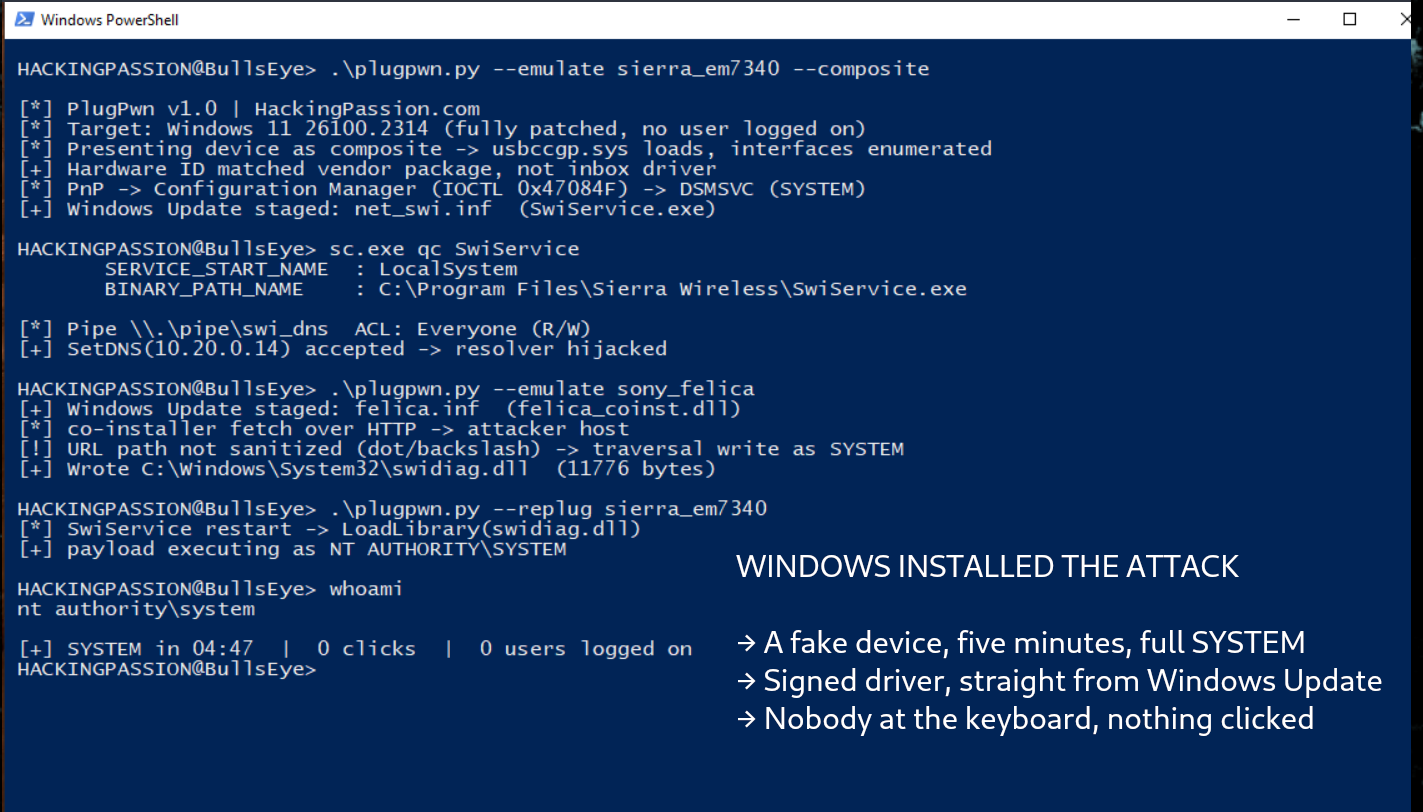
The first chain needs no logged-in user and no clicks, and it runs in about five minutes.
It starts with a Linux laptop running FaceDancer, a Python framework from Great Scott Gadgets that lets you build a USB device in software, with a Cynthion or GreatFET board speaking the protocol on the wire. Together they claim to be a Sierra Wireless EM7340 modem module. One detail decides whether that works at all. The device says it is not one thing but several in one plug, which is what a composite device is. Windows then loads usbccgp.sys and handles each part separately, and that is what makes it reach for the vendor package instead of the plain driver it ships with.
Windows reads the hardware ID, goes out to Windows Update, and installs the Sierra driver package. That package includes SwiService, a Windows service that runs as SYSTEM and opens a named pipe so other programs can talk to it. The permissions on that pipe grant read and write access to Everyone. Any account on the machine can connect to it, and so can an account on another machine over SMB. One of the functions waiting on the other side of that pipe sets the DNS servers.
At that point the attack controls where the machine looks up names, and it got there through a device that only ever existed as a description on a wire.
Then the same board claims to be a Sony FeliCa card reader. Windows installs the Sony package, and that one ships a co-installer called felica_coinst.dll. A co-installer is a small DLL that runs during device installation to finish the configuration, and this one goes out to fetch its settings over plain HTTP. The DNS answer it receives is the attacker’s, so the file it downloads is the attacker’s too. The URL handling in that component does not filter dots or backslashes, which turns the download into a path traversal: a write to any location on disk, carried out by a process running as SYSTEM.
They write a DLL into System32. Then they reconnect the Sierra device, its service starts up, it loads the DLL that is now sitting exactly where it expects to find one, and the code inside runs as SYSTEM.
Both packages are legitimate. Both are signed. Neither vendor shipped anything resembling malware. The chain exists because Windows was willing to go and fetch both of them on request from a device that was making up its own identity.
The second chain drops the hardware entirely. The researchers call it NoPlug and Pwn.
Remote Desktop can pass USB devices from your machine through to the server you connect to. The server never sees the hardware. It builds its picture of the device out of the descriptors the client sends over a channel called URBDRC, and it believes what arrives. The researchers wrote a Python RDP client that sends descriptors for a device that does not exist, an Intel RealSense camera. The server creates the device node and installs the package for it. From there they use the order in which Windows looks for a program’s building blocks. It checks C:\Intel\RSDCM first, a folder a normal user may write to, so whatever gets placed there is what gets loaded.
A standard user with valid credentials, a remote desktop session and no hardware at all ends up as SYSTEM on the server. USB redirection over RDP is switched off by default, through the fDisablePNPRedir setting. Where an administrator turned it on for a reason that made sense at the time, the door is open.
The third chain is the one worth studying, because both halves look defensible on their own.
The Wacom tablet service runs as LocalSystem. It reads a registry value named PowerT, and when that value holds one specific four-byte pattern, 7F 4C 6B 34, the service opens an interactive command prompt on the desktop. That is a leftover debug path, out of reach for a user without rights.
The Atheros wireless service also runs as LocalSystem. It listens for short numbered commands from anything on the machine, and command 133 reaches a function that creates and changes registry keys with the service’s own rights. That one has a name: CVE-2019-10617. DownWithUp reported it to Qualcomm in April 2019, Nick Landers at NetSPI found it again five months later and was told it was a duplicate, and Qualcomm fixed it by taking the registry code out of the service completely.
Neither gives you SYSTEM by itself. Put them together and the picture changes, though not on the first try. Going straight from Atheros to the Wacom value failed, because the Atheros service reads its input character by character and the bytes that come out are not the ones Wacom is waiting for. The way around it runs through the Windows print spooler. The Atheros service writes an entry into the part of the registry where Windows keeps its printer helpers:
| |
The print spooler runs as SYSTEM and loads the monitor DLLs listed under that key. Their DLL, PocPortMon.dll, sits in ProgramData, where a normal user can write. After a reboot the spooler loads it as SYSTEM, it writes the PowerT value, the Wacom service restarts, and a command prompt with SYSTEM rights opens on the desktop.
Three services, none of them built to do this, all of them arriving on the machine because someone connected a device that never existed.
This is not new ground. In August 2021 a researcher going by j0nh4t showed the same thing with a Razer mouse. Plug it into a Windows 10 machine and Windows downloaded and ran RazerInstaller.exe as SYSTEM, and from that installer window you could open a PowerShell prompt with the same rights. SteelSeries devices did the same thing. Will Dormann, then at CERT/CC, published the registry value that blocks the mechanism.
The hardware was optional even then. Istvan Toth built an Android USB gadget that emulated the Razer device with no mouse in the room. What is gone five years later is the clicks and the logged-on session, and the target has moved: instead of one vendor’s installer, this goes after the install path itself.
Microsoft did act on it. Since January 2023, driver packages containing a co-installer are no longer signed by the Hardware Developer Center portal, under the 22H2 hardware compatibility policy.
The fix only points forward. Everything already sitting in the driver store keeps being served, co-installer and all, and that store goes back years. The Sony component in the first chain is one of those. So is the Atheros package. A flaw Qualcomm repaired in 2019 can still land on a machine in 2026, because Windows picks which package to install and the old one is still on the shelf. The patch exists. It is not the version being handed out.
The researchers deliberately did not report most of this as new vulnerabilities, because on their own the pieces are not security bugs. They only become one in combination.
Dormann and the researchers do not agree on how much that matters. On 10 August, Will Dormann pointed out that setting DisableCoInstallers blocks this entire class of vulnerability, and called it disappointing that the plugandpwn site never mentions it anywhere. Two days later Hernando answered that it helps and would break parts of what they showed, but that it does not stop the class, because PnP enumeration, Windows Update resolution, driver staging and INF-installed services stay untouched.
None of this stayed on the conference stage. The researchers released their tooling along with the talk: the script that emulates the fake USB device, the Python RDP client that invents one over the network, and a utility that replays the installation flow without hardware. A Linux laptop and a Cynthion or GreatFET board are enough to walk through the chains.
What you can do:
- → Block co-installers. This is the registry value Will Dormann published back in 2021. Microsoft does not document it publicly, so test it before you push it out widely:
| |
The trade-off is that a device’s configuration software no longer installs by itself, so you download it from the vendor when you need it. And it is not a full stop, because by Hernando’s account the services that arrive through the INF stay outside its reach.
- → Switch off USB and PnP redirection for Remote Desktop where it is not needed, through
fDisablePNPRediror the matching group policy. - → Restrict device installation by hardware ID, so a machine only accepts the classes of hardware it is supposed to see.
- → Look for driver installations on machines with no active session. A workstation at the login screen that suddenly installs a modem driver is not a normal event.
The install button is not on your screen. It is the port on the side of your machine, and it has worked that way for years.
You do not need years of experience to find a weak service like that one. In my ethical hacking course you build your own lab first, then work up to Windows privilege escalation, step by step from zero:
→ Join my complete ethical hacking course
Hacking is not a hobby but a way of life.
Sources:
Stay updated
Get the latest posts in your inbox every week. Ethical hacking, security news, tutorials, and everything that catches my attention. If that sounds useful, drop your email below.