 HackingPassion.com
Printer Tracking Dots Put Your Color Laser Printer's Serial Number on the Pages You Print
Ethical Hacking Complete Course Zero to Expert
Hack like black hat hackers. Penetration testing, Kali Linux, WiFi and web hacking, and the hacker mindset behind it.
→ Take the full courseYour color laser printer puts its serial number on your pages in yellow dots. You will not notice them. Printers from 15 of 18 makers had them, a Secret Service request going back to at least the early 1990s.
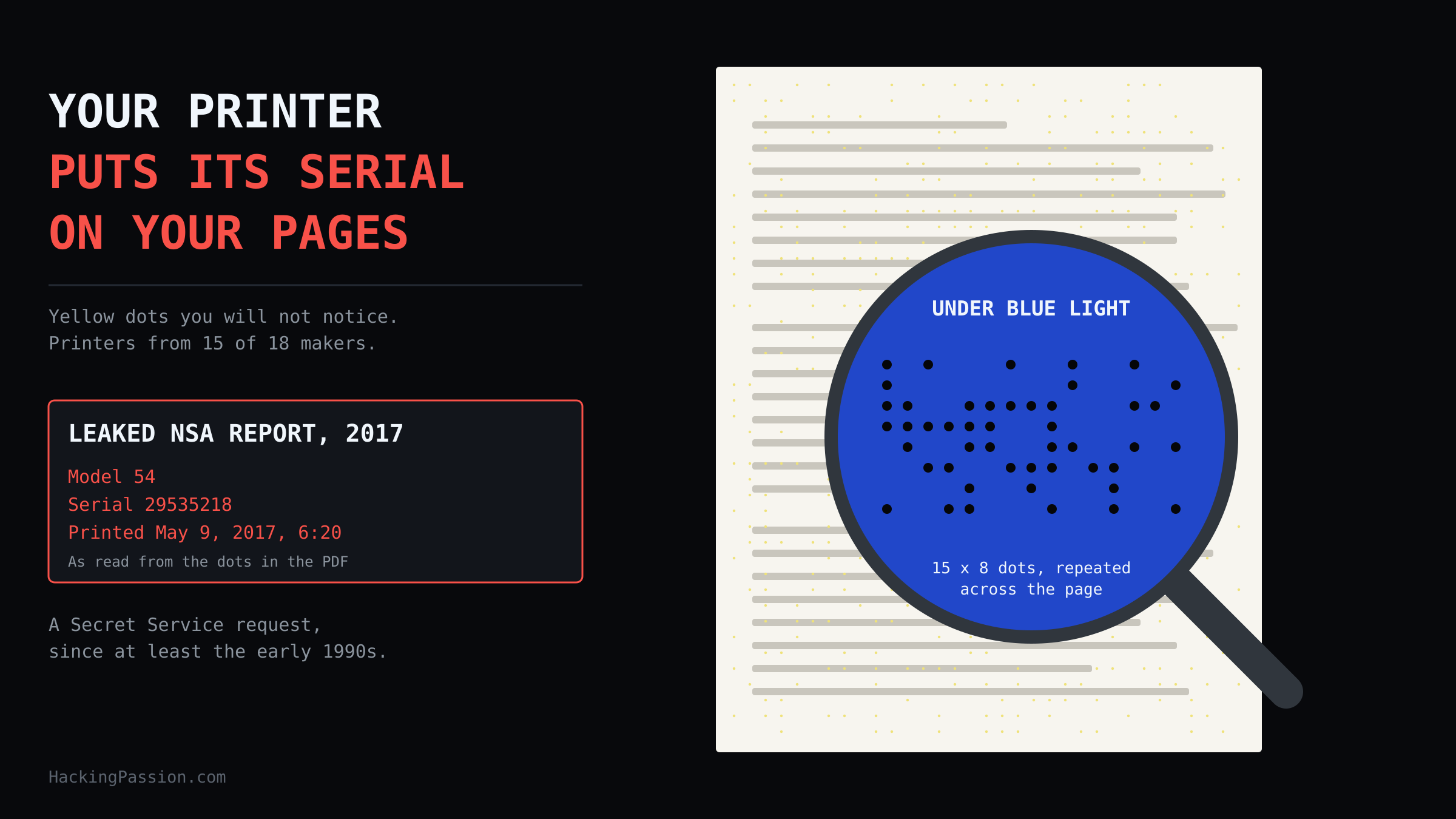
A color laser printer works with four toners: cyan, magenta, yellow and black. Next to the text and the pictures you asked for, many of these printers add something you never asked for, in yellow. Tiny dots, spread over the white parts of the paper in a fixed pattern. On white paper, a few specks of yellow are almost impossible to see with the naked eye. Shine a blue light on the page and look through a magnifying glass, and they show up black.
The Electronic Frontier Foundation, the EFF, worked out what those dots say in 2005, for one Xerox model, the DocuColor. On that printer they form a block of 15 by 8 positions. Each position either has a dot or stays empty, so each one is a 1 or a 0, a single bit. The block is printed again and again across the page, so a part that is covered by text or cut off still has a copy somewhere else on the sheet.
Read the block from right to left and it gives you the serial number of the printer, with two digits in each column. After that come the year, the month, the day, the hour and the minute the page came out. The block even checks itself. Each column, and each row except the top one, holds an odd number of dots, and the printer adds an extra dot where needed to keep it odd. A lost dot, or a speck of dust that looks like one, breaks that count, and the reader knows the line is damaged.
The group put a decoder online, a page where you enter the dots and get the serial number and the time back.
In June 2017, that decoder ended up in the news. The Intercept published a classified NSA report as a scanned PDF, and the yellow dots were still on it. On June 5, Robert Graham of Errata Security opened that PDF in Preview on his Mac, zoomed in on an empty part of the page and took a screenshot.
In a paint program he inverted the colors, so the faint yellow turned into a clear pattern of dark dots. He rotated the image 180 degrees, entered the dots in that decoder and got his answer: what he read as printer model 54, serial number 29535218, printed on May 9, 2017 at 6:20. That time comes from the printer’s own clock, which can be set wrong.
That same day, the US Justice Department announced charges against Reality Winner, a 25-year-old contractor from Augusta, Georgia. According to the complaint, she worked for a company called Pluribus International at a government facility in the same state and had held a Top Secret clearance since February. She printed the classified report on or about May 9 and mailed it to a news outlet a few days later. The FBI had arrested her at her home on June 3. During the search of her house, she admitted that she printed and mailed it. The Deputy Attorney General said that exceptional law enforcement efforts made it possible to identify and arrest her quickly.
May 9 is the date in the dots.
The affidavit, the sworn statement behind her arrest, tells a plainer story. On May 30, the news outlet got in touch with the agency behind the report about an upcoming story and handed over a copy of the document. The agency saw that the pages looked folded or creased, as if someone had printed them and carried them out of a secure room. An internal audit showed that six people had printed the report. The agency then went through the desk computers of those six. Only she had email contact with the news outlet.
The affidavit does not mention the dots once. A 2018 study from TU Dresden still calls them the most probable reason she was identified. The dots were decoded in public on June 5, two days after the arrest. Either way, the published file carried the serial number of the printer and the date of printing, and a free decoder and a paint program were enough to read it.
The official reason for the dots is counterfeit money. According to the EFF, manufacturers built them at the request of the US Secret Service. A fake banknote from a color copier or printer could then be traced through the serial number and the customer records of the manufacturer to the owner of the machine. The group found that the agency had worked with printer makers on this since at least the early 1990s, without the public knowing about it, let alone discussing it.
According to the group, the dots could trace the authors of an anonymously printed political pamphlet to at least the serial number and maker of their machine. And the group wrote that it did not even know whether the government has to ask the manufacturer each time, or could simply hold a copy of the customer database and look people up itself.
A senior research fellow at Xerox told the group that the company handles each request from the agency case by case, and only identifies suspected currency, not pamphlets, letters or other documents. He was also the one who suggested the blue light and the magnifying glass, and the group confirmed that this was enough to see the dots. The 2018 paper adds a line from a 2004 interview, in which a research fellow at the company said the US government and his company have a good relationship.
In 2017, the group wrote that the dots come from secret agreements between governments and the printer industry, and that the US is not the only government involved. The group added that nothing in the technology limits it to money.
The researchers behind that 2018 study work in printer forensics: working out which printer made a page. Most methods look at small flaws in the print itself, like rough edges on letters or tiny shifts in the lines, and they usually get no further than the brand and the model. Tracking dots point to one specific device. So the team wanted to know exactly what is in them.
They started by asking printer makers. One manufacturer replied. It called them Document Colour Tracking Dots, could not answer the questions, and sent the researchers on to the Central Bank Counterfeit Deterrence Group. That group wrote back that the dots are not its product or technology.
So the researchers decoded the dots themselves. They worked with 1,286 prints from 141 printers, 106 models from 18 manufacturers. Most of the prints came from an archive of the German Research Center for Artificial Intelligence with prints from 132 printers, the rest from printers at their own computer science department. They scanned each page at 800 dots per inch, a very sharp scan.
What they found on the printers they tested:
- → Canon, Dell, IBM, Kyocera, Lanier, NRG, Ricoh and Savin: dots
- → HP, Xerox, Epson, Konica Minolta, Lexmark and Okidata: dots on some models
- → Brother, Samsung and Tektronix: no dots found
That last line comes from a small test, with one, five and four printers from those three brands. One more printer in the set came from an unknown maker, and it had dots as well.
The dots come from the firmware, the software built into the printer itself. Across the 18 makers, the researchers found four different patterns. They differ in size, from a block of 18 by 23 positions to one of 24 by 48, and in how far apart the dots sit, between 0.02 and 0.04 inch. Three of the patterns had been described in earlier research. Pattern 1 had never been published before.
Pattern 1 shows up on Ricoh printers, on Lanier and Savin, two brands that belong to the same company, and on NRG. The researchers cracked how it stores the serial number. In their example, one block of dots reads out as W794P601601, the serial number of that printer, letters included.
Pattern 2 is used by five manufacturers that are not part of the same company: HP, Kyocera, Lexmark, Okidata and Ricoh. The researchers found it on 51 devices. The first block of that pattern tells you which of those manufacturers made the printer. In their example, it reads 3, 2, 1, 0, and that combination means Okidata.
Pattern 3 shows up on Epson and Konica Minolta printers. Here the researchers found the structure, but so far no link to anything they knew about the printers.
Pattern 4 is the one decoded in 2005, with the date and the time in it. The researchers found it on 16 devices from Dell, Epson and Xerox.
Many Canon printers showed something different again: a pattern that changes from print to print and seems to repeat itself in a rotated form. The researchers did not try to decode that one.
Patterns 1, 2 and 3 stay exactly the same on each print from the same printer. That is why the researchers think those three hold fixed information, such as the serial number, and not the date.
When they read the serial numbers out of the dots and compared them with the printers, 100 percent of them were part of the printer’s actual serial number.
A note in their paper lists Canon, Brother, HP, Konica Minolta, Ricoh and Xerox as companies that signed an agreement with the Secret Service to handle document identification requests. The source for that is a reply the agency sent in February 2012 to a Freedom of Information Act appeal. Brother is on that list, while the one Brother printer in the test showed no dots.
According to the researchers, tracking dots have no lock on them. Whoever holds the page can read them, the authorities and any third party alike, and the printer often belongs to the person who wrote the text. For a critical leaflet in a dictatorship, that would be a disaster.
A page without visible dots can still carry a code. Documents the digital rights group obtained describe a newer generation that slightly moves dots the printer was going to print anyway, instead of adding new yellow ones. Since 2017, the group’s advice has been to assume a color laser printer marks your pages, even when you see no dots.
In 2007, a member of the European Parliament asked the European Commission about these tracking codes. The Commission answered in January 2008 that tracing people through what they print or copy could break their right to privacy and the protection of their personal data. In the same answer, it said it knew of no specific law on tracking in color laser printers.
You can check your own prints. Print a page with plenty of white space on a color laser printer, shine a blue LED light on it and look through a magnifying glass. Yellow dots from your printer show up as a regular grid of black points in the empty areas.
For a full readout, the same researchers released DEDA, a free toolkit. Scan the page at 300 dpi and save it as PNG, which keeps each pixel as it is. A JPG compresses the image and can smear dots this small:
| |
The tool finds the dots, maps them into a grid and decodes the pattern when it knows the format. With two or more scans, it can also tell you if the pages came from the same printer, and with an unknown pattern it can pull the dots out for your own analysis:
| |
It works the other way around as well. With deda_create_dots, the toolkit adds a tracking dot pattern of your own to a PDF before you print it. So a pattern on a page can be made by hand. Keep that in mind before you treat yellow dots on a document as proof of which printer made it.
The toolkit can also hide the code. It prints extra yellow dots on top of the pattern, so the original code can no longer be read back.
How many depends on the pattern. Patterns 1 and 4 are the ones the researchers fully worked out. For those, the tool adds a limited number of dots in empty spots and breaks the built-in check on purpose, so a reader can no longer tell which dots are original and which were added.
For patterns 2 and 3, part of the code is still unknown and might hide a second check. There the tool fills each empty spot in the code blocks with a dot. That makes the yellow easier to spot, but it is the safe option.
To build the mask, the tool first has to learn where your printer puts its pattern. You print a test page, scan it, and the tool works out the mask for your specific printer. The test page is A4 and has small magenta squares in the corners, plus one cyan square, so the tool can line up your scan. Yellow stays off the test page, because the tracking dots already use it. Then the mask goes over the document you want to print:
| |
Print the test page and the document without page margins. A different margin can leave part of the original pattern uncovered. The tool also sets the document to A4 before it adds the mask, something to know for printers that run on US Letter paper.
Scans need their own step. Before you publish a scan of a printed page, deda_clean_document removes most of the yellow from the empty areas of the image, which is exactly where the dots sit:
| |
What you can do:
- → Check your own color laser prints with a blue light and a magnifying glass
- → Before you publish a scan of a printed page, remember the dots go along with it; clean the scan first
- → For pages that must not lead back to a printer, print in black only or use an inkjet; the toolkit’s documentation says those might not contain tracking dots, which is not a guarantee
- → Do not take yellow dots on a document as proof on their own, since a pattern can be added by hand
Want to see what else your files give away? Run exiftool on a PDF before you send it and read what is inside.
My Ethical Hacking Complete Course Zero to Expert takes you there step by step:
reconnaissance, scanning, exploitation and traffic analysis,
hands-on, from your first day with no Linux or hacking background.
→ Join my complete ethical hacking course
Hacking is not a hobby but a way of life.
Sources:
Forensic Analysis and Anonymisation of Printed Documents, TU Dresden | DocuColor Tracking Dot Decoding Guide, EFF | Affidavit in support of arrest of Reality Leigh Winner, US Department of Justice
Stay updated
Get the latest posts in your inbox every week. Ethical hacking, security news, tutorials, and everything that catches my attention. If that sounds useful, drop your email below.