 HackingPassion.com
RedSun and UnDefend: Two Unpatched Windows Defender Zero-Days
Ethical Hacking Complete Course Zero to Expert
Hack like black hat hackers. Penetration testing, Kali Linux, WiFi and web hacking, and the hacker mindset behind it.
→ Take the full courseTwo unpatched Windows Defender zero-days have been actively exploited since April 16th, and both of them work on fully patched Windows 10, Windows 11, and Server 2019 and later, including machines that installed this month’s Patch Tuesday updates. One of them makes Defender write the attacker’s payload into System32 by itself, then stands back and lets Windows run it as SYSTEM. The other blocks Defender from receiving any new virus definitions and lies to the EDR management console about it, showing green checkmarks on machines that are already fully compromised. 😏
The two exploits are called RedSun and UnDefend, and they come from the same GitHub account that released BlueHammer earlier this month. Microsoft patched BlueHammer during April’s Patch Tuesday under CVE-2026-33825. RedSun and UnDefend did not get that treatment. The working proof-of-concept code sits publicly on GitHub, and it runs on every supported version of Windows that has Defender enabled.
Even on machines that are fully up to date.
A Windows machine patched with everything Microsoft has shipped this year can still be taken over by an unprivileged user with local access, running a tool that anyone with a GitHub account can download in thirty seconds.
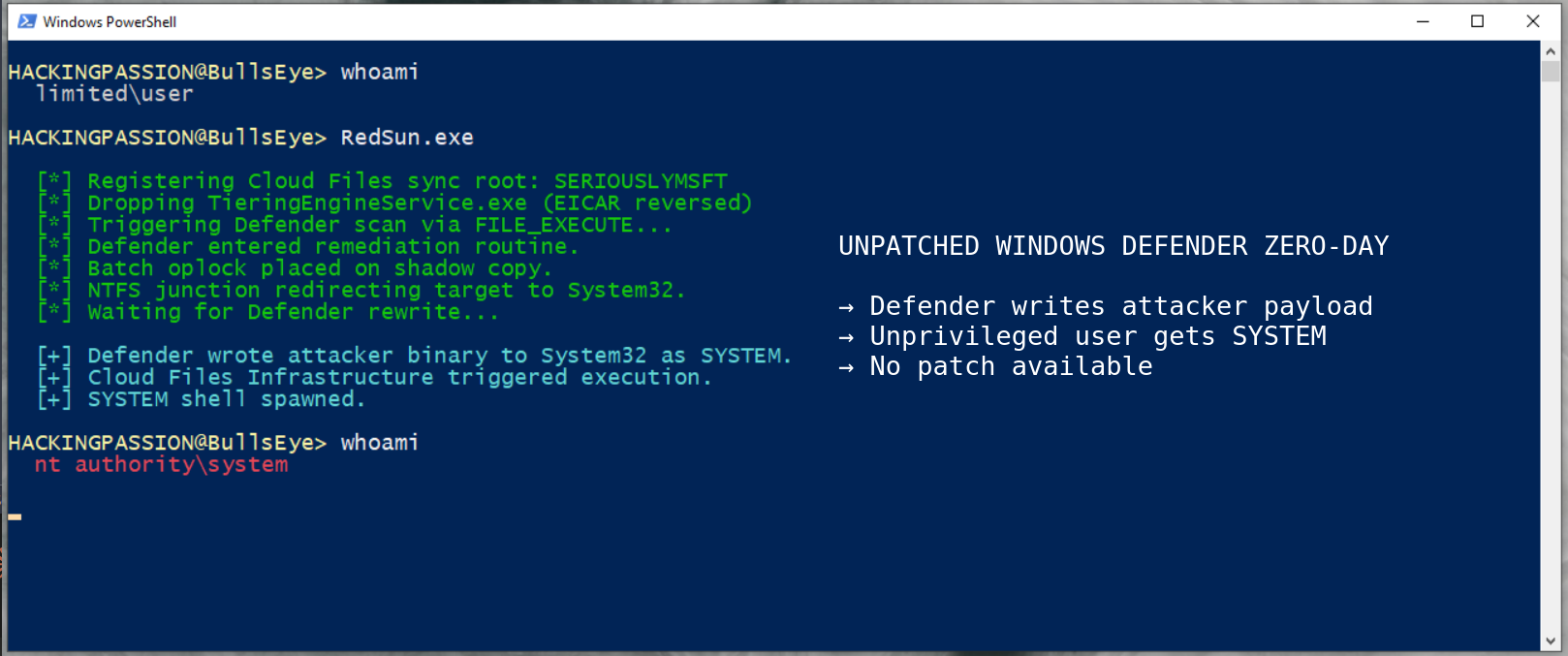
To understand why RedSun works, you need to know about one strange decision inside Windows Defender. When Defender detects a malicious file that carries what is called a cloud tag, meaning metadata telling Windows this file belongs to a cloud service like OneDrive or Dropbox, it does not quarantine or delete the file. It assumes the file must have been corrupted during sync and tries to rewrite it back to its original location, and that rewrite runs under Defender’s own SYSTEM privileges because Defender always runs as SYSTEM.
RedSun turns that well-meaning behavior into a weapon. The exploit drops a decoy file into a temporary folder, tags it as a cloud file using the Windows Cloud Files API, and forces Defender into its remediation routine. While Defender is paused on a precise timing lock called a batch oplock, the exploit silently swaps what the target folder actually is, using an NTFS junction point as a redirect. The path Defender thinks is the user’s temp folder is now pointing at C:\Windows\System32. When Defender resumes and writes the restored file, the write lands in System32 under SYSTEM privileges, and the binary that ends up there is the attacker’s own, swapped in at exactly the right moment.
The file that gets written is named TieringEngineService.exe, and that choice is not random. TieringEngineService is a real Windows service that normally manages how data moves between SSDs and hard drives, runs automatically under SYSTEM, and lives in System32 by default. By replacing its binary in the spot Windows expects, the attacker gets Windows to launch their payload as SYSTEM on its own schedule, with Defender doing the placement and Windows doing the execution without the attacker needing to do anything else.
The root cause of all this is a missing reparse point validation inside MpSvc.dll, the core Malware Protection Engine that Defender runs on top of. The engine does not check whether the target path has been swapped before performing its privileged write. One missing check.
One detail in the exploit shows the level of thought behind it. The decoy file needs to contain something Defender will recognize as malicious, and for that the researcher uses the EICAR test string, a harmless 68-character string every antivirus is programmed to flag as a test. If the researcher had stored that string inside the exploit binary the normal way, Defender would have detected and blocked the exploit itself at first execution. The solution was to store the EICAR string backwards and flip it to the correct order in memory at runtime. Anti-antivirus design, baked into the attack.
One moment in the RedSun source code deserves attention. To pull the cloud tag trick off, the exploit has to register itself as a fake cloud sync provider, and that registration requires a provider name. The name written directly into the source code, visible to anyone who reads it, is SERIOUSLYMSFT. Next to it is a comment aimed at Microsoft, daring them to keep playing this game. The earlier BlueHammer exploit used the provider name IHATEMICROSOFT. This is a public, personal fight with Microsoft, playing out inside working exploit code that is already in the hands of real attackers.
The second tool is UnDefend, and what it does is simpler than RedSun but possibly more damaging in what it enables.
UnDefend does not give anyone SYSTEM. It goes after Defender itself. It watches the folder where Windows stores Defender signature updates, the file that holds its virus database, and the moment a new update tries to arrive it blocks it. Defender keeps running. The process keeps showing up in Task Manager. Real-time protection keeps reporting as on. But nothing new ever reaches the detection engine. Over a few weeks, an antivirus that looks alive on the surface becomes blind to every threat that has emerged in that time.
What UnDefend does beyond blocking updates needs to be said plainly, because this is the detail that turns it from a nuisance into a serious problem.
UnDefend lies to your EDR management console. Most organizations running Windows at scale have a central dashboard somewhere that shows whether every endpoint is healthy, up to date, and protected. UnDefend makes Defender report itself as healthy and up to date to that dashboard, even when it has been blinded. Your security team looks at a screen full of green checkmarks. Every machine on the list says protected. The machines with UnDefend running are wide open, and the dashboard has no idea.
Green checkmarks, all the way down.
Huntress Labs has been reporting what the real-world attacks actually look like, starting on April 16th. The attackers first get initial access through a compromised VPN account, specifically a FortiGate SSL VPN where multi-factor authentication was never turned on. Once inside, they run reconnaissance commands like whoami /priv, cmdkey /list, and net group to figure out what account they are on and what that account can do.
Then they drop the exploit binaries into the user’s Pictures folder or Downloads folder, often renamed to look innocent, names like z.exe or FunnyApp.exe, sometimes tucked into two-letter subfolders. UnDefend runs first to blind Defender and degrade the dashboard. RedSun runs second to take SYSTEM. The combination is deliberate, and what Huntress described as hands-on-keyboard activity means this was a human doing this in real time, not a script.
As of today, neither RedSun nor UnDefend has been assigned a CVE, and neither has been publicly acknowledged by Microsoft. The next scheduled Patch Tuesday is weeks away, and whether there will be an out-of-band emergency update or not is still an open question.
Meanwhile the code is downloadable and working. Multiple security teams have reproduced RedSun with success rates approaching 100 percent, including CloudSEK who confirmed it running on Windows 11 25H2 Build 26200.8246, which is the most recent version of Windows 11 shipping right now. Real attacks are happening.
Here is what to check on your own systems and the systems you are responsible for.
Open a PowerShell prompt and look at whether Defender is still receiving updates and running real-time protection:
| |
If the timestamp on the last signature update is older than about a day, something is wrong, and UnDefend is one of the possible reasons.
Check the hash of your TieringEngineService.exe against a known clean baseline. Any unexpected change there is a strong indicator that RedSun has already run on the machine:
| |
Search the common staging folders for the exploit filenames:
| |
If any EDR logs or ETW captures show a process that is not OneDrive or Dropbox or Box calling the Cloud Files API with the provider name SERIOUSLYMSFT, that is an exact-match indicator of RedSun activity and it should be treated as a confirmed compromise.
If Windows Update history shows repeated failures on Defender signature updates with Error Code 80070643, that is one of the fingerprints UnDefend leaves behind when running in passive mode.
Here is what to actually do about it.
- → Apply the April 2026 Patch Tuesday updates anyway. That closes BlueHammer, which is being used in the same attacks.
- → Turn on multi-factor authentication on every VPN account, without exceptions. Every single attack Huntress has reported started with a compromised VPN login that did not have MFA.
- → Block execution from the Pictures and Downloads folders where possible, using AppLocker or Windows Defender Application Control. These are the folders the attackers actually use.
- → If the endpoint protection strategy relies only on Windows Defender, this is the moment to think seriously about adding a second layer that does not sit on the same architecture that is currently being abused.
- → Watch Microsoft’s Security Update Guide for the eventual fix, and apply it the moment it ships.
What RedSun and UnDefend show together is bigger than two specific exploits in one antivirus. Windows Defender sits on more computers than any other security tool, and its design was built around assumptions that no one appears to have stress-tested against a determined attacker. When the tool meant to protect a machine becomes the thing that carries the attack into it, and a second tool makes sure the dashboard never tells anyone, what you are looking at is a design problem. Not two bugs.
Privilege escalation, climbing from an unprivileged foothold to SYSTEM, and using Windows’ own built-in tools to do it, is exactly what I cover in my complete ethical hacking course. The full attack chain, from reconnaissance through exploitation to post-exploitation:
Hacking is not a hobby but a way of life.
Sources
Stay updated
Get the latest posts in your inbox every week. Ethical hacking, security news, tutorials, and everything that catches my attention. If that sounds useful, drop your email below.