 HackingPassion.com
Microsoft Signed 11 Files That Bypass Secure Boot
Ethical Hacking Complete Course Zero to Expert
Hack like black hat hackers. Penetration testing, Kali Linux, WiFi and web hacking, and the hacker mindset behind it.
→ Take the full courseSome malware loads before Windows even starts, before your antivirus exists. It survives a full reinstall, and 11 files signed by Microsoft are all it takes.
One check is supposed to make that impossible. These 11 get past it, on almost any PC.
ESET’s Martin Smolár published this on July 14. The files are old, some more than ten years old, and each one carries a valid Microsoft signature.
When you turn on your computer, something runs before Windows does. It is the firmware, the low-level code built into the machine, and its job is to load the thing that loads Windows. Secure Boot is the check that runs at that moment. It looks at each piece of startup code and asks one question: is this signed by someone I trust? If the answer is yes, it runs. If no, it stops.
Your PC does not choose who it trusts here. It comes with a short list stored in the firmware, and Microsoft sits at the top of it. Anything carrying a Microsoft signature boots. That is how Windows starts. It is also how Linux starts on the same machines, through a small helper Microsoft agreed to sign.
That helper is called a shim. A shim is a tiny first-stage bootloader. Microsoft checks it once, signs it, and from then on the shim vouches for the rest of the Linux boot chain, GRUB and the kernel. It saves Linux distributions from going back to Microsoft for a signature on each update. Microsoft signs the shim, the shim signs the rest.
Those shims were signed years ago and never taken back. ESET found 11 old ones, all at version 0.9 or below, that Microsoft signed and forgot. They came from PC diagnostic tools, Linux distributions, all sorts. One of them is Abitti, the software Finnish students sit their national exams on. Microsoft signed it, and that signature works as a Secure Boot bypass on any PC that trusts it. And an attacker does not need the software they came from. He brings his own copy of the old shim and drops it on the machine. The firmware trusts it, because the Microsoft signature is still valid.
The trouble with an old shim is what it does not know. It never got the fixes that came after it.
Take the trick behind CVE-2026-10797. A signed file writes down how long its signature is, and it writes that length in two separate places inside itself. The old shim reads one of those places when it checks whether a file has been banned. It reads the other place when it checks whether the signature is genuine. Line those two up differently and the ban check looks at the wrong bytes. The file sits right there on the forbidden list, revoked, and the shim never notices. There is a limit: it only works when the ban targets the signer, not the file’s exact fingerprint. This bug was quietly fixed in the shim’s own code almost exactly ten years ago. It just never got a CVE number until now, and all these old signed copies still carry it.
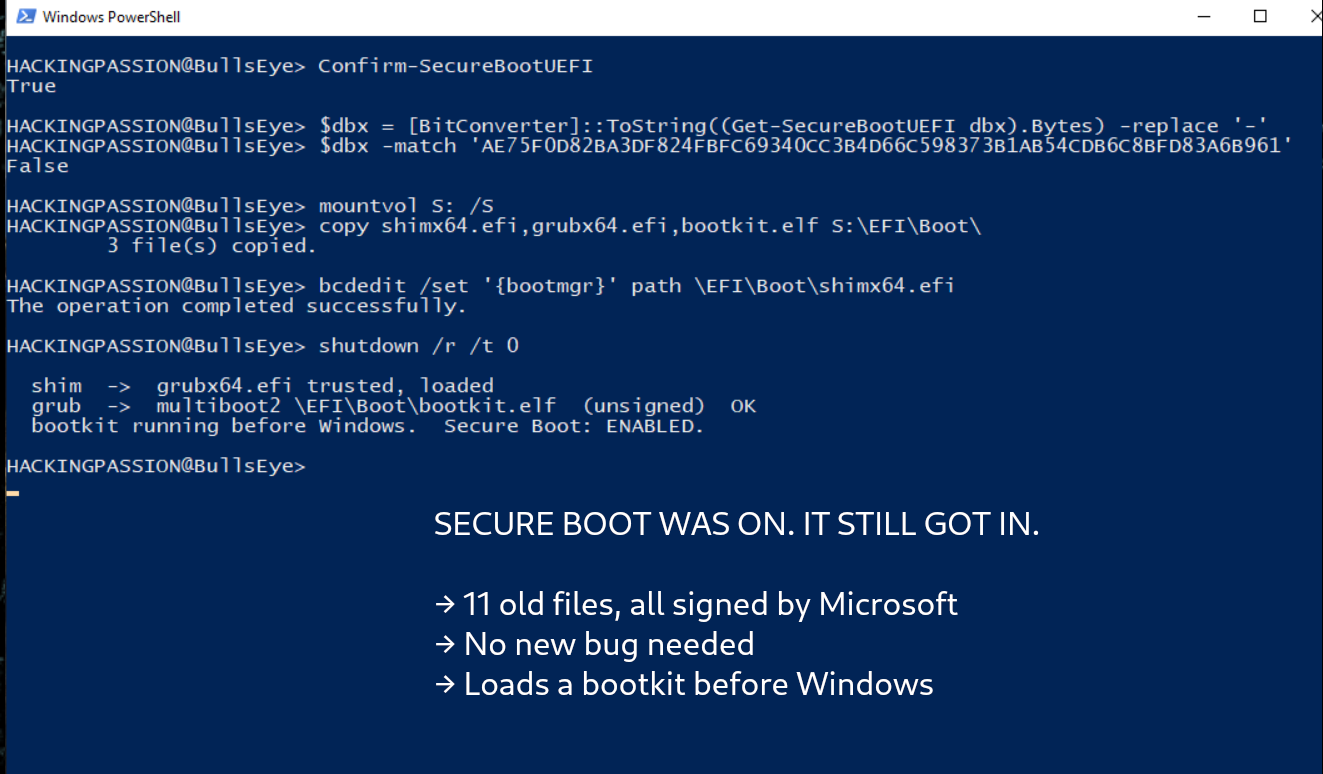
Some of it does not even need a new bug. One of the reported shims, from an old Oracle Linux, trusts a version of GRUB with a hole known since 2015, tracked as CVE-2015-5281. It leaves a feature called multiboot2 switched on, and that feature loads code without checking the signature. A build meant for Secure Boot should leave it out. This one did not. So an attacker writes a small unsigned program, copies it next to the old shim and GRUB, and one command loads it during boot. No memory corruption, no exploit chain, no reverse engineering. Just an old signed file doing exactly what it was built to do, on a machine that trusts it.
What sits at the end of this is a bootkit. That is malware that loads before Windows, before any antivirus is up, and hides in the boot process so a reinstall does not clear it. ESET has found malware doing exactly this: Bootkitty, HybridPetya, BlackLotus. Secure Boot is the one thing meant to keep them out. These old shims let them through.
Why does this old junk still linger? Because the forbidden list itself is tiny. That ban list, called dbx, lives in the firmware and holds around 32 KB. When a single 2020 bug called BootHole had to block 150 signatures at once, that alone ate a third of the space. There is no room to ban each old file one by one. So the cleanup lags, and forgotten shims keep their valid signatures for years.
You might think this fixes itself. That Microsoft certificate expired on June 27. But an expired certificate changes nothing here. Secure Boot does not care about the date. As long as the certificate stays on the trusted list and is not explicitly banned, anything ever signed with it keeps booting. Microsoft kept signing new files with it right up to the day it expired.
And the rest? Never counted. These 11 are only the ones ESET went looking for and found. The catalogue of who signed what only started in 2017. There is no record of anything signed before that. How many more old, trusted shims are still out there is unknown.
That is the point. This is not one clever new hole. It is that no new hole is needed. An old file, still trusted, never revoked, is enough to switch off one of the most important protections your computer has. The fix is not a better check. It is remembering to revoke the old files before someone reuses them.
Microsoft files it as CVE-2026-8863 and rates it Important, not Critical. The reason it is not Critical is exactly this: it is not a one-click attack from the other side of the internet. An attacker needs to reach the machine first, with admin rights or with his hands on it, to drop the files and point the boot at them. What the old shim gives him is the next step. Once he is in, he can dig in below the operating system, out of sight of the tools that run above it. He stays there through a wipe. It turns a temporary break-in into a permanent one.
Microsoft revoked all 11 on the June 9 Patch Tuesday, adding their signatures to the forbidden list that Secure Boot checks each time the machine starts. If your Windows updates are current, you likely already have it. You can check for yourself. Open PowerShell as administrator and look for one of the revoked signatures in your ban list:
| |
True means that shim is revoked on your machine. ESET published the full list of 11 and a script that checks all of them at once.
What to do:
- → On Windows, install the latest updates. The June revocation ships through Windows Update.
- → Check it landed: in an admin PowerShell, match the 11 revoked hashes against your dbx with
Get-SecureBootUEFI dbx. - → Secured-core PCs already have the third-party key off. If you manage a fleet, that setting is worth turning on.
This is the kind of thinking I teach in my ethical hacking course. Why a signed, trusted file is not automatically a safe one, how attackers turn the tools a system already trusts against it, and how they dig in and keep their access:
→ Join my complete ethical hacking course
Hacking is not a hobby but a way of life.
Sources:
ESET, Forgotten UEFI shims undermining Secure Boot | Microsoft MSRC, CVE-2026-8863 | NVD, CVE-2015-5281
Stay updated
Get the latest posts in your inbox every week. Ethical hacking, security news, tutorials, and everything that catches my attention. If that sounds useful, drop your email below.