 HackingPassion.com
Siemens Software Center Ran Attackers' Code With a Valid Siemens Signature on PCs That Never Installed It
Ethical Hacking Complete Course Zero to Expert
Hack like black hat hackers. Penetration testing, Kali Linux, WiFi and web hacking, and the hacker mindset behind it.
→ Take the full courseCanon, then Stardock, now Siemens. Attackers keep running their code behind a trusted signature. On October 19 Siemens confirmed its own signed program was the latest, on Windows PCs that never had it.
Here is what it looked like on a PC that got hit. A program called Siemens Software Center, sitting in the list of apps that start with Windows. On a machine that never had Siemens software on it. The owner did not put it there. It loaded on its own at startup.
That program is genuine. Siemens makes it, and its customers use it to download, install and update the software they bought from Siemens. It even carries Siemens’ own digital signature, which tells Windows “we made this file, and it has not been changed.” Both of those things were true here. The file was genuine. The signature checked out. And it was running the attacker’s code.
Siemens confirmed all of this on October 19.
So how does a genuine, signed program end up on a machine that never asked for it, running someone else’s code? It takes two steps, and I will walk through both.
The first step is how it landed on the computer at all. The trick is called ClickFix, and I wrote about it on October 3. It goes like this. You open a web page, and the page tells you something needs to be verified or fixed. It asks you to press Win+R, paste in a line it gives you, and hit Enter. What you cannot see is that the page already dropped a command onto your clipboard. Win+R opens the little Run box in Windows, the one that runs whatever you put in it.
You think you are proving you are human. In that one paste, you run the attacker’s command, on your own PC, with your own account.
That is why the Siemens warning carries one line meant for ordinary people and not for IT staff: never paste a command from a web page into Win+R, the Run box or PowerShell.
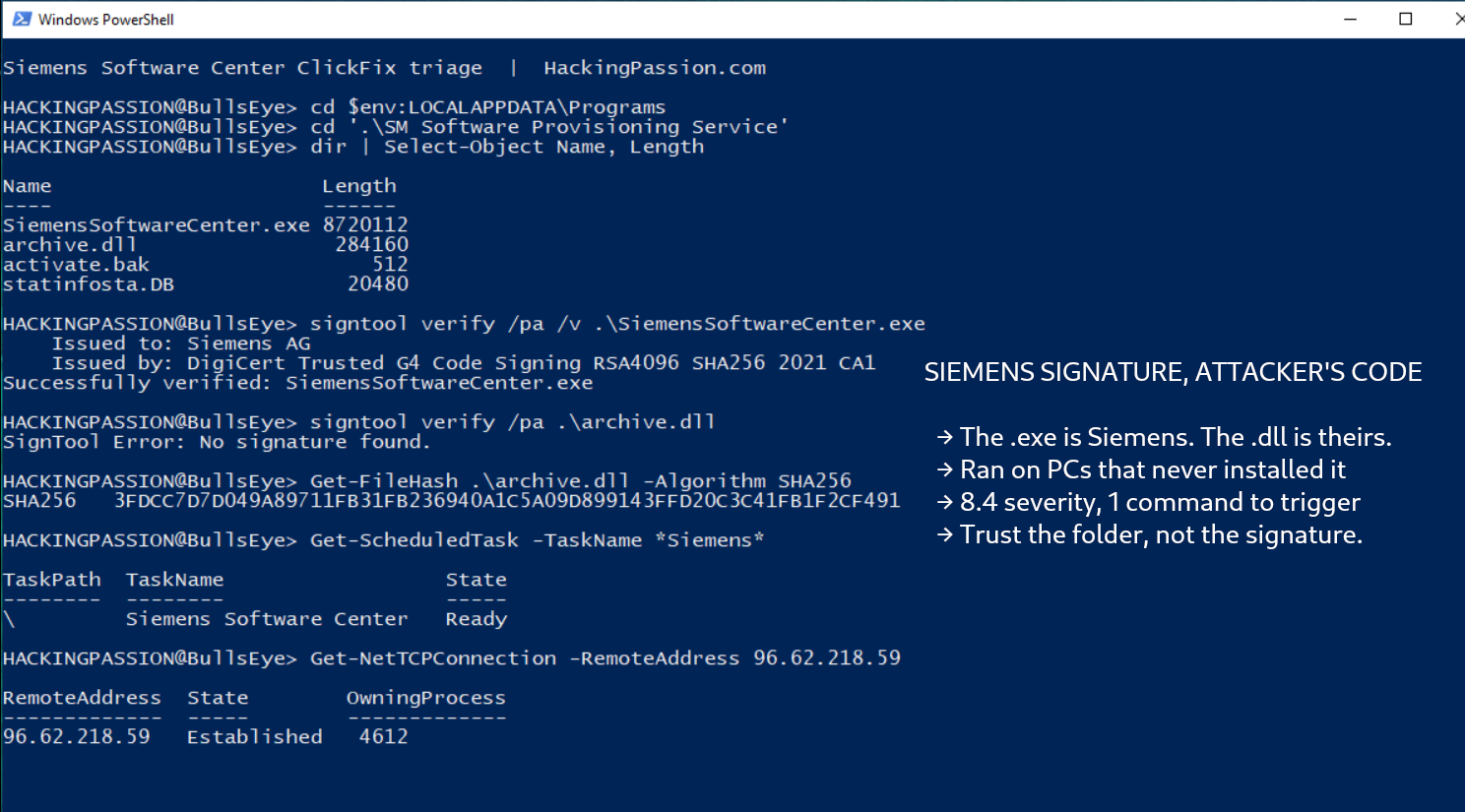
That pasted command pulled in an installer called AllMyBasic.msi from a server the attackers controlled. The installer made a folder named SM Software Provisioning Service in a corner of the user’s own account, and dropped the original SiemensSoftwareCenter.exe inside it. Right next to that file it placed its own, among them one called archive.dll. Then it gave the program a spot in the startup apps, so it comes back after a reboot.
And that one extra file, lying beside the original one, is the attack itself. To see why, you need one small thing about how Windows programs are put together.
A program is almost never a single file. Around the main program sit smaller helper files, called DLLs, that hold pieces of the code the program leans on while it runs. When the program needs one, it asks Windows for it by name. Windows then looks in a fixed order, and the first folder it checks is the one the program was started from. The first file it finds with the right name wins. It does not ask who made it.
So the attackers gave their file the name the program was looking for and left it in that same folder. The program asked for its helper, grabbed the attacker’s file instead, and ran it. There was no warning. The security world calls this DLL sideloading. Siemens logged it as CVE-2026-110936, in the family of bugs known as an uncontrolled search path.
The signature on SiemensSoftwareCenter.exe vouches for that one file, and nothing else. It says Siemens made it and it was not tampered with, and that stayed true throughout. It says nothing about archive.dll sitting beside it. So the moment the program loaded that DLL, the attacker’s code was running inside a process Windows saw as trusted Siemens software. That is exactly why they picked this program. Siemens said so plainly: they chose it because it is signed and trusted.
On paper the bug does not even look frightening. Siemens scores it 8.4 out of 10 on the newer scale and 6.7 on the older one, and the fine print assumes the attacker is already on your machine with high rights, ready to drop that DLL. But in these attacks the person dropping the DLL is you, by pasting the one command that brought it in.
Siemens is not the first brand used this way, and the warning was already out there.
On September 28, researchers at Huntress laid out a run of attacks that, for some victims, began with a Google search for the word chatgpt. A paid result at the top pointed to a custom assistant hosted on the genuine chatgpt.com. Talk to it, and it gave the same answer each time: the service is busy, please use our backup page. The backup page was a fake Cloudflare check, and the check asked you to paste a command. The same ClickFix move.
That command installed a fake printer tool built around a genuine program signed by Canon, and used it to sideload the attacker’s DLL, the same trick used on Siemens. A later wave swapped Canon for a program signed by Stardock. Both ended in the same place: a remote access tool that hands over the screen, the camera and the microphone, and comes with a file manager that searches through the contents of the files on the PC. Huntress counted at least 40 incidents.
And they do not sit still. The first fake assistant came down on September 25. Two days later there was a new one. By October 14 they had fresh web addresses in rotation, like gptverification[.]com. Take one down, another is already up.
In that same report, back in September, the researchers wrote plainly that it was highly likely other signed programs were being abused the same way, and that any alarm built on those two names would miss the next one. Three weeks later, the next one carried a Siemens signature. And the Siemens flaw was reported to the company by Jose Oregon of Huntress Labs, from the same team behind that report.
The second connection comes from Forescout. On October 15, the same day the Siemens advisory came out, its researchers published a write-up of something called ROMULUS. They had been working a separate case and noticed the malware was coming from a server running a login panel by that name. ROMULUS turned out to be a ready-made delivery system for ClickFix attacks: one web address hands a victim a PowerShell script, another hands over an installer, and on one of the servers a stats page quietly counted installs and runs by country.
They found it on six servers. One of them, 2.27.248[.]127, is the exact server Siemens named as the one that handed out the AllMyBasic.msi bundle with the signed program inside. Another, 96.62.224[.]81, is the one behind the fake chatgpt assistant. The same servers, three different signed brands.
Who runs ROMULUS is still an open question. Forescout is careful about it: it could be one private crew, a service other criminals rent, an affiliate setup, or a tool that got copied around. What we can be sure of is how the malware works and which server sent it, not who is behind it.
This is also not the first time Siemens Software Center had a DLL problem. Back in August 2023, Siemens disclosed the same class of flaw in the same program, CVE-2021-41544, reported by a researcher at Dragos and fixed in version 3.0. Three years on, the same weakness turned up again in a newer version, 3.5.8.7, and this time someone put it to use.
On October 17 Siemens added the fix, version 4.0.9.8, to its advisory. If you already run Siemens Software Center for work, you do not have to do anything, because it updates itself the next time you open it. That closes the hole for the people who actually use the program.
It does nothing about the copy the attackers carry. Their bundle brings its own old 3.5.8.7, with the genuine signature still on it, drops it in its own folder, and never goes near Siemens’ official download. Siemens has said nothing about pulling back the certificate behind that signature. Its own advice points the same way: do not rely on the file’s fingerprint, because the file is Siemens’ own and the fingerprint matches. Watch the folders and the behaviour instead.
Siemens lists these signs of trouble, for users and for defenders:
- → Siemens Software Center in your startup apps or Task Scheduler on a PC that never had it installed
- → A folder called
SM Software Provisioning ServiceinAppData\Local\Programs - →
SiemensSoftwareCenter.exerunning fromAppData\Local\Programs, started bymsiexec - → The files
activate.bakorstatinfosta.DBnext toSiemensSoftwareCenter.exe - → A folder called
FTSuitewith a file calledftc.umlinAppData\Local - → Connections to 96.62.218[.]59
You can check the two folders yourself in PowerShell, run as the user who might have pasted the command:
| |
The two Test-Path lines answer True or False. A True on either one, or a Siemens entry in the last two lines on a PC with no Siemens software, means the machine needs a closer look.
For the people who run the network, Siemens gives the indicators to block and to search the logs for:
| |
The inactive server is down now, but a machine that pulled from it earlier can still be infected. Siemens also says to look for unexpected DLLs next to Siemens programs outside the normal install folder.
If a PC matches, Siemens says to take it off the network, stop the process, remove the startup entry and the scheduled task, and reset the passwords, before the usual incident response. Change the passwords used on that machine first, from a different device.
Siemens says it knows of no break-in to its own systems, products or update channels, and that the attackers spread the signed program together with their own files outside the official channels. The company is sharing what it knows with the authorities and with security vendors. The Canadian Centre for Cyber Security put out its own warning, AV26-1063, the same day. There are no victim numbers, and no name has been put to the attackers.
A signature covers one file, the one it is attached to. It says nothing about the other files that program pulls in while it runs.
Want to see what is starting up on your own Windows machine, and spot the one entry that does not belong? That begins with understanding how programs load and where things hide. My Ethical Hacking Complete Course Zero to Expert takes you there step by step: reconnaissance, scanning, exploitation and traffic analysis, hands-on, from your first day with no Linux or hacking background.
→ Join my complete ethical hacking course
Hacking is not a hobby but a way of life.
Sources:
Stay updated
Get the latest posts in your inbox every week. Ethical hacking, security news, tutorials, and everything that catches my attention. If that sounds useful, drop your email below.