 HackingPassion.com
SignDrop Turns the Protection Microsoft Built for Windows Log Files Into SYSTEM Access
Ethical Hacking Complete Course Zero to Expert
Hack like black hat hackers. Penetration testing, Kali Linux, WiFi and web hacking, and the hacker mindset behind it.
→ Take the full courseNightmare Eclipse, the researcher Microsoft fired, released his 17th exploit since April on Patch Tuesday. There is no patch. It turns Microsoft’s protection against 24 bugs into a way to SYSTEM.
This is the eleventh time I am writing about Nightmare Eclipse. Since April I have followed him through BlueHammer, RedSun, UnDefend, YellowKey, MiniPlasma, RoguePlanet, GreatXML, LegacyHive, ShieldBreak and ShieldCrash. In September he put his own name under them: Abdelhamid Naceri, who worked at the Microsoft Security Response Center until Microsoft fired him. His GitHub account is called MSNightmare, and the bio still says I love Microsoft.
The new one is called SignDrop. It lets an ordinary Windows account become SYSTEM, the highest level of access a Windows machine has. It goes after a protection Microsoft built into Windows itself, meant to end a long run of attacks on a single driver.
He has a habit with dates. ShieldCrash went up on September 8, about two hours after that month’s Patch Tuesday updates. Patch Tuesday is the second Tuesday of the month, when Microsoft ships its security fixes. His first exploit on the new account went up on June 9, also a Patch Tuesday. The code for SignDrop went up on November 10. Patch Tuesday again. Microsoft shipped its November fixes that day, and none of them touches SignDrop. There is no CVE number, the official ID a known flaw gets, and no advisory.
Between September and now there was one more, BigDiskBuster, which I did not write about. It waits until Defender starts an update and then fills the drive with hidden temporary files, so the update runs out of space and fails. Defender stays on the version it already had for as long as the tool keeps interfering. He admitted himself that it was a bit buggy. Researchers at one security firm count sixteen public releases from him between April 3 and SignDrop, and their list leaves it out. Counted with that one, SignDrop is his 17th.
Windows has a built-in service that programs use to keep logs, records of what they did, in a fixed format that survives a crash. It is called the Common Log File System, or CLFS, and the driver behind it is clfs.sys. A driver like this runs in the kernel, the core of Windows.
That driver has been one of the most attacked parts of Windows for years. In August 2024 Microsoft counted 24 CVEs in CLFS over five years. 19 of them came from the same mistake: the driver trusted a field in a log file without checking it. An attacker needed nothing special for that. A log file is a file on disk, and an ordinary user can write a malicious one with the normal Windows file functions and then let the driver read it.
Those bugs were used. CISA, the US cybersecurity agency, keeps a catalog of flaws that attackers have exploited. CLFS appears in it 12 times, and for 7 of those 12 the agency notes that ransomware gangs used them. One of the most recent was CVE-2025-29824 in April 2025. Microsoft tied it to a group it calls Storm-2460. Starting from a standard user account, the attackers used the flaw to get into SYSTEM processes, and Microsoft then saw files encrypted on the machines they hit.
So Microsoft changed its approach. Instead of fixing one field at a time, it started checking who wrote the file. Since the updates of October 28, 2025, for Windows 11 25H2 and Windows Server 2025, CLFS signs the log files it writes. It calculates a code from the contents and a secret key that is unique to each machine, called an HMAC, and stores that code at the end of the file. The key sits in the registry, the central settings database of Windows, where only SYSTEM and administrators can reach it. When CLFS opens a log later, it checks the code. If someone changed the file by hand, the code no longer matches and the driver refuses to read it.
The protection also added a small companion file next to each log, with the extension .cnpf, which CLFS uses to repair the log if it was not closed cleanly. Machines that get the update have 90 days to adapt. During that time the protection runs in learning mode: it adds codes to existing logs and still opens them. After 90 days it switches itself to enforcement on the next boot. The protection costs something too. Microsoft’s own documentation says that writing a record takes about twice as long on average.
Naceri says himself in his writeup that publicly exploited CLFS flaws dropped sharply after the protection arrived.
That companion .cnpf file is where SignDrop gets in.
It starts with things an ordinary user is allowed to do. The user asks CLFS to create a log file, which ends in .blf, and attaches extra containers to it, the files where CLFS keeps the actual records. Each container gets its own .cnpf file. Up to this point CLFS checks access properly and creates the files with the user’s own rights.
The trouble starts when a different process opens that log. CLFS opens the attached containers along with it, and it creates the .cnpf files with the rights of whichever process did the opening. If that process runs as SYSTEM, CLFS creates the file as SYSTEM. It also gives the new file the same access rights as the original file, and the original belonged to the user.
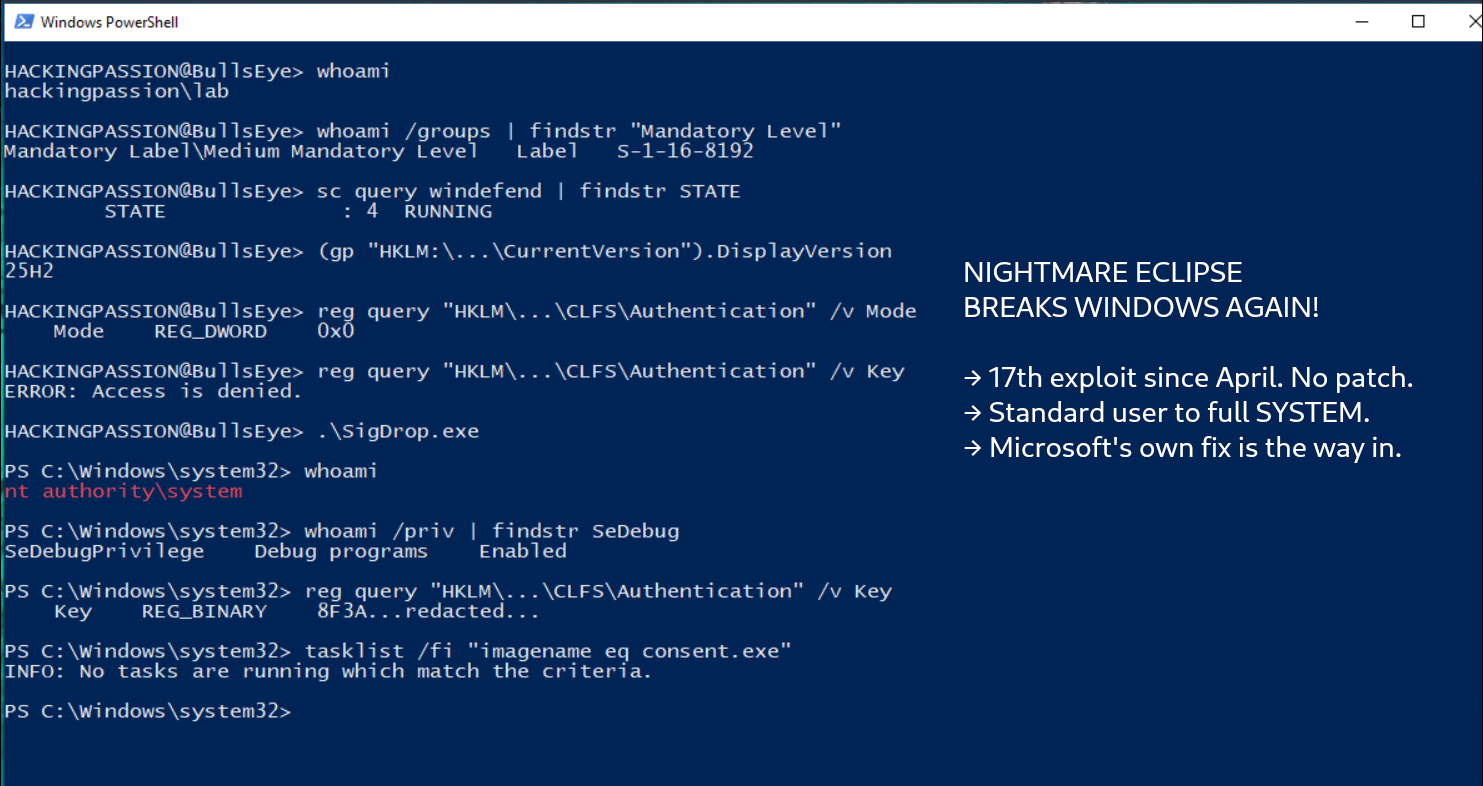
So the exploit needs a process that runs as SYSTEM and can be made to open a file. It uses Windows Defender. Defender has an internal interface for its own signature updates. A standard user can call one function in it, ServerMpUpdateEngineSignature, and make Defender open the prepared log. Before that, the exploit sets up redirects in Windows’ internal list of names, so one name points to another location. These are called object manager symbolic links. Because of them, the file Defender creates lands in a place the attacker chose. In a screenshot he added to the repository, Defender’s own process is the one creating the file.
What comes out is a file that Windows created with SYSTEM rights, in a location the attacker picked, with access rights the attacker controls. The exploit puts that file in a Windows folder called ink, names it hid.dll and fills it with its own code. It has already started the On-Screen Keyboard, hidden from view. Then it asks Windows to run a program as administrator.
That request opens the UAC window, the box Windows shows when something asks for administrator rights. The program behind that window, consent.exe, runs as SYSTEM, and with that keyboard active it loads hid.dll from the ink folder. The attacker’s code now runs inside that window itself. It opens a command window running as SYSTEM on the user’s desktop and closes the prompt. So the window that is supposed to guard administrator rights is the one that hands them over.
He also writes that the same trick can turn off any antivirus or EDR product, the security software companies run to watch their computers. It gets around the self-protection those products use against tampering. That wider claim has not been tested.
The protection Microsoft built against two dozen CLFS bugs is now the way in, and switching it off does not help. With the registry value Mode set to 2, an administrator has disabled the protection, and SignDrop has nothing to work with. But then CLFS stops checking log files, and Microsoft’s documentation warns that it will read files that may be damaged or planted by an attacker. Naceri gives the same warning in his writeup: turning the protection off opens the machine to the memory corruption bugs it was built against. His only answer is to wait for a patch from Microsoft.
Two security firms have tested it. Cyderes rebuilt the chain and got a console running as NT AUTHORITY\SYSTEM, started from a standard user session. A team at the Korean security firm 78researchlab found that it works too, though not reliably enough to use in an attack.
It also has limits. Defender has to be switched on, because Defender is the process doing the work. And a person at that machine would see it: it ends with a SYSTEM command window open on the desktop of whoever is logged in.
In his writeup he estimates that 80 percent of the world’s Windows installations are vulnerable, and he calls it a guess himself. The numbers do not support it. Microsoft ships the protection SignDrop needs for Windows 11 25H2, Windows 11 26H1 and Windows Server 2025. Windows 10 is not on that list, and neither is Windows 11 24H2. Without a .cnpf file the exploit stops, the researchers who rebuilt the chain found.
In October 2026, Statcounter measured 74.29 percent of Windows desktops on Windows 11 and 25.13 percent still on Windows 10. Even if the Windows 11 share had moved to 25H2 or later without a single exception, the ceiling for desktops is about 74 percent. That is below his 80.
For once, the PCs in scope are the newest ones, the machines that took the October 2025 update and moved on to 25H2 or later. A Windows 10 PC, or a Windows 11 PC that stayed on 24H2, is outside this particular exploit. Holding back updates is no answer, because those machines lack the protection against the kind of CLFS bug that ended up in that catalog 12 times.
Microsoft told a security news site that it is actively investigating the report. According to the company, Defender detects and blocks this attack, and raises an alert when an account jumps to higher rights. It has not seen the exploit used in attacks so far. There is still no CVE. Defender is the program the exploit uses, and according to Microsoft it is also the program that stops it.
The fight between him and Microsoft goes on. On May 27, the same response center he used to work for wrote that putting exploit code for unpatched flaws out in public is never justifiable. In that post it named six of his releases as not responsibly disclosed. In August, at DEF CON, the Pwnie Awards gave Microsoft Lamest Vendor Response for its implied legal threats against him. The README for SignDrop ends by telling people who have a problem with the repository to email Microsoft’s own security address. His own blog has been silent since September 18, and the last post there says a close third party manages it, not him.
The first three exploits I named at the top, each aimed at Defender, turned up in live intrusions after he published them. SignDrop has not been seen in an attack yet. The code is public, though. By November 14, four days after release, the repository had 363 stars and 85 copies made by other users, and at least two security firms had tested it.
What you can check on your own machine:
Press Win+R and type winver. If it says 25H2, 26H1 or newer, or Windows Server 2025, your machine is in scope. Then open a command prompt and read the CLFS mode:
| |
- → 0 means the protection is enforced, 1 means it is in learning mode. Both fall within what SignDrop targets
- → 2 means an administrator switched the protection off, 3 is a value Windows sets itself. According to Naceri, neither is vulnerable to SignDrop
- → Do not set Mode to 2 to get rid of SignDrop. That reopens the class of bugs that put CLFS on the US list of exploited flaws 12 times
- → Keep Defender on and up to date. According to Microsoft, Defender blocks this exploit
- → Watch for a SYSTEM shell or console started from a standard user session, for Defender’s process,
MsMpEng.exe, creating.cnpffiles, and forconsent.exeloading ahid.dllfrom the ink folder - → Watch Microsoft’s Security Update Guide for a CVE and a fix
Want to see how a standard user climbs to SYSTEM? Build a Windows 11 VM at home, log in without admin rights, and read that CLFS value yourself. My Ethical Hacking Complete Course Zero to Expert takes you there step by step: reconnaissance, scanning, exploitation and traffic analysis, hands-on, from your first day with no Linux or hacking background.
→ Join my complete ethical hacking course
Hacking is not a hobby but a way of life.
Sources:
SignDrop on GitHub | Microsoft KB5056852 | Cyderes Howler Cell
Stay updated
Get the latest posts in your inbox every week. Ethical hacking, security news, tutorials, and everything that catches my attention. If that sounds useful, drop your email below.