 HackingPassion.com
uBlock Origin Removed From the Chrome Web Store as Google Closes Out Manifest V2
Ethical Hacking Complete Course Zero to Expert
Hack like black hat hackers. Penetration testing, Kali Linux, WiFi and web hacking, and the hacker mindset behind it.
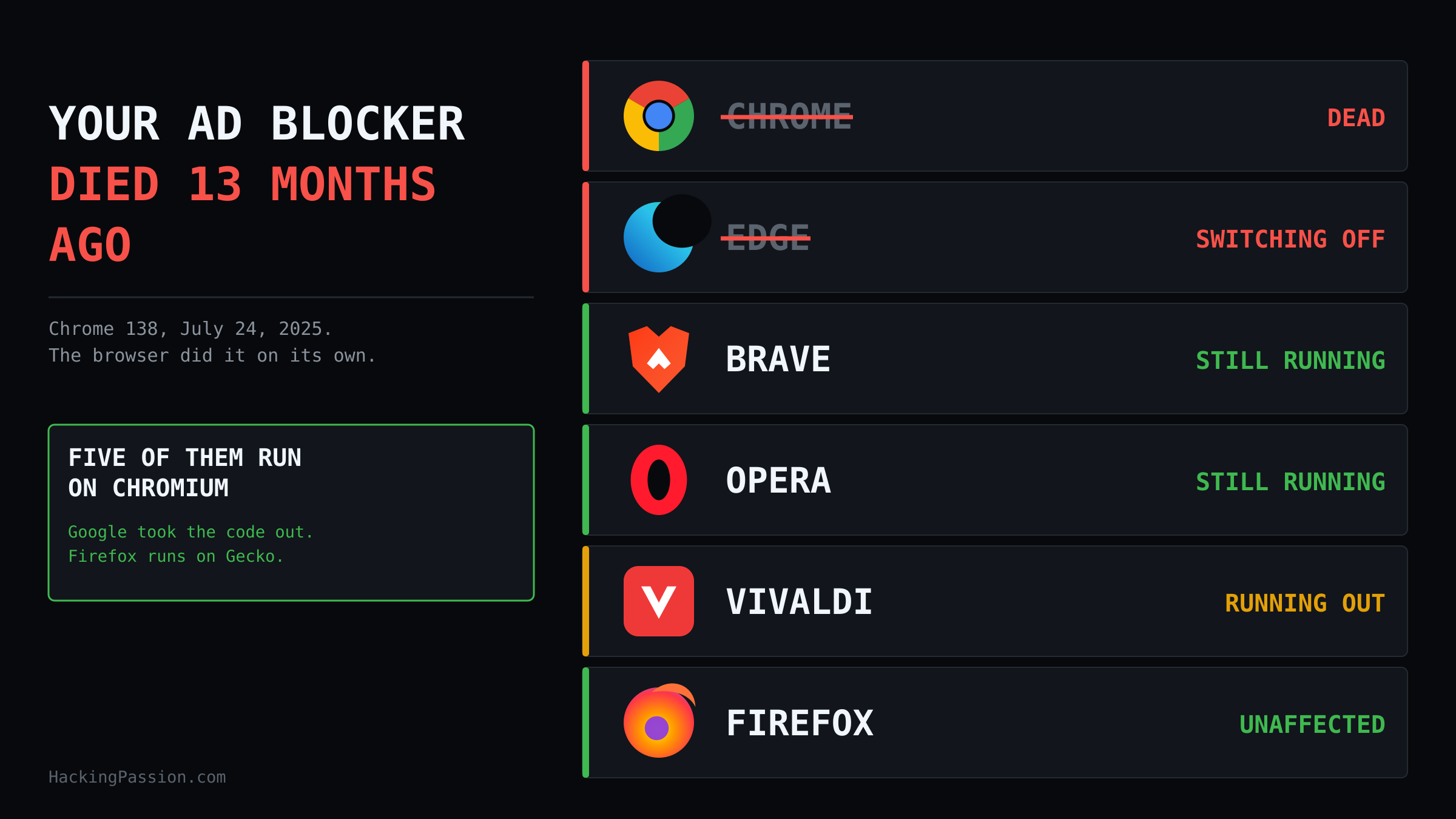
→ Take the full courseYour ad blocker stopped working thirteen months ago. Chrome 138 switched it off in July 2025. On August 31 Google pulled the last copy from the store. Edge, Brave, Opera and Vivaldi run the same engine.
On August 31, 2026, Google took the last Manifest V2 extensions out of the Chrome Web Store. uBlock Origin was among them. A copy that is already installed keeps its files and keeps running, but it will not receive another update and it cannot be installed again from the store.
That date is not where this started, and it is not where the damage was done either. Google publishes its own deprecation timeline, and read in order it tells a longer story.
- → January 2022: the store stops accepting new public Manifest V2 extensions
- → June 3, 2024: warning banners show up in Beta, Dev and Canary, and MV2 extensions lose their Featured badge
- → October 9, 2024: Chrome starts switching MV2 extensions off in the stable channel, with the option to switch them back on
- → March 31, 2025: switched off by default on all channels
- → July 24, 2025: Chrome 138 takes away the option to switch them back on
- → August 31, 2026: what was still listed is pulled from the store
July 24, 2025 is the day it ended. Google’s own timeline puts it flatly: with Chrome 138 all users on all channels have Manifest V2 extensions disabled, and users can no longer re-enable them. The browser did that on its own, without asking. What happened on August 31 was that the last copy left the shelf, thirteen months after the thing had already stopped working for the people who were using it.
To understand why a blocker cannot just be rewritten for the new rules, you have to look at what Manifest V3 took away. An ad blocker does one thing. It stands between the page and the internet, and for each file that page wants to load, an image, a script, a tracking pixel, it decides whether that file gets fetched at all. Where it stands in that line, and how much it is allowed to see from there, is something the browser decides. That permission has a name, and for years it was called webRequest.
In its blocking form, webRequest put the extension first in line. A network request the browser was about to make went through the extension’s own code before anything left the machine. The extension read the request, looked at where it was going, checked the response headers, and then decided: let it through, cancel it, redirect it, or rewrite it. The logic lived inside the extension, and it could be as clever as its author wanted.
Manifest V3 takes that spot in the line away. In its place comes declarativeNetRequest. The extension no longer sees the requests. It hands Chrome a list of rules in advance, and Chrome does the matching itself. Google’s documentation frames this as a privacy gain, because the extension modifies requests without intercepting them or reading their content. In the manifest file of an extension the difference is this small.
Manifest V2:
| |
Manifest V3:
| |
A blocking decision that used to be a line of code the extension ran is now an entry in that list, matched by Chrome. And rules that Chrome matches for you are rules Chrome has to count. A content blocker hits a wall there.
The numbers come from Chrome’s own API documentation. An extension may enable 50 static rule sets at a time out of the 100 it ships, hold 30,000 dynamic rules with 5,000 of the unsafe kind among them, and 5,000 session rules. On top of that, 1,000 rules may use a regular expression, counted separately for the static set and for the dynamic and session rules. Those look like generous numbers until you put an actual filter list next to them.
Chrome guarantees an extension 30,000 static rules. Anything above that comes out of a global pool it shares with the other extensions in the same browser, so what is left over depends on what else you have running. uBlock Origin’s own MV3 documentation puts that Chromium pool at 330,000.
A second limit has nothing to do with counting. declarativeNetRequest only applies to requests that reach the network stack. A response served by a service worker, or pulled out of CacheStorage, never gets there, so no rule touches it.
Counting is only half the problem, because a blocker’s filter list is not a flat list of domains. A good part of it is conditional, and those conditions are what does not survive the trip to a Chrome rule. Four filter options from uBlock Origin’s own syntax:
| |
The first two are about who is asking. Normal first-party and third-party matching works on the base domain, so anything under example.com counts as the same party. strict1p and strict3p compare the full hostname instead, which is how a blocker catches a tracker parked on a subdomain of the site you are visiting. The third one creates a redirect directive with no blocking filter attached, so the request is only swapped for a harmless local file if something else blocks it first, another filter or a dynamic rule. Chrome’s format has no concept of redirect-if-blocked at all. The fourth strips the query parameters whose names start with utm_, using a regular expression to decide which ones.
Chrome’s rule format has room for part of that and not for the rest. Since Chrome 145 it does know which address sits in the address bar, through the topDomains and excludedTopDomains conditions, so that gap is closed. What it still cannot work out is whether a request is first-party or third-party relative to that top domain, which is exactly the job strict1p and strict3p do. It cannot read what comes back in the response headers. And it throws out a large part of the regular expressions a blocker leans on.
Then the arithmetic. uBlock Origin Lite, the MV3 version written by the same author, ships a default rule set of roughly 17,000 rules in its Optimal and Complete modes. Switch on the seven annoyance rule sets, the two privacy sets and one regional list, and the total lands just above 30,000. That is the guaranteed limit, reached by the blocker’s own lists, before you add a single filter of your own. The uBO Lite documentation does not treat that as the pressing problem, because the global Chromium pool of 330,000 leaves room as long as no second content blocker is installed beside it. That room only exists as long as nothing else claims it, and the rules that do fit are the simple ones.
There is one more thing about that August 31 date, and it is the part that reaches past Chrome. Chrome, Edge, Brave, Opera and Vivaldi all run on the same source code, Chromium, and Google maintains it. The support for Manifest V2 lived in there. Google is taking that code out. Google’s own timeline says that in June 2025 the branch for Chrome 139 began, and that support for Manifest V2 extensions was removed from Chrome in it. A year later the cleanup finished: a commit in the Chromium source from June 9, 2026 deletes the last testing flag developers used to load an unpacked MV2 extension:
| |
The message on that commit says no supported version of Chrome supports MV2, so it can be removed. That is a different story from a store clearing its shelves. The ability itself is leaving the engine, and the browsers built on that engine pull the change in with their next update. Whoever wants to keep Manifest V2 running has to put the code back and maintain it themselves, again for each Chromium version that lands.
Brave is one of the browsers I use, and in Brave I noticed nothing at all. The icon stayed where it was, the pages stayed clean, and there was no message telling me anything had changed. For a moment I wondered whether this was being blown up bigger than it is. It is not. What happened is that Brave made a decision years ago that hardly any of the coverage mentions, and the same goes for three other browsers.
Chrome is not the only browser built on Chromium. Edge, Brave, Opera and Vivaldi run the same engine, and the extension system arrives with it. Each of them made a different call, the four calls are not close together, and which one you use decides whether you still have a blocker tomorrow.
- → Microsoft Edge is doing the same thing, one year behind and on its own schedule. Microsoft announced on August 7, 2026 that the consumer transition starts that month: first a notice on the Manage Extensions page, then MV2 extensions disabled by default in Canary, Dev and Beta, with the Stable channel following in the months after. Consumers are meant to be done by the end of 2026 and managed enterprise devices in early 2027. Of the top MV2 extensions in the Edge store 95 percent had already moved to MV3, 58 were still in active use, and three of those had no MV3 alternative at all
- → Brave force-enabled Manifest V2 in the browser and hosts four extensions on its own backend since version 1.81: uBlock Origin, uMatrix, NoScript and AdGuard. Brave calls this best effort and says it buys limited MV2 support even after the code leaves the upstream Chromium project
- → Opera keeps MV2 extensions running, in its own words for as long as it stays technically reasonable. It stopped accepting new MV2 uploads to its store and pulled the older, less used ones
- → Vivaldi tied its answer to the code, and that answer is running out. Snapshot 4116.3, released July 29, 2026, moved Vivaldi onto Chromium 152, and MV2 extensions stopped loading in it. The stable channel follows the same code
You do not find out about a thing like this from a changelog. You find out because a news site suddenly has three banners stacked above the article, and a video you open starts with a commercial you had not sat through in years. So what you notice depends on the icon you click in the morning. In Chrome the extension was switched off for you and there is nothing to reinstall. In Edge the same thing started in August, in the test channels first. In Brave and Opera it is still running today. In Vivaldi it still runs on stable as of September 2, 2026 and already stopped in the snapshot builds on Chromium 152, and in Firefox none of this ever applied. Same blocker, same filter lists, five different outcomes.
Three of those four answers have the same thing sitting underneath them, and that is the part that decides the outcome. Brave Shields, Opera’s ad blocker and Vivaldi’s tracker and ad blocker are compiled into the browser instead of running as extensions. Brave states plainly that Manifest V3 does not weaken Shields, because Shields was never an extension. Vivaldi says the same about its own blocker: it does not depend on the extension architecture. That is why I did not notice a thing. Shields kept running underneath, and the extension on top of it was never switched off in the first place.
The browsers walking away from this with their blocking intact are the ones that took blocking out of the extension system years ago. What is closing is the road that runs through the store.
Firefox took a different road altogether and kept the blocking webRequest API, and the gap that leaves is not theoretical. From uBlock Origin’s own documentation, these work on Firefox and not on Chromium:
- → CNAME uncloaking: a third-party tracker hiding behind a CNAME record that makes it look first-party gets unmasked
- → HTML filtering: the response body of an HTML document is filtered before the browser parses it, through
webRequest.filterResponseData() - → IP address filtering: the blocker can decide based on the addresses in the DNS record
- → Early blocking: at browser start Firefox waits until the blocker is ready before it sends requests from tabs that were already open, and Chromium does not wait
- → Prefetching: Firefox honours the setting, while Chromium gives the website precedence over what the user chose
- → WebAssembly in the core filtering paths, which the Chrome Web Store permission model made impractical
On addons.mozilla.org the extension sits at 10,766,677 users, rated 4.8 over 22,059 reviews, on version 1.74.0 released August 25, 2026. That version shipped six days before Google pulled the Chrome copy off the shelf. The project was never in trouble. Only one of its homes was.
Which leaves four routes, and none of them is the same thing.
- → uBlock Origin Lite is still in the store and works inside the limits above. It is a different blocker with different capabilities, not a drop-in replacement
- → Brave installs the full version from
brave://settings/extensions/v2, and Shields runs underneath it either way - → Firefox keeps the full version, with the six capabilities listed above
- → Opera still runs MV2 today and Vivaldi does on its stable channel, and both point at their own built-in blocker for the day that ends
An installed copy in Chrome keeps working for now. It stops receiving new logic and fixes, and it cannot be put back once it leaves the profile. Open chrome://extensions and look at what is there and which version number it stopped on, because that number is not going to change again.
The web you see is the web your browser was allowed to load. Point your own browser through Burp Suite tonight and watch what a single page requests before anything blocks it.
My Ethical Hacking Complete Course Zero to Expert takes you there step by step: reconnaissance, scanning, exploitation and traffic analysis, hands-on, from your first day with no Linux or hacking background.
→ Join my complete ethical hacking course
Hacking is not a hobby but a way of life.
Sources:
Chrome for Developers | Chromium Source | uBlock Origin Lite
Stay updated
Get the latest posts in your inbox every week. Ethical hacking, security news, tutorials, and everything that catches my attention. If that sounds useful, drop your email below.