 HackingPassion.com
WhatsApp Video Calls Open Your Photo Gallery on a Locked Android Phone
Ethical Hacking Complete Course Zero to Expert
Hack like black hat hackers. Penetration testing, Kali Linux, WiFi and web hacking, and the hacker mindset behind it.
→ Take the full courseYour locked Android phone opened its photo gallery to the person holding it. One video call and four taps did it. A Pixel on Android 17 with the newest patch went through, and there is still no fix.
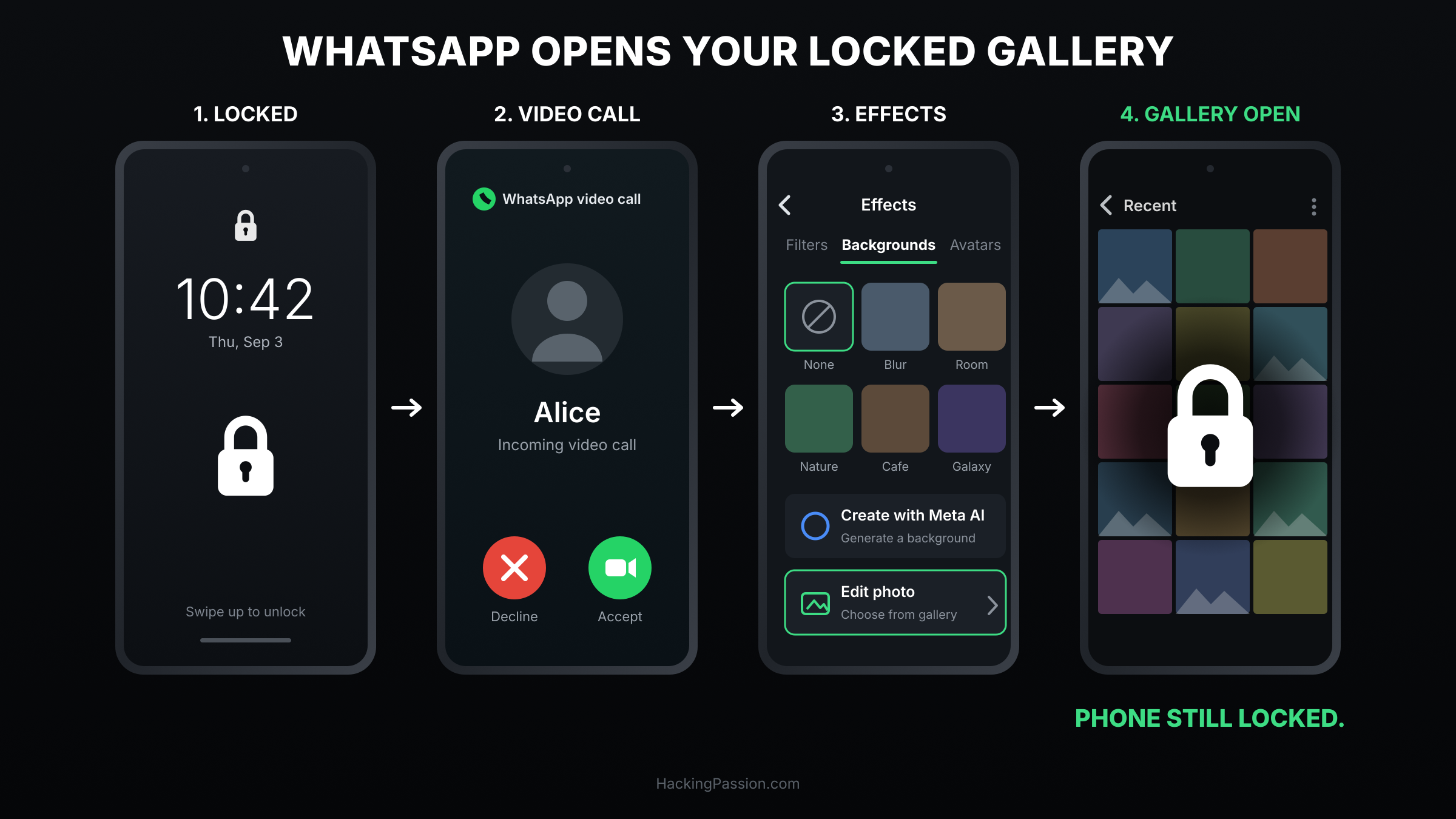
The phone lies face down, screen off, locked. A WhatsApp video call comes in. You swipe to answer it, the way you answer any call, because taking a call without unlocking first is exactly what a lock screen is built to allow. The call connects. Then you tap the effects icon on the call screen, open the backgrounds tab, choose Create with Meta AI, and tap Edit photo.
The photo gallery opens. All of it, scrollable, while the phone sits there locked.
That is the attack, start to finish:
- → Answer the incoming WhatsApp video call on the locked phone
- → Tap the effects icon
- → Open the backgrounds tab
- → Tap
Create with Meta AI - → Tap
Edit photo - → The photo gallery opens
What it takes is ten seconds with someone else’s phone in your hand. The rest is tapping.
One condition has to be true first, and on your phone it probably already is. WhatsApp needs the photos and videos permission, the same one you granted so you could send pictures in the first place. That permission is what the route walks through, and it is also where you close it.
Keep the size of it straight. Someone has to be holding the phone, and the rest of the device stays shut: other apps and settings sit behind the lock screen where they were. What opens is the gallery, and that is more than enough.
NotebookCheck ran the sequence on three phones on 2 September. A Google Pixel 6 Pro running Android 17 with the newest security patch installed opened the gallery. An Oppo K13 on ColorOS 16 opened the gallery. A Samsung Galaxy S25 Ultra on One UI 8.5 did not: the moment that button was tapped, One UI threw the lock screen back up and demanded authentication. Two more have been tried since, a Motorola Razr Fold and a Tecno Pova 6, and both of those held as well.
Google’s own phone, on the newest version of Google’s own operating system, fully patched, is the one that failed.
Now look at what stopped it. One UI 8.5 runs on Android 16. The Pixel runs Android 17. The phone on the older Android held the line and the phone on the newer Android did not.
There is a second thing about that phone. In July, Google dropped the Pixel 6 and 6 Pro from the Android 17 QPR2 beta because the phones reach end of life with QPR1. They get the September Feature Drop, then one final security update in October 2026. After that the phone stops receiving anything at all, and that is about seven weeks away from the day this test was run.
So why does a locked phone put any of this on screen.
A lock screen is a rule about which screens are allowed to appear in front of it, and incoming calls are on that list on purpose. They have to be, because a phone you cannot answer without unlocking it first is a phone that misses calls.
On Android, that incoming call screen belongs to WhatsApp. WhatsApp draws it, WhatsApp fills it, and WhatsApp decides which buttons sit on it: effects, filters, backgrounds, and one that reaches into the photo picker.
Nothing in that chain stops to ask whether the phone is still locked. The call screen was allowed in front of the lock screen, and whatever opens from it inherits the same position.
Android has a name for that inheritance, and Google wrote the documentation for it. setInheritShowWhenLocked, added in API level 29, decides whether an activity is shown on top of the lock screen when the activity behind it has the showWhenLocked attribute set. The use case Google gives in that same documentation is permission dialogs, which should only be visible on the lock screen if the activity that requested them is visible too.
That use case is a permission dialog. A photo picker is something else. I have not seen WhatsApp’s manifest, so take that as the mechanism that fits the behaviour rather than as proof of how they built it. The behaviour is exactly what that flag describes.
Samsung breaks the chain anyway. One UI runs a check at that button and sends you back to authentication. That check is not part of core Android, which is why the same version of WhatsApp behaves one way on a Pixel and another way on a Galaxy. The flaw sits between Android and WhatsApp, and each manufacturer decides how wide that gap is.
iPhones are not affected. On iOS, WhatsApp is not permitted to draw its own incoming call screen. Apple requires calling apps to hand the call to CallKit, the system calling interface, so an incoming WhatsApp call on a locked iPhone looks and behaves like a call from the Phone app. What you get is Apple’s own call screen, with an accept button and a decline button. The route ends at the screen it would have started from.
The man who found this has been at it for thirteen years.
Jose Rodriguez is a Spanish researcher, and his method has not changed since 2013: take something the lock screen is supposed to permit, then keep tapping until you are standing somewhere you should not be. In September 2013 it was the Control Center on iOS 7, and what he reached was the photo gallery. In 2015 it was Siri on iOS 9. In 2018 it was VoiceOver on iOS 12, photos and contacts again. In 2021 Apple paid him 25,000 and 5,000 dollars for two lock screen bypasses, CVE-2021-1835 and CVE-2021-30699, both of which let someone open other apps straight from a locked iPhone. He said afterwards that Apple had mitigated those two rather than repaired them, and had made them sound smaller than they were. On the day iOS 15 shipped to the public, he published a video of a variation that still worked.
This is his second time at the same door on Android.
In May 2023 he reported a lock screen bypass in Android 13 and 14 that ran through Google Maps on the lock screen. With driving mode enabled it reached the photos, the account details, and from there further into the account itself. Google acknowledged it and sat on it. By late November there was still no scheduled date for a security update. A date only appeared after it went public: the February 2024 release.
While that was sitting there, he asked people to run it on their own phones and send back what happened, with the device model and the Android version. The same question is open now: five phones have been tried, and there are a lot more than five phones.
Thirteen years apart, three different routes, the same destination: someone picks up a locked phone and looks at the photos. 2013, 2023, 2026. Same researcher, same pattern, and on Android both times nothing moved until he went public.
Where it stands right now: Meta has the report and Google has the report. Since then, silence from both. The flaw does not even carry a CVE number. The sequence above still works today.
You can close this yourself in about fifteen seconds, without waiting for a patch. Instead of handing WhatsApp your full photo library, you hand it the few pictures that you pick:
- → Settings
- → Apps
- → Permissions
- → Photos and videos
- → Allow limited access
Android added that in version 14 and calls it Selected Photos Access, backed by a permission named READ_MEDIA_VISUAL_USER_SELECTED. With it set, the picker that comes up in front of the lock screen has nothing to display except the files you picked yourself. The route still opens. What it opens onto is the short list you made yourself.
It costs you almost nothing in daily use. When you want to send a photo, WhatsApp asks you to select it, and you select it.
There is a harder version if you want it. Take away WhatsApp’s camera permission and the video calling that starts this route stops working, which also means your own video calls stop working.
Scroll the rest of that permissions screen while you are in there. The apps on your phone sit in that list with whatever they were granted on the day you installed them, and this is the screen where you find out what that was.
Lock your own phone, call yourself from a second one, and see how far you get before anything asks you for a PIN.
My Ethical Hacking Complete Course Zero to Expert takes you there step by step: reconnaissance, scanning, exploitation and traffic analysis, hands-on, from your first day with no Linux or hacking background.
→ Join my complete ethical hacking course
Hacking is not a hobby but a way of life.
Sources:
Stay updated
Get the latest posts in your inbox every week. Ethical hacking, security news, tutorials, and everything that catches my attention. If that sounds useful, drop your email below.