One Windows Update, Ten Problems, Two Emergency Patches
Want to learn ethical hacking? I built a complete course. Have a look!
Learn penetration testing, web exploitation, network security, and the hacker mindset:
→ Master ethical hacking hands-on
(The link supports me directly as your instructor!)
Hacking is not a hobby but a way of life!
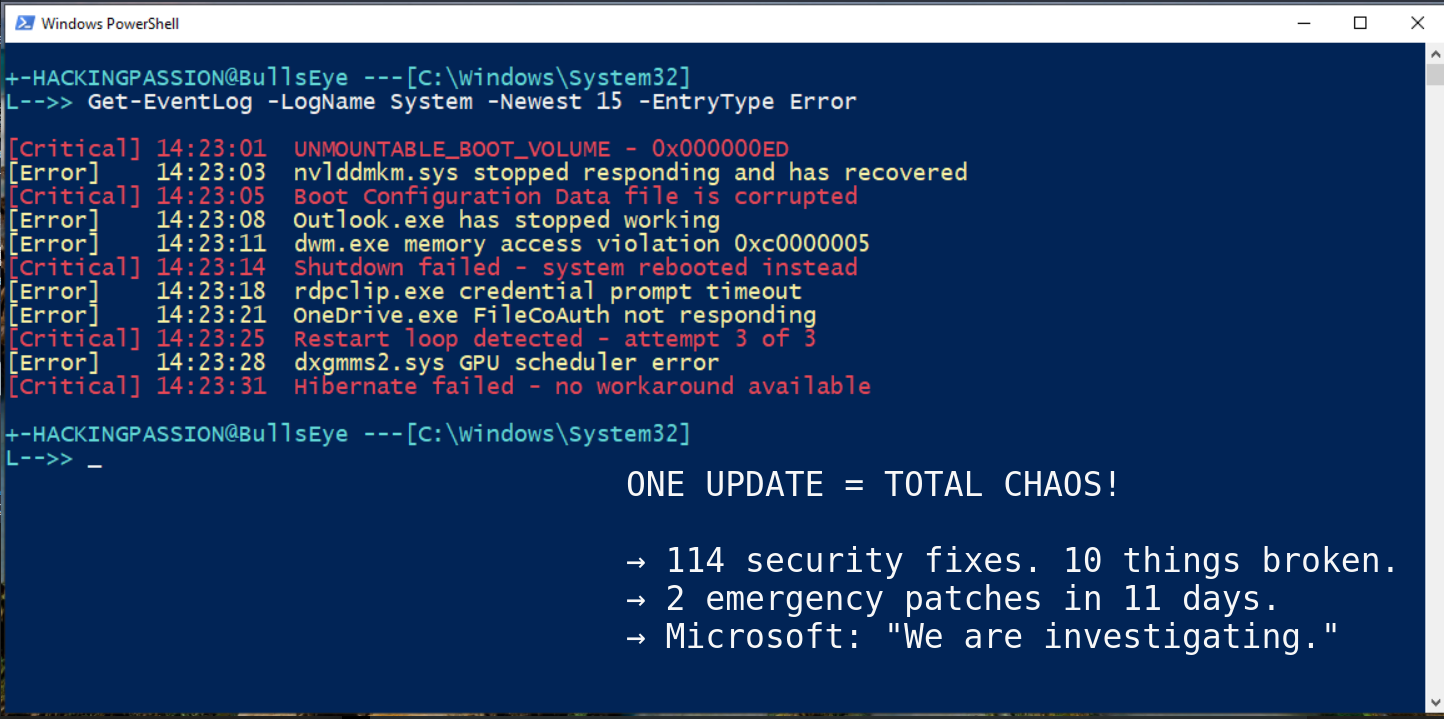
Microsoft pushed one security update. It broke at least 10 different things. 114 security fixes. Two emergency patches. PCs that won’t boot. Outlook that crashes. Remote Desktop that fails. Shutdown buttons that do nothing. And Microsoft is still investigating why some systems show a black screen and never start again. 🧐
A Windows and Microsoft story that keeps getting worse.
This was one of the largest Patch Tuesday releases in history. 114 vulnerabilities fixed, 8 rated Critical, 106 Important. The breakdown: 57 privilege escalation flaws, 22 remote code execution bugs, and 22 information disclosure vulnerabilities. Three zero-days in total, one actively exploited in the wild and two publicly known before Microsoft could patch them. In 2025 alone, Microsoft patched 1,130 CVEs across the year, 12% more than 2024.
The update was mandatory because hackers were already exploiting a zero-day vulnerability, so users had no real choice. Patch now or stay vulnerable. Millions patched, and then the chaos started.
Here is everything that broke after users installed the update.
- → Some PCs stopped booting entirely
- → Remote Desktop connections fail on login
- → Shutdown and hibernate do nothing, the PC just reboots
- → Outlook Classic crashes if you use POP accounts or PST files on OneDrive
- → OneDrive and Dropbox freeze when opening or saving files
- → NVIDIA users reported losing 15 to 20 FPS in games
- → Random black screens and GPU driver crashes
- → Desktop wallpaper resets to black
- → File Explorer ignores custom folder settings
- → USB drives fail to format with FAT32
Ten problems from one update, and Microsoft needed two emergency patches just to fix some of them.
The boot failure is the worst. Users see UNMOUNTABLE_BOOT_VOLUME on a black screen, restart, same error, restart again, same error. The PC is stuck in a loop. Microsoft confirmed this on January 25 and said they are investigating, but there is no fix and no workaround. Just boot into recovery mode and hope.
The shutdown bug hits Enterprise systems with System Guard Secure Launch enabled. Click shutdown, Windows starts powering off, then it just reboots. The update broke the handoff between the servicing stack and power management. Microsoft’s advice? Run shutdown /s /t 0 from command line. For hibernate? “There is no workaround at this time.”
Remote Desktop failed because the Windows App could not complete credential prompts. Azure Virtual Desktop and Windows 365 users could not log into their own cloud PCs. Sessions rejected before they even started.
Outlook Classic hangs on startup if you store PST files on OneDrive. The app runs in the background but the window never opens. Only way to use it is killing Outlook.exe in Task Manager every single time. Some users also saw sent emails vanish and old emails download repeatedly.
NVIDIA gamers got hit hard. Reports flooded Reddit about sudden FPS drops, black screen flashes lasting a few seconds, and driver crashes. RTX 4090 users reported dxgmms2.sys failures. Some Cinema 4D users had complete GPU deadlocks that required forced power-off. This happened before in October 2025 with a different update, same pattern.
The timeline shows how fast this spiraled.
- → January 13: Patch Tuesday drops
- → January 14-16: Reports flood in, Remote Desktop broken, PCs won’t shut down
- → January 17: First emergency patch
KB5077744 - → January 18-23: New problems, Outlook crashes, cloud storage breaks
- → January 24: Second emergency patch
KB5078127 - → January 25: Microsoft confirms boot failures
- → Today: Boot failures still not fixed
Two emergency patches in eleven days, and that almost never happens.
The first emergency patch on January 17 fixed the Remote Desktop and shutdown bugs. But it broke Outlook and cloud storage. So Microsoft released a second emergency patch on January 24 to fix what the first fix broke.
Now let me explain why this update was mandatory in the first place.
The whole reason this update was mandatory is CVE-2026-20805, a vulnerability in Desktop Window Manager. DWM is the component that draws everything on a Windows screen. Every window, every visual effect, everything you see.
The bug lets an attacker with local access leak memory addresses, and that breaks one of Windows’ core defenses. Windows uses something called ASLR to randomize where code sits in memory. This makes exploits unreliable because attackers cannot predict where to aim. But if you can leak the actual addresses, you defeat ASLR completely. The exploit becomes reliable.
This vulnerability is not the final attack, it is the first step. Leak the memory layout, then chain it with another exploit to escalate privileges. Microsoft’s own Threat Intelligence team found it because they saw it happening in the wild.
CISA added it to the Known Exploited Vulnerabilities list and federal agencies must patch by February 3. The same component, Desktop Window Manager, had a similar zero-day in May 2024 that QakBot malware used to spread banking trojans. DWM has been patched 20 times since 2022 because attackers keep finding holes in it.
Microsoft also removed some ancient modem drivers in this update.
- →
agrsm64.sys - →
agrsm.sys - →
smserl64.sys - →
smserial.sys
These drivers date back to the 1990s from a company that no longer exists. Hackers were exploiting CVE-2023-31096, a vulnerability published over two years ago with working exploit code. You do not need a modem plugged in. Just having the driver on the system makes it vulnerable.
There is also a time bomb in this update. Secure Boot certificates expire in June 2026. If systems do not get the new certificates, they lose the ability to receive Secure Boot fixes. Some devices could fail to boot securely after the old certificates expire.
So what should you do if you are affected?
- → If your PC works fine: install
KB5078127and move on - → If you see
UNMOUNTABLE_BOOT_VOLUME: boot from recovery media, trychkdsk /randbootrec /fixboot - → If Outlook keeps hanging: make sure
KB5078127is installed, move PST files out of OneDrive temporarily - → If NVIDIA performance dropped: try clean driver reinstall with DDU in safe mode
- → If you manage enterprise systems: test in pilot rings first, the shutdown bug hits Secure Launch devices
The irony here is brutal because an update meant to make Windows secure made millions of systems unstable or unbootable. Users who wanted protection got chaos instead.
Want to understand how attackers exploit Windows vulnerabilities like this?
I cover Windows privilege escalation, how attackers bypass protections like ASLR and DEP, and real exploitation scenarios in my ethical hacking course:
Hacking is not a hobby but a way of life.
→ Stay updated!
Get the latest posts in your inbox every week. Ethical hacking, security news, tutorials, and everything that catches my attention. If that sounds useful, drop your email below.