 HackingPassion.com
YellowKey Bypasses BitLocker on Windows 11 Using Nothing But a Folder on a USB Stick
Ethical Hacking Complete Course Zero to Expert
Hack like black hat hackers. Penetration testing, Kali Linux, WiFi and web hacking, and the hacker mindset behind it.
→ Take the full courseA folder copied to a USB stick is enough to bypass BitLocker encryption on Windows 11 and Windows Server 2022 and 2025, giving an attacker with a few minutes of physical access a command prompt with unrestricted access to everything on the encrypted drive.
The tool is called YellowKey. It was published on May 12, 2026, as a working proof of concept on GitHub. Windows 10 is not affected. There is no patch. Microsoft has not assigned a CVE number. And the researcher who found it believes it looks like something that was put there deliberately.
The person behind this goes by Nightmare-Eclipse on GitHub and Chaotic Eclipse and Dead Eclipse elsewhere. Every blog post is PGP-signed, meaning each post is mathematically tied to a unique private key. Anyone can verify the content came from this specific person and was not modified after publication. The blog appeared in early 2026. The first post mentioned a violated agreement and being left with nothing. That is where this started.
The researcher behind the RedSun and UnDefend disclosures covered earlier on HackingPassion.com is back. Each release since then has escalated.
In early April, BlueHammer went public as a zero-day against Windows Defender. A zero-day is a vulnerability made public before the vendor has a fix ready. BlueHammer exploited a race condition in Defender’s threat remediation engine. A race condition happens when two processes run so close together in time that one can interfere with the other before it finishes. Microsoft assigned it CVE-2026-33825 and patched it on the April Patch Tuesday. About a week after BlueHammer appeared, researchers at Huntress observed real attackers using it against actual systems on April 10.
RedSun and UnDefend followed on April 15 and 16. Both went into active exploitation almost immediately. Microsoft later fixed RedSun quietly, without assigning a CVE or publishing any advisory. The researcher noticed, and the blog post that followed made the frustration clear.
On May 12, YellowKey and GreenPlasma were published. GreenPlasma is a separate privilege escalation flaw targeting a Windows component called CTFMON, though the researcher deliberately stripped out the final piece needed for a working SYSTEM shell. The code is public as a challenge, not as a finished weapon. In the right hands, the combination of both could form a complete attack chain: YellowKey opens the encrypted drive, GreenPlasma provides the path to full SYSTEM-level privileges on top of that. The accompanying post said the fire will keep burning as long as Microsoft wants it to, and promised a big surprise for the June 2026 Patch Tuesday. Every previous promise from this researcher has been delivered.
The Register reported rumors in security circles that Nightmare-Eclipse is a former Microsoft employee. This has not been confirmed and cannot be verified from publicly available information.
BitLocker is Microsoft’s built-in disk encryption. When active, everything on the drive is scrambled and unreadable without a key. That key is held by a chip soldered onto the motherboard called a TPM, which stands for Trusted Platform Module. In the most common setup, the default on most Windows 11 machines, the TPM hands over the decryption key automatically at boot. The drive unlocks on its own, without typing anything. This is called TPM-only mode, and it exists because requiring a password on every single boot is inconvenient for most users.
Windows also has a built-in lightweight repair environment. When something breaks badly enough that the main system cannot start, Windows can boot into a stripped-down recovery mode with tools for diagnosing and fixing the problem. That environment is called WinRE, short for Windows Recovery Environment. Because it needs access to the disk to repair things on it, the TPM cooperates and hands over the decryption key during recovery boots as well.
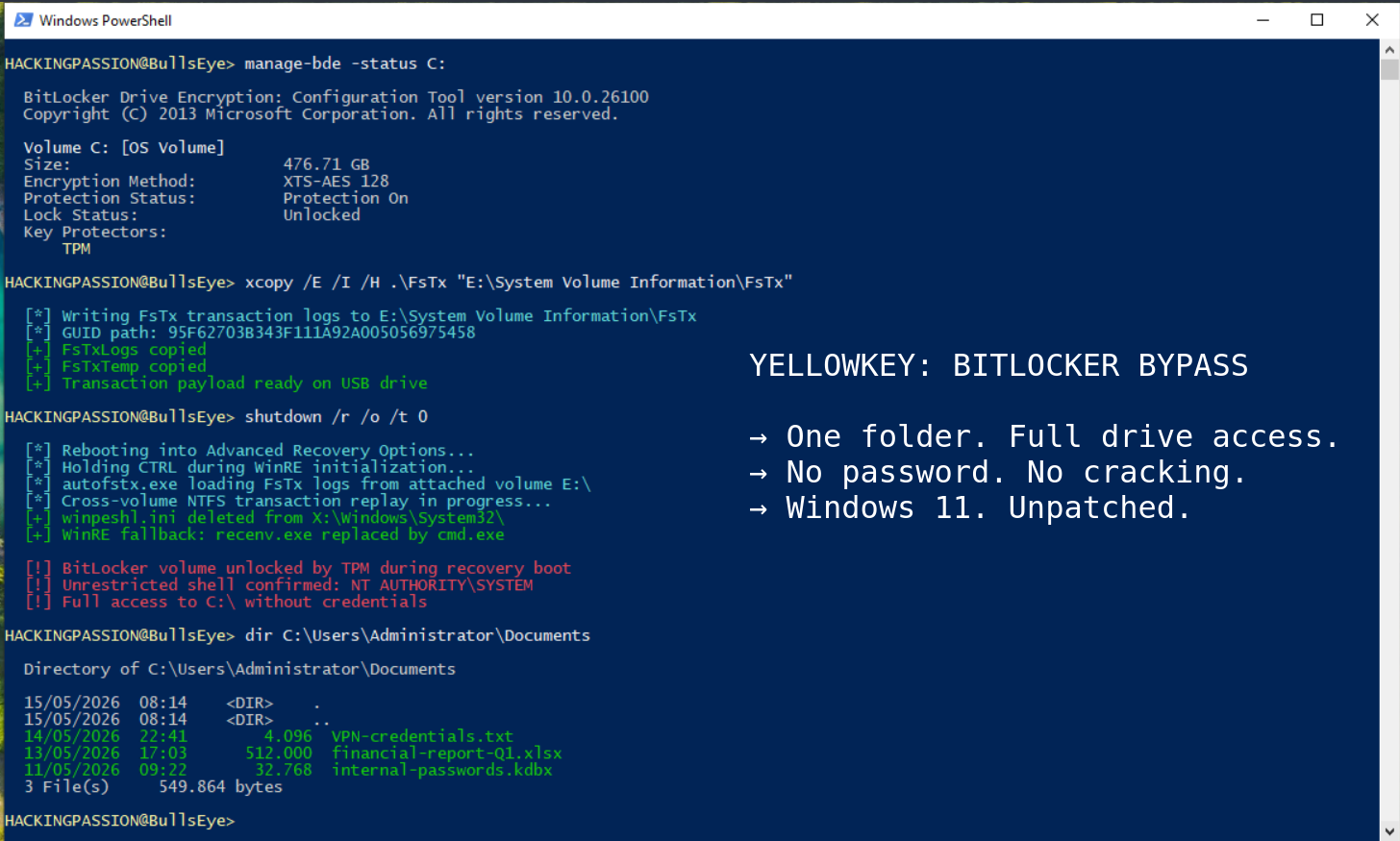
A small configuration file called winpeshl.ini controls what WinRE does when it starts. It tells the recovery environment which program to launch. Normally that is the recovery interface, the familiar blue screens with repair options. When winpeshl.ini is missing, WinRE falls back to a default: a plain command prompt, with the BitLocker volume already unlocked.
YellowKey deletes winpeshl.ini.
The mechanism behind that deletion is a Windows feature introduced in Vista in 2007 called Transactional NTFS, abbreviated TxF. TxF was designed to make file system operations more reliable by logging changes before applying them, the same way a database records a transaction before committing it. If something failed midway through, the log could be replayed to clean up. Microsoft marked TxF as deprecated years ago, meaning they stopped developing it and considered it on the way out. They never actually removed it.
Inside WinRE there is a binary called autofstx.exe. This name appeared in a Nightmare-Eclipse blog update on May 14, two days after the initial release, and almost nobody has reported on it. autofstx.exe processes Transactional NTFS log files stored in a folder called FsTx inside a directory called System Volume Information on any attached storage. The flaw is that it does not limit its operations to the drive the logs came from. It applies those transactions to other connected volumes as well.
A USB stick carrying crafted FsTx logs can therefore delete winpeshl.ini on the system’s own recovery drive. Those are two completely separate volumes. One is an external device plugged in by an attacker. The other is the machine’s internal recovery partition.
Will Dormann, principal vulnerability analyst at Tharros Labs, reproduced the attack independently and confirmed it works. His post on Mastodon pointed out that the cross-volume behavior is the real buried story: NTFS transaction logs on one drive being able to modify files on a completely different drive is a significant flaw on its own, separate from what YellowKey uses it for.
In practice the attack is short enough to fit on a napkin. Copy the FsTx folder to a USB drive at this exact path:
| |
NTFS format works best. FAT32 and exFAT are compatible too.
- → Plug the USB drive into the target machine with BitLocker active
- → Hold Shift and click Restart to boot into the recovery environment
- → The moment the machine starts restarting, release Shift and hold CTRL without letting go
- → A command prompt appears with the BitLocker-protected drive already unlocked and accessible
There is a variant that requires no USB drive at all. If the machine is accessible long enough to pull the disk out, the FsTx folder can be copied directly to the EFI partition. The EFI partition is a small hidden partition Windows uses during boot. Put the disk back in, boot into recovery, and the result is the same according to the researcher, who described this in the GitHub README. Will Dormann independently confirmed the USB-based variant works but was not able to reproduce this EFI variant in his own testing.
That brings up a question nobody has been able to answer cleanly. In cybersecurity, proving intent is one of the hardest problems. The same code can have a legitimate explanation and a malicious one, and the difference is often impossible to establish from the outside.
Here is what the code actually does. autofstx.exe exists in normal Windows installations under the exact same name, but without the functionality that triggers the bypass. Only inside the WinRE image does it behave this way. Windows 10 ships with a version of the component too, also without the triggering behavior. Windows 11 and Server 2022 and 2025 have it active inside the recovery environment.
Nightmare-Eclipse says there is no innocent explanation for that distinction. Kevin Beaumont, a widely followed independent security researcher, confirmed the exploit works and publicly agreed with the backdoor characterization. Sources speaking to The Register said the theory is impossible to verify based on what is publicly available. That is where things stand: the behavior is documented, the intent is not.
The May 14 blog update added something else. An independent researcher found that autofstx.exe is also present in Windows Update WinRE images, not just the recovery partition already on the machine. If those carry the same vulnerability, disabling WinRE may not hold as a long-term fix, because a Windows Update could restore the component. This has not been independently tested yet.
The affected systems:
- → Windows 11: all versions
- → Windows Server 2022: all versions
- → Windows Server 2025: all versions
- → Windows 10: not affected
Adding a PIN to BitLocker is the first recommendation most people reach for in this situation. With a PIN configured, the TPM will not release the decryption key until the correct PIN is entered at boot. Nightmare-Eclipse says that does not protect against YellowKey. The May 13 blog post states the attack works in a TPM+PIN environment and that a proof of concept for that variant exists but is being withheld. The only version independently tested and confirmed so far is the TPM-only bypass. The TPM+PIN claim cannot be verified until that code is released.
To see which BitLocker mode is active, run this in an administrator command prompt:
| |
Under Key Protectors, TPM-only means the drive unlocks at boot without any user input. That is the configuration this attack is confirmed against. TPM and PIN means the published version does not apply, though the researcher’s unpublished variant claims otherwise.
- → Adding a BitLocker PIN addresses the confirmed TPM-only attack. Whether it stops the full version remains unverified.
- → Setting a BIOS or UEFI password and disabling USB boot prevents the USB-based variant, because the machine will not boot from external devices without the password. This option is in the firmware settings menu of most machines.
- → Disabling WinRE removes the environment where
autofstx.exeruns. The May 14 update raises the question of whether Windows Update WinRE images carry the same component and could reintroduce it after an update. - → Physical security is the only measure that covers every known variant, including the EFI partition method that requires no external device at all.
Microsoft has not released a patch and has not assigned a CVE. MSRC is aware of the disclosure.
BitLocker in TPM-only mode was built for one specific scenario: a device that is lost or stolen. The entire premise is that someone walking off with the hardware cannot read what is on the drive. For years that premise held. YellowKey changes that for any machine where an attacker has a few unsupervised minutes, in a hotel room, at a border crossing where devices are handed over for inspection, in a shared office, or anywhere else a laptop briefly leaves its owner’s sight. These are not unusual situations. They are the situations BitLocker was designed to handle.
One boundary worth being clear about: the attack requires the complete original device, not just the drive. The TPM chip is soldered to the motherboard and holds the decryption key. Pull the drive out and take it somewhere else, and BitLocker stays locked. The threat here is a device that is physically accessible while still intact.
Worth knowing: anyone who bought a new Windows 11 machine or did a clean installation since version 24H2 with a Microsoft account has device encryption switched on automatically, without ever choosing it. Most of those users are running TPM-only. They may not know BitLocker is active at all.
YellowKey is also not the only attack against BitLocker that appeared this week. French security firm Intrinsec published a separate working proof of concept called BitUnlocker, built on CVE-2025-48804, that reaches the decrypted drive on fully patched Windows 11 machines in under five minutes through a completely different method. Microsoft patched that vulnerability in July 2025, but the old boot manager signing certificate, known as PCA 2011, was never mass-revoked because doing so would break too much across the Windows ecosystem. An older vulnerable boot manager, still signed with PCA 2011, passes Secure Boot on virtually every machine currently in use. The result is that two independent researchers have now published separate working proof of concepts against BitLocker through completely different attack paths, and both reach the same decrypted drive.
The researcher promised a big surprise for the June 2026 Patch Tuesday. Nothing announced so far has gone undelivered.
Encryption fundamentals and privilege escalation from a limited account to full SYSTEM access on Windows are exactly what my ethical hacking course covers step by step:
Hacking is not a hobby but a way of life. 🎯
Sources: YellowKey GitHub Repository | Chaotic Eclipse Blog
Stay updated
Get the latest posts in your inbox every week. Ethical hacking, security news, tutorials, and everything that catches my attention. If that sounds useful, drop your email below.